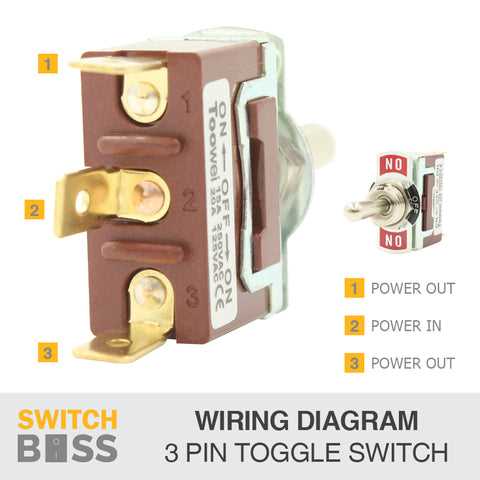
Use a three-terminal lever control when a circuit must alternate between two paths; connect the power feed to the center contact, then route the remaining two terminals toward separate loads or control lines. This arrangement allows one mechanical action to redirect current between outputs without adding relays or complex electronics. For low-voltage systems (5–24 V), copper conductors with a cross-section of 0.5–0.75 mm² handle currents up to roughly 5 A while maintaining stable contact temperature.
A practical connection scheme places the supply line on the middle lug while the side lugs act as selectable routes. When the lever moves left, the internal bridge links the center to the first outer terminal; when pushed right, the bridge connects the center to the opposite side. This simple internal contact bridge creates two operating states controlled by a single mechanical movement. For lighting circuits operating at 120–230 V, installers commonly select units rated at 10–16 A with silver-alloy contacts to reduce arcing and prolong service life.
Mount the component through a 6–12 mm panel opening and secure it with the threaded collar supplied by the manufacturer. Keep conductor insulation stripped to roughly 5–7 mm; longer exposed metal increases the chance of short circuits between terminals spaced only a few millimeters apart. If vibration is present–vehicles, machinery panels, marine dashboards–apply crimped spade connectors rather than bare loops, tightening them to about 0.4–0.6 Nm for stable electrical contact.
In control panels, technicians frequently mark the center terminal as COM while the outer contacts are labeled L1 and L2. This labeling prevents incorrect connections during maintenance and speeds troubleshooting. When current exceeds 15 A or inductive loads such as motors are involved, route the lever device only as a control signal for a relay or contactor; this reduces heat buildup and contact erosion inside the small mechanical unit.
Lever-Control Electrical Connection Layout
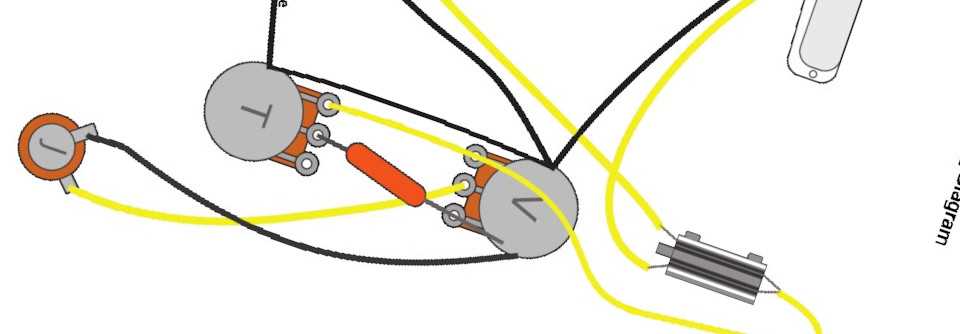
Use a three-terminal lever controller for circuits where one power source must feed two alternative loads. Connect the incoming phase conductor to the center contact; attach each outgoing conductor to the side contacts. With this arrangement the internal metal blade routes current to only one branch at a time. For 12 V systems with loads below 10 A, copper conductors of 1.0–1.5 mm² reduce heating and voltage drop. In 120–230 V household lines, choose components rated at least 16 A and secure the ground line directly to the chassis rather than routing it through the lever mechanism.
Terminal Orientation
The center lug typically acts as the common contact; verify with a multimeter in continuity mode before attaching conductors.
Practical Connection Notes
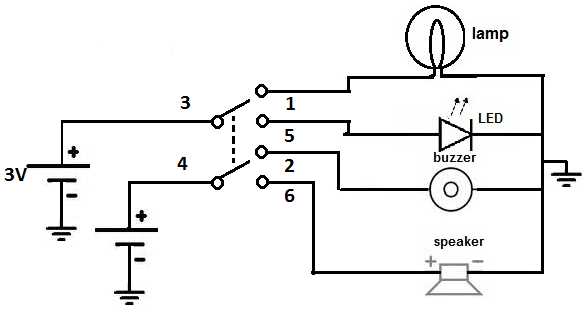
Single-pole units contain two lugs and simply open or close a circuit. Three-lug models redirect current between outputs. Six-lug versions manage two independent circuits using the same lever. When mounting on a metal panel, isolate the device using a plastic bushing if the supply exceeds 48 V to prevent stray contact with the enclosure. Keep conductor insulation stripped to about 6–7 mm, tighten terminal screws to roughly 0.5–0.6 Nm for small brass clamps, and avoid solder on screw-type contacts because compression weakens after thermal cycling. In automotive dashboards place the control upstream of the load but downstream of the fuse so that fault current remains limited by the protective element. Label positions clearly: upward often indicates power flow, downward disconnects the circuit.
How to Read Terminal Labels and Symbols in a Toggle Switch Wiring Diagram
Check the terminal markings stamped near each pin on the lever-operated contact unit: labels such as COM, NO, and NC indicate electrical behavior. COM marks the common contact that receives the supply line. NO (normally open) shows a contact that connects only after the lever is moved, while NC (normally closed) indicates a path that carries current while the actuator rests in its default position. On many miniature panel controls, pins are also numbered–1, 2, 3 or 1–6 for multi-pole models. Manufacturers usually assign the center pin as the common terminal in a three-pin configuration, with the side pins acting as alternate outputs. Cross-check these markings with the symbol printed in the schematic sheet: moving contact arms are drawn as angled lines touching or leaving fixed nodes.
Interpret graphical marks by tracing each conductive path from the power source symbol to the load icon. A filled dot where lines meet means a direct electrical junction; crossing lines without a dot represent separate conductors that do not connect. Lever-type control symbols often include multiple parallel contact sets for DPDT or 3PDT units; each set represents an independent pole that changes state simultaneously when the handle moves. Arrowheads or diagonal bars show the direction of contact movement. If the symbol shows a break in the line beside the actuator, the contact opens when the handle moves to that position; if the line closes against a node, the circuit path becomes active. Compare these visual cues with the stamped terminal codes on the device body to match each pin with its graphical counterpart before attaching conductors.