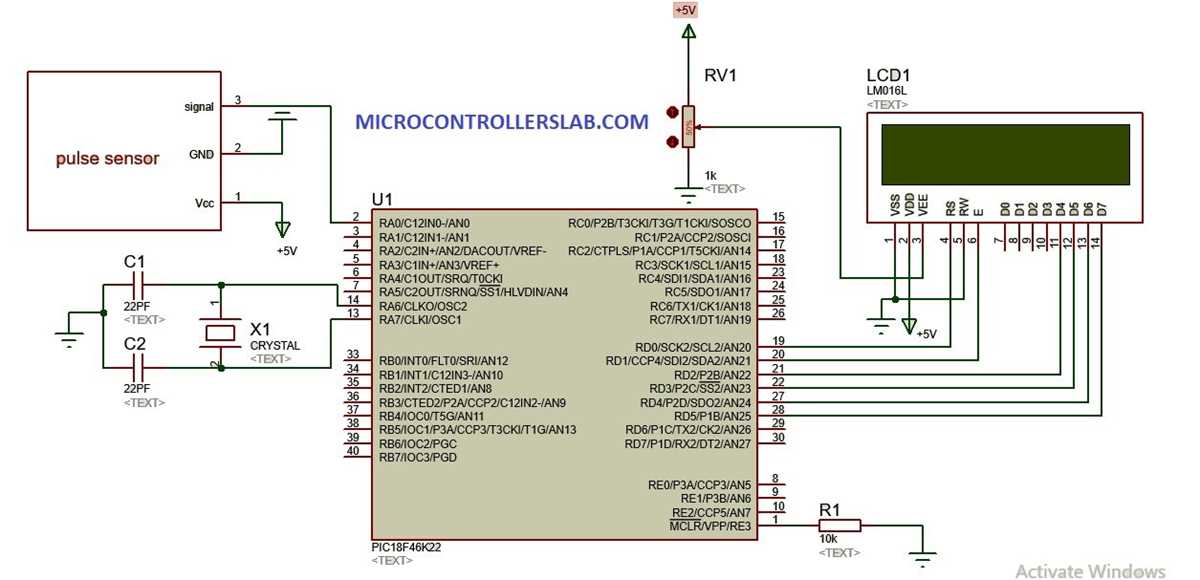
If you need to build a device to track the number of heartbeats per minute, a key step is understanding the individual components involved. A basic setup will require sensors to detect subtle changes in blood flow, followed by an amplification stage to make the signal readable by a microcontroller. The right combination of parts can lead to an accurate and responsive system for real-time monitoring of heart activity.
The heart of the device typically consists of a light sensor that detects fluctuations in blood volume, which correspond to each pulse. This sensor must be paired with a filtering and amplification circuit to ensure the signals are clear enough for processing. Afterward, the microcontroller interprets these signals, calculates the time between each beat, and displays or records the information accordingly.
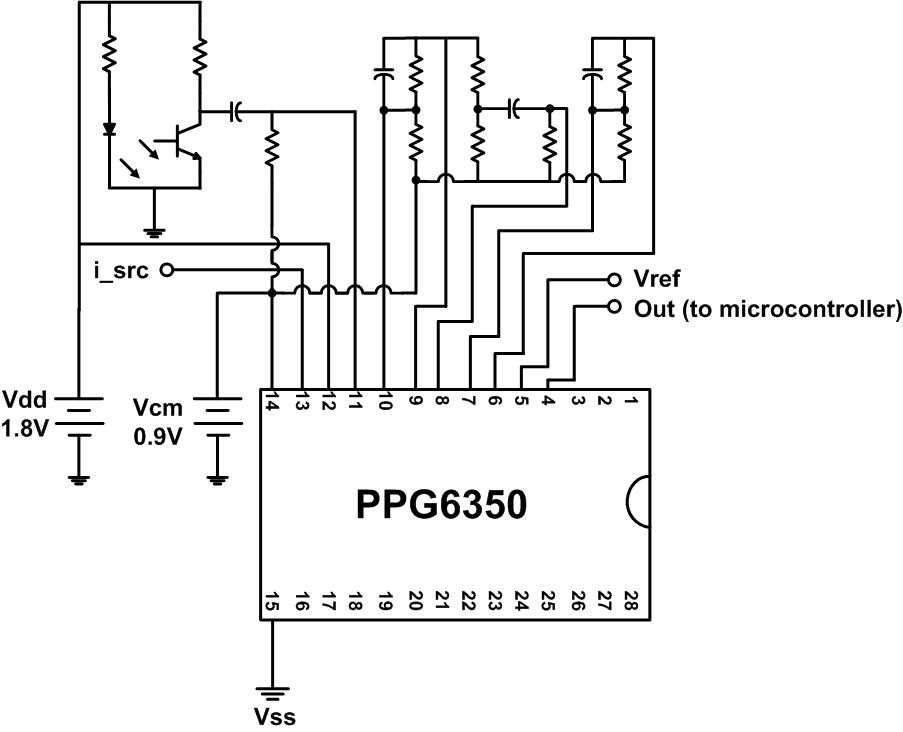
To assemble such a system, make sure to choose components based on the desired accuracy and range. For instance, you may want to use an infrared sensor for detecting changes in light transmission through the skin, coupled with a low-noise operational amplifier to ensure a strong and stable signal. The overall design should also prioritize low power consumption and compact size, making it suitable for portable health applications.
Understanding the Components of a Heartbeat Detection System
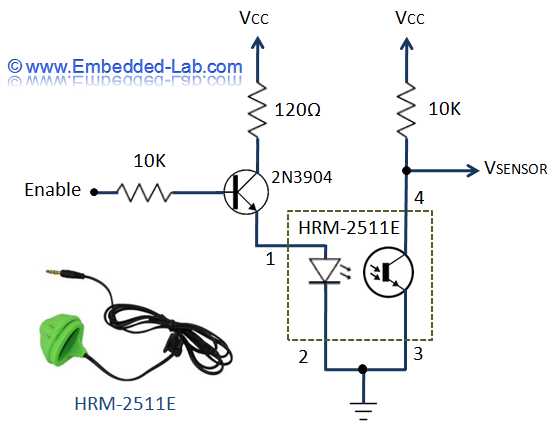
The first component to consider is the light sensor, which detects changes in the skin’s blood volume during each heartbeat. These changes alter the amount of light reflected back to the sensor, allowing it to capture the fluctuations caused by blood flow. Typically, infrared light sensors, such as photodiodes, are used for their ability to measure variations in the absorption of light by the skin. Ensure the sensor is sensitive enough to detect small changes for accurate results.
The next step is the amplifier stage, which strengthens the weak signals from the sensor to a level that can be processed. A low-noise operational amplifier (op-amp) is often used to prevent signal distortion. For greater precision, use a differential amplifier, which can isolate the desired signal from unwanted noise or external interference. Proper gain settings in this stage are important to avoid signal saturation while ensuring a strong output for further analysis.
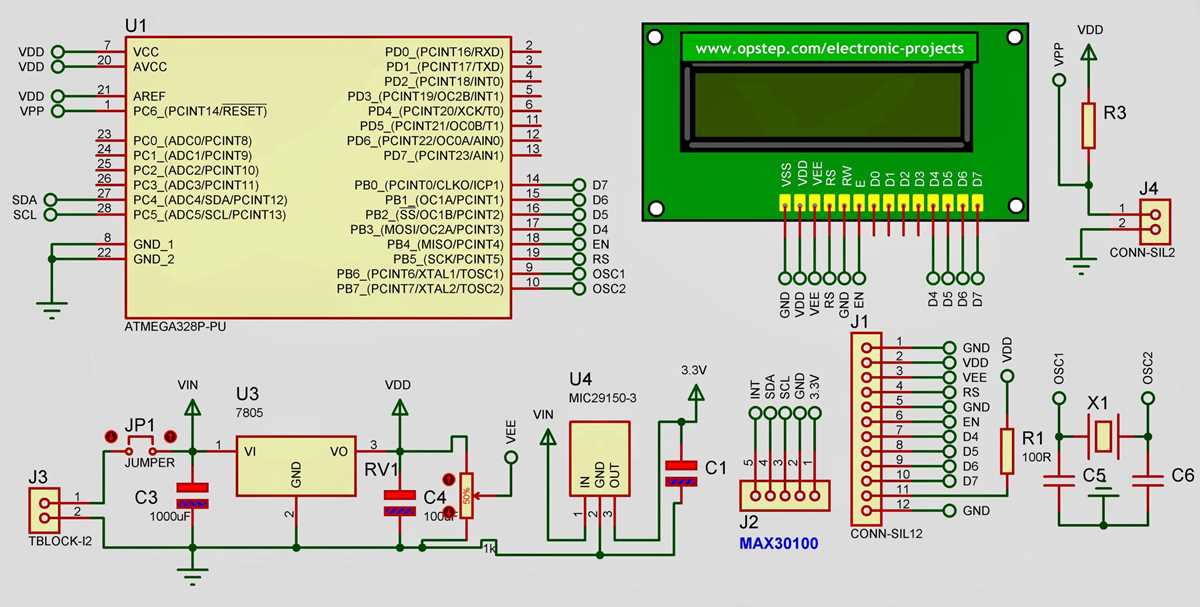
Finally, the microcontroller handles signal processing and data display. It interprets the amplified signals, calculates the intervals between detected beats, and may display the result in real-time on an attached screen or store it for future analysis. Some microcontrollers also have built-in analog-to-digital converters (ADC), which are useful for converting the analog signal from the amplifier into digital data for processing. It’s important to choose a microcontroller with enough processing power and memory to handle the tasks at hand without introducing delays in real-time applications.
How to Design a Simple Heartbeat Detection System
Begin with selecting a light sensor that will detect changes in blood volume, such as an infrared photodiode. Connect it to a voltage divider circuit that adjusts the sensor’s output to a level suitable for processing. Use a filtering circuit to remove any noise from the signal, ensuring the data captured is clean. A basic low-pass filter will suffice for this task, allowing only the frequency range corresponding to the heartbeat to pass through.
The next step is amplifying the signal. Use a low-noise op-amp in a non-inverting configuration to strengthen the weak signals from the sensor. Set the gain carefully to ensure the output is within a suitable range for the next stage. Once amplified, send the signal to a microcontroller that will process the data and calculate the intervals between detected beats. The microcontroller can then display this information on an attached screen or store it for future use. A simple LED display or even a serial connection to a PC is enough to visualize the results in real-time.
Practical Applications and Troubleshooting of Heartbeat Detection Systems
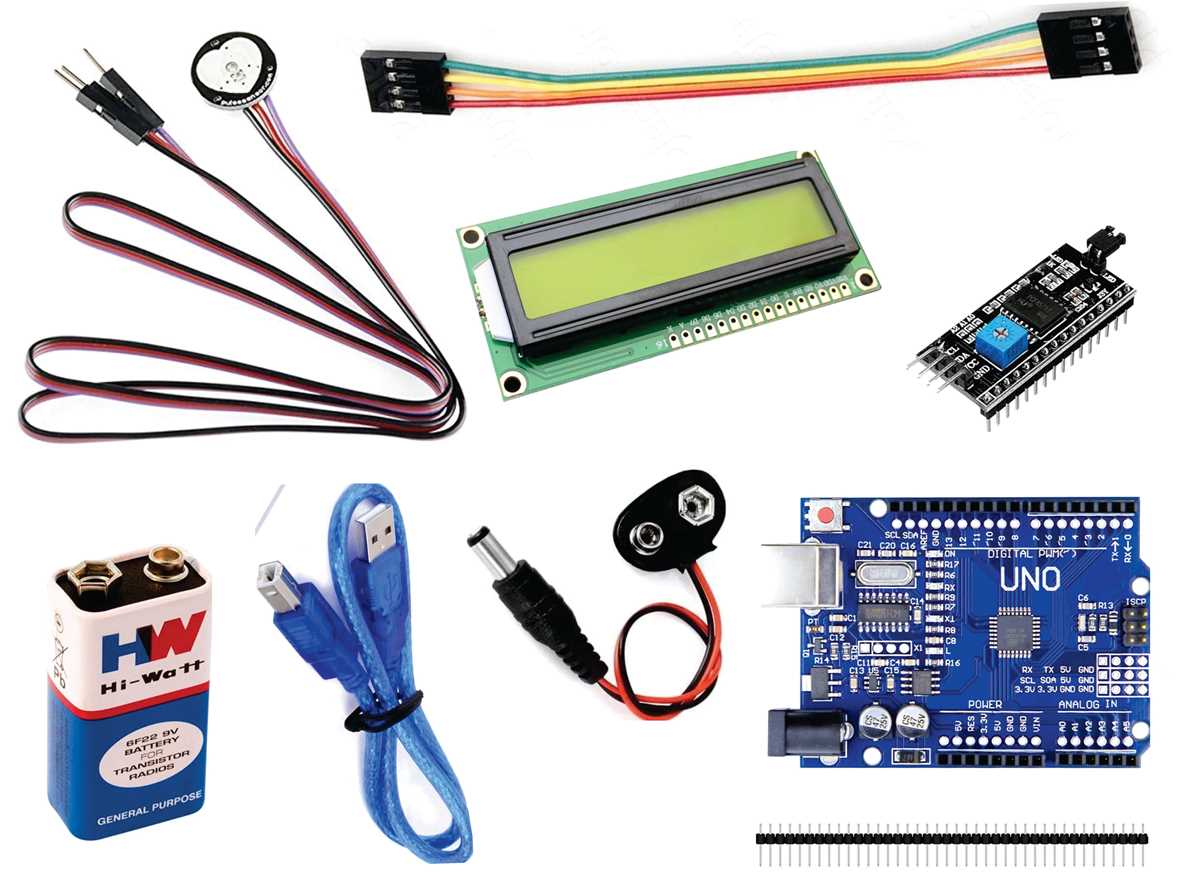
Heartbeat detection systems have various applications, particularly in health monitoring and fitness tracking. One of the most common uses is in wearable devices such as fitness bands and smartwatches. These devices rely on infrared light sensors to detect fluctuations in blood volume, providing users with real-time data on their heart activity. Such systems are also integral in medical equipment used for continuous patient monitoring in hospitals, where accurate and constant monitoring is required.
Another practical application is in the development of medical diagnostic tools. For example, by analyzing the intervals between heartbeats, doctors can identify irregularities in a patient’s cardiovascular system. These systems can be designed to trigger alerts in case of abnormalities, helping healthcare providers intervene before conditions worsen. Similar technology is also used in emergency response scenarios, where rapid heart rate readings can assist paramedics in assessing the state of a patient’s health quickly.
When troubleshooting these systems, one common issue is the instability of the signal from the light sensor. If the detected signal is weak or fluctuating unexpectedly, it could indicate improper sensor placement or contamination on the sensor lens. Ensure the sensor is positioned securely against the skin, with minimal movement to avoid disruptions. Cleaning the sensor lens and ensuring proper contact with the skin can help improve the signal quality.
Another problem often encountered is inaccurate amplification. If the signal is either too weak or distorted, check the gain settings on the operational amplifier. Setting the gain too high can lead to signal saturation, while setting it too low might prevent the signal from being recognized properly. Additionally, the amplifier’s frequency response should be matched with the range of heartbeats, so reviewing the specifications of the op-amp is crucial.
Sometimes, the microcontroller might fail to process the signals correctly, leading to incorrect readings or delays. In such cases, verify the analog-to-digital conversion (ADC) resolution and sampling rate. If the microcontroller’s ADC is too slow or has insufficient resolution, it may not capture the heartbeat signal accurately. Upgrading the microcontroller or optimizing the code for faster processing can resolve these issues.
| Problem | Cause | Solution |
|---|---|---|
| Weak signal from the sensor | Poor sensor placement or contamination | Ensure proper contact with skin and clean the sensor lens |
| Distorted or weak signal | Incorrect amplifier gain | Adjust the gain settings and check op-amp specifications |
| Incorrect data processing | Slow ADC or insufficient resolution | Increase ADC speed or upgrade microcontroller |