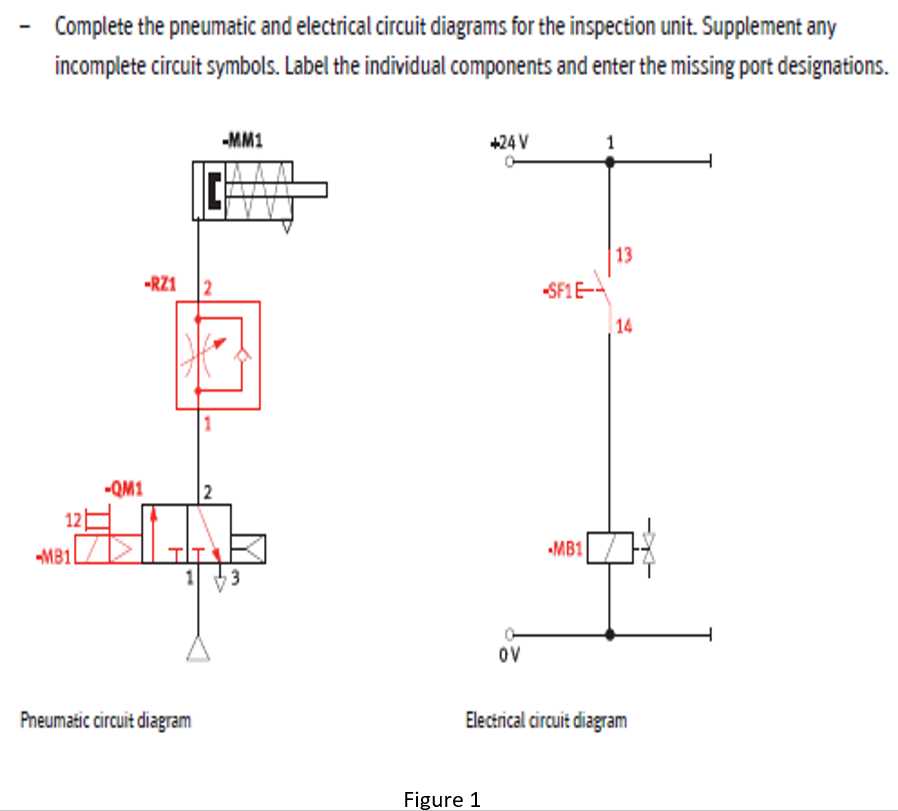
Use the ISO 1219 notation system as the primary reference when reading or drafting compressed-air control schematics. This standard defines the graphic marks for valves, actuators, flow paths, and service units, allowing technicians to interpret layouts without ambiguity. For example, a directional valve is shown as adjacent squares representing switching positions, while arrows inside each square indicate airflow direction through the internal passages.
Each actuator in the layout has a distinct graphical sign. A linear drive is displayed as a rectangle with a rod extending outward, while a rotary unit appears as a circular element with a curved arrow showing rotation. Single-acting drives typically include a spring indicator on one side, showing the return mechanism. Double-acting versions omit this spring mark and display two supply connections. These small differences prevent installation errors during assembly and maintenance.
Line styles also carry meaning. A solid line represents the main compressed-air path, while dashed lines usually indicate pilot control routes. Exhaust outlets often appear with a short line ending in a small open triangle or vent indicator. Flow regulation devices are drawn with a variable restriction mark–two opposing arcs intersected by a diagonal arrow showing adjustable throttling.
Port identification adds another layer of clarity. Connection points on directional valves follow a numeric convention: 1 for supply, 2 and 4 for working outlets, 3 and 5 for exhaust. Control ports are commonly labeled 12 or 14. Recognizing these numbers within the schematic layout allows quick tracing of air movement from compressor output through preparation units, switching elements, and finally to the actuator that performs the mechanical task.
Compressed-Air Control Drawing Marks
Use standardized ISO 1219 graphical marks whenever documenting compressed-air control layouts; mixing proprietary icons causes frequent misinterpretation during maintenance. For example, a two-position directional valve is represented by adjacent rectangles showing flow paths with arrows, while blocked ports are drawn as “T” intersections. Supply lines should appear as solid strokes, pilot lines as dashed strokes, and exhaust routes must terminate with an open triangle indicating discharge to atmosphere. Applying these conventions keeps service technicians from misreading valve states or actuator movement.
Different valve types require precise visual encoding. A 3/2 valve (three ports, two positions) is typically drawn with three connection points labeled 1 (pressure), 2 (working port), and 3 (exhaust). A 5/2 unit adds two working ports controlling a double-acting cylinder; the two rectangles illustrate alternate air paths. Springs appear as zig-zag shapes on one side of the valve block, while manual push buttons appear as a short vertical bar pressing toward the valve body. Mechanical roller actuators use a small circle at the end of a lever line. Misplacing these indicators can invert the interpretation of default position versus actuated state.
Actuators also follow strict graphical logic. A single-acting cylinder is depicted with one air connection and a spring inside the body line, while a double-acting version shows two ports without a spring mark. Cushioning features are added as triangular arrows at cylinder ends. Rotary actuators use curved arrows inside a semicircle or circular housing outline. Position sensors mounted along the body are marked with small rectangles touching the cylinder wall, often labeled with proximity switch identifiers such as S1 or S2.
Flow control components rely on directional arrow cues. A variable throttle appears as an adjustable restriction symbol formed by a diagonal arrow crossing a narrow passage. One-way flow regulators combine a check valve mark with that adjustable restriction, indicating free flow in one direction and controlled flow in the reverse path. Filters are drawn as diamond shapes inserted in the line; adding a diagonal drain line beneath the diamond indicates a water separator. Lubricators include a droplet icon inside a similar diamond shape placed downstream of filtration.
How to Identify Directional Control Valve Symbols in Pneumatic Circuit Diagrams
Check the number of adjacent rectangles first. Each rectangle represents one flow state of a directional valve. Two rectangles indicate a two-position device, while three rectangles indicate a three-position unit. Count them before interpreting any port lines; misreading this detail leads to incorrect understanding of actuator behavior.
Look closely at the internal arrows drawn inside each box. These arrows show the permitted air path between ports. A straight arrow linking two ports means open flow, while a blocked end or “T” bar marks a closed path. If arrows connect supply and actuator ports in the first state but reverse in the second state, the device reverses actuator movement. When both actuator ports are connected to exhaust within one position, the actuator depressurizes.
Identify the port count from the external connection marks. Most directional devices follow numeric port patterns:
- 2/2: two ports, two positions; simple on–off control
- 3/2: supply, outlet, exhaust; common for single-acting actuators
- 4/2: two actuator ports plus supply and exhaust
- 5/2: two exhaust paths, allowing faster actuator venting
- 5/3: five ports with a neutral middle state
Pay attention to actuator indicators placed at the ends of the valve representation. These small shapes reveal how the valve shifts between states.
- Triangle pointing inward: pilot pressure actuation
- Small rectangle with diagonal line: solenoid coil
- Spring symbol: automatic return to default position
- Manual push button or lever icon: mechanical control
The default state is always shown next to a spring mark. If a spring appears on the right side, the rectangle nearest that spring represents the normal position. When pressure or electrical signal disappears, the valve returns to that state automatically. Without a spring, the device usually remains in the last actuated position.
Center configurations of three-position valves require careful inspection. Three typical neutral states appear frequently:
- Closed center: all ports blocked; actuator remains locked.
- Exhaust center: actuator ports connected to exhaust; cylinder relaxes.
- Pressure center: supply connected to both actuator ports; holding force maintained.
Trace the supply port (commonly labeled 1 or P) and exhaust ports (often marked 3 and 5). Following these paths through each position clarifies actuator motion. If port 1 connects to port 2 in one state and port 4 in another, the valve alternates pressure between actuator chambers. Mapping these flow paths mentally allows fast interpretation of complex compressed-air system schematics used in industrial automation.