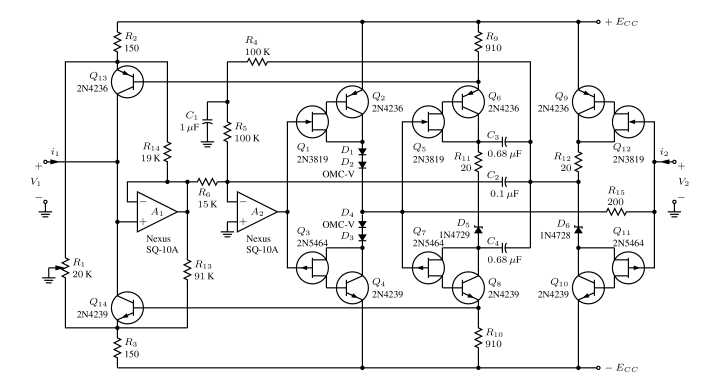
Install the Circuitikz package and compile drawings directly inside the document source. This approach allows electrical schematics to be generated with the same typesetting engine used for academic papers, technical manuals, and engineering reports. The drawing instructions remain text-based, which makes version control and editing far easier than working with exported graphics.
Load the package with usepackage{circuitikz} and place drawing commands inside a circuitikz environment. Components such as resistors, voltage sources, inductors, and switches are inserted with short path commands that connect coordinate points. A simple resistor between two nodes may be defined using coordinates like (0,0) to[R=10k] (3,0), producing a labeled component with the value printed near the element.
Node coordinates determine layout precision. Engineers often place reference points using grid-style coordinates such as (0,0), (2,0), and (2,2). Straight wires connect these points automatically. Labels, current arrows, and polarity markers can be attached through options inside the component declaration. This method keeps the schematic readable while allowing exact alignment with mathematical expressions or explanatory text.
Text-driven schematics also integrate cleanly with scientific publishing workflows. Because the drawing instructions live inside the source file, updates propagate during compilation without exporting new graphics. Researchers preparing documentation for IEEE or academic journals often rely on this method so that figures match the same fonts, spacing rules, and typographic style used throughout the document.
Large schematics can be structured with reusable coordinates, custom styles, and grouped components. Power rails, measurement nodes, and grounding points are typically defined once and referenced repeatedly. This structure reduces editing time while keeping electrical layouts consistent across multiple figures inside the same technical report.
LaTeX Circuit Diagram Guide Using Circuitikz for Electrical Schematics
Load the Circuitikz package and construct electrical schematics directly through drawing commands. Insert usepackage{circuitikz} in the document preamble and place graphical instructions inside the circuitikz environment. Each component is defined along a path between coordinates. For instance, a resistor placed between two nodes may be described by connecting points such as (0,0) and (3,0) with a resistor element option and a value label like 10k.
Placing Electrical Components with Path Commands
Electrical elements are inserted using short path instructions that connect coordinates. A wire is drawn automatically between points, while additional options define the component placed on that path. Common elements include resistors, capacitors, inductors, voltage sources, current sources, and switches. Orientation is controlled by coordinate placement; horizontal and vertical alignment is achieved by adjusting node positions such as (0,0), (2,0), or (2,2). Labels and polarity markers can be added directly within the element options.
Managing Node Positions and Layout Structure
Define reference nodes early in the drawing to maintain alignment across complex schematics. Many engineers use grid spacing of one or two units so components line up visually across power rails and signal paths. Ground points, supply lines, and measurement nodes can be declared once and reused in multiple connections. This approach keeps the electrical drawing readable and prevents overlapping wires.
Large schematics benefit from grouping repeated structures such as amplifier stages, filter networks, or sensor interfaces. Coordinates, reusable styles, and named nodes allow the same arrangement of components to appear consistently across several figures. During compilation the typesetting system renders the drawing with the same fonts and spacing used in the rest of the document, which keeps figures visually consistent with equations, tables, and technical explanations.
Installing Circuitikz Package and Setting Up LaTeX for Electrical Drawings
Install the Circuitikz library through the TeX distribution package manager before writing any schematic code. Most modern distributions such as TeX Live and MiKTeX already include it. If the library is missing, install it through the package manager and update the distribution so the drawing commands become available during compilation.
Preparing the Document Environment
Add the package declaration inside the preamble so the drawing tools load during compilation.
- Insert the command usepackage{circuitikz} in the document header
- Compile once to confirm the library loads without errors
- Create a drawing area using the circuitikz environment
- Place coordinate-based paths that represent electrical connections
Many technical documents also load graphical support libraries that improve layout control. The following additions are commonly placed in the preamble.
- tikz base library for coordinate drawing
- calc for coordinate calculations
- arrows.meta for advanced arrow styles
- positioning for relative node placement
Checking Compilation and Output Quality
Compile the document using pdfLaTeX or LuaLaTeX so vector graphics are rendered with the same fonts and spacing used in the text. After compilation verify that component labels, node positions, and wire paths appear aligned. If elements overlap, adjust coordinates or spacing between nodes rather than scaling the entire drawing. This method keeps electrical schematics readable and consistent across research papers, laboratory reports, and engineering manuals.