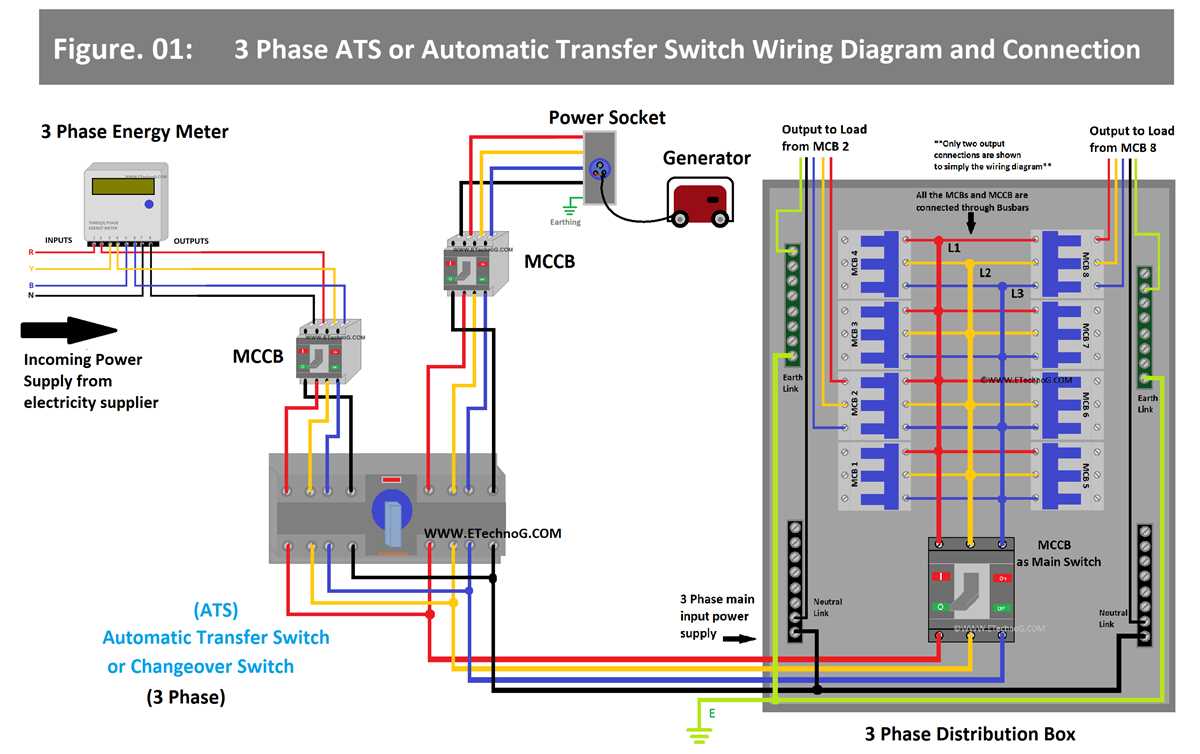
Connect the two hot conductors to the designated terminals and attach the neutral conductor to its specific terminal. Ensure each connection is tight to prevent overheating and maintain reliable operation.
Ground the enclosure using a green or bare copper wire to avoid electrical hazards. Verify that all connections are properly seated and that no exposed copper is visible outside the terminals.
Use a cable rated for at least 30 amps or higher. Inspect insulation for cuts or damage and strip 10–12 millimeters without nicking the strands to maintain conductivity and safety.
After installation, test the assembled circuit with a multimeter or voltage tester. Check continuity, correct polarity, and grounding before connecting any high power appliances to ensure safe operation.
Guide to Installing a Backup Power Control Device
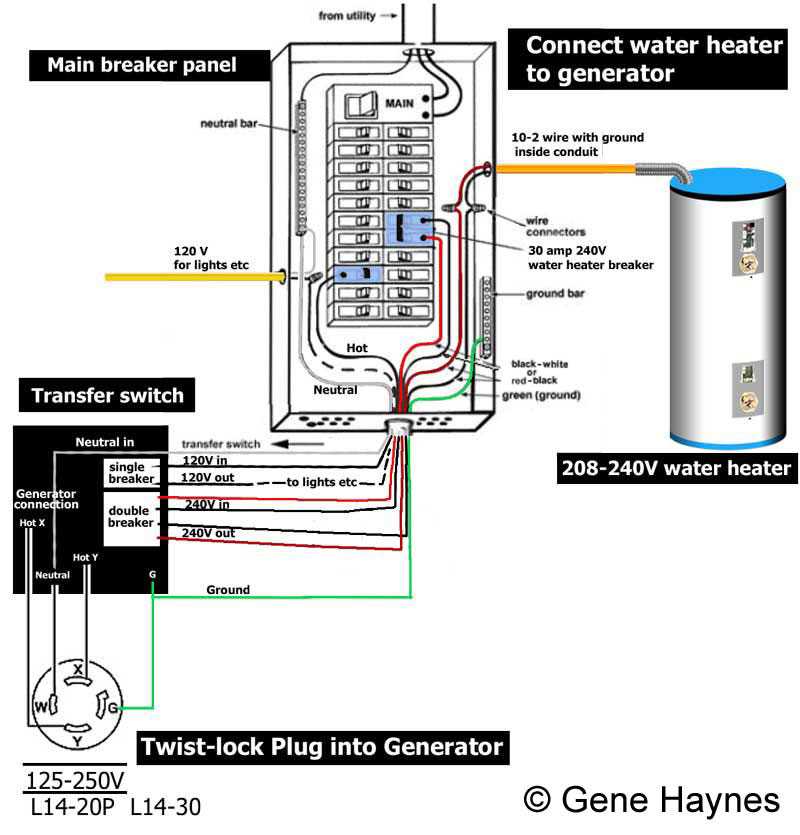
Mount the control unit on a stable surface near the main service panel. Ensure it is securely fastened and positioned for easy access to terminals and protective covers.
Turn off the main breaker before connecting any incoming or outgoing conductors. Safety is critical to prevent shock or damage during installation.
Identify the line and load terminals on the device. Label each conductor to avoid cross connections and ensure correct operation during activation.
Use conductors rated for the amperage of the control unit. Strip the ends carefully without nicking strands to maintain maximum conductivity.
Connect the neutral conductor to its dedicated terminal and secure with a torque-rated screw. Verify that no strands extend outside the clamp for safe performance.
Install a grounding conductor to the green screw or designated bus bar. Confirm continuity with a tester to ensure the protective path is effective.
After all conductors are connected, close the cover and tighten all screws. Double-check terminal connections for firmness and proper alignment before energizing the unit.
Test the control device by simulating a power loss scenario. Observe proper operation of all connected circuits and verify that safety mechanisms engage as expected before normal use.
Identifying Terminals and Conductors for Backup Power Connection
Locate the main input terminals on the control device and verify their labels for line and load connections. Use a voltage tester to confirm the circuits are de-energized before touching any contacts.
Examine each conductor for insulation color and gauge. Red or black conductors typically indicate hot lines, white indicates neutral, and green or bare copper is reserved for grounding paths.
Secure each conductor to its corresponding terminal using the recommended torque settings. Ensure strands are fully inserted to prevent loose connections and potential arcing during operation.
After all terminals are connected, perform a continuity check between the grounding conductor and the panel to confirm a reliable path. Document the terminal assignments for future maintenance and troubleshooting.