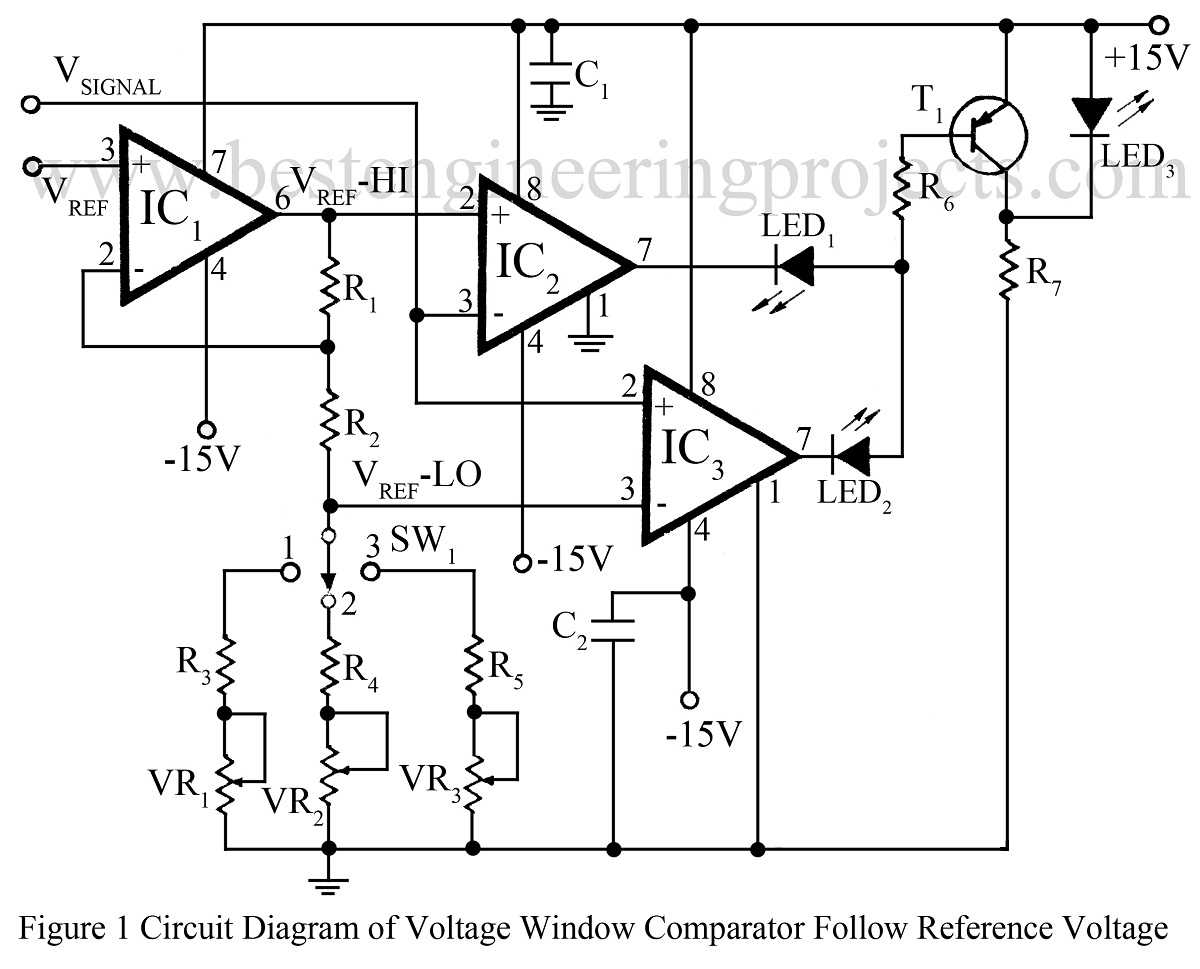
To build a basic voltage comparison setup, start by selecting an operational amplifier (op-amp) with suitable specifications for your application. Connect the two inputs of the op-amp to the reference and signal voltages, respectively. The output will show the result of comparing these voltages, either high or low, depending on the inputs.
For reliable operation, ensure the op-amp you choose has a high input impedance and a low offset voltage. These characteristics minimize errors in voltage comparison. Additionally, use a power supply that meets the voltage requirements of the op-amp, typically between ±5V and ±15V for most standard models.
In a basic setup, include a resistor to limit the current and a capacitor to stabilize the output, especially in fast-switching scenarios. This will prevent noise and oscillations in the system. Carefully calculate the feedback resistances to adjust the response time and gain for the desired threshold levels.
Finally, test the system using a known reference voltage and an adjustable signal source. Measure the output with an oscilloscope to verify that the circuit operates as expected. If the output does not switch correctly, check the component connections and adjust the thresholds by tweaking the feedback network.
Designing a Voltage Comparison System
Start by selecting an op-amp with a suitable input voltage range for your application. Choose a device with a low input bias current and high gain to ensure accuracy in detecting small voltage differences. The op-amp should be able to handle the expected voltage levels without distorting the signal.
For reliable performance, connect the inverting and non-inverting terminals of the op-amp to the reference and input voltages, respectively. The output will reflect whether the input voltage exceeds or falls short of the reference level, resulting in a binary high or low output state. Properly configure the power supply to provide the necessary voltage levels for the op-amp to operate optimally.
Next, include a resistor network to set the threshold voltage. This allows you to adjust the sensitivity of the system, ensuring it responds appropriately to the desired input voltage range. The resistor values should be chosen based on the required comparison point, using Ohm’s law to calculate the correct values for the desired output response.
To prevent oscillations and noise, add a small capacitor across the op-amp’s power pins. This helps stabilize the system, especially when dealing with fast voltage transitions. A decoupling capacitor can also be placed between the input signal and ground to filter any high-frequency noise that might cause false readings.
Once all components are connected, use a multimeter or oscilloscope to test the system’s behavior. Verify that the output switches correctly when the input voltage crosses the set threshold. If the response is not as expected, check the component values and connections, particularly the resistor network and feedback loop.
Finally, for more complex applications, consider incorporating hysteresis into the design. This can be done by adjusting the feedback network to create a small difference between the switching points of the input voltage. Hysteresis ensures that the system remains stable and does not switch erratically due to small fluctuations in the input signal.
How to Build a Basic Comparator Circuit with Op-Amp
Start by selecting an op-amp with a suitable voltage range for your input signal. A common choice is the LM741 op-amp, which works well for many general-purpose applications. Ensure that the op-amp can handle the desired supply voltages and has a wide input voltage range to avoid clipping of the signal.
Next, connect the non-inverting input (+) to the reference voltage. This is the voltage that you want to compare against the input signal. The inverting input (−) should be connected to the input signal, which will be the voltage that you want to compare with the reference. This setup ensures that the op-amp will compare the two voltages and provide a high or low output based on the comparison.
To set up the power for the op-amp, connect the positive supply voltage to the V+ pin and the negative supply voltage to the V- pin. These voltages should be within the op-amp’s specified range, typically ±5V to ±15V for most op-amps. Be mindful of the power supply limitations to avoid damaging the components.
Now, connect the output of the op-amp to a suitable load, such as an LED or relay, depending on the application. The output will be either high or low, depending on whether the input signal is higher or lower than the reference voltage. If the input signal exceeds the reference voltage, the output will switch to high, and if it is lower, the output will switch to low.
For better stability and to avoid output oscillations, add a small capacitor (typically in the range of 10nF to 100nF) between the power supply pins of the op-amp. This helps filter out any noise or voltage spikes that could cause erratic behavior in the circuit.
Incorporate a feedback resistor from the output to the inverting input (−). This resistor determines the gain of the system and can also be used to add hysteresis, which can prevent unwanted switching when the input signal is close to the reference voltage. A typical value for the feedback resistor is around 10kΩ, but this can be adjusted based on the specific requirements.
Once the circuit is assembled, use a signal generator to apply varying voltage to the input and measure the output with a multimeter or oscilloscope. You should observe a sharp transition at the reference voltage. If the output behaves as expected, the setup is complete.
If the output response is too slow or erratic, consider adjusting the resistor values in the feedback loop, or check the power supply stability. The addition of a decoupling capacitor can help in smoothing out voltage fluctuations, improving the response time and overall performance of the system.