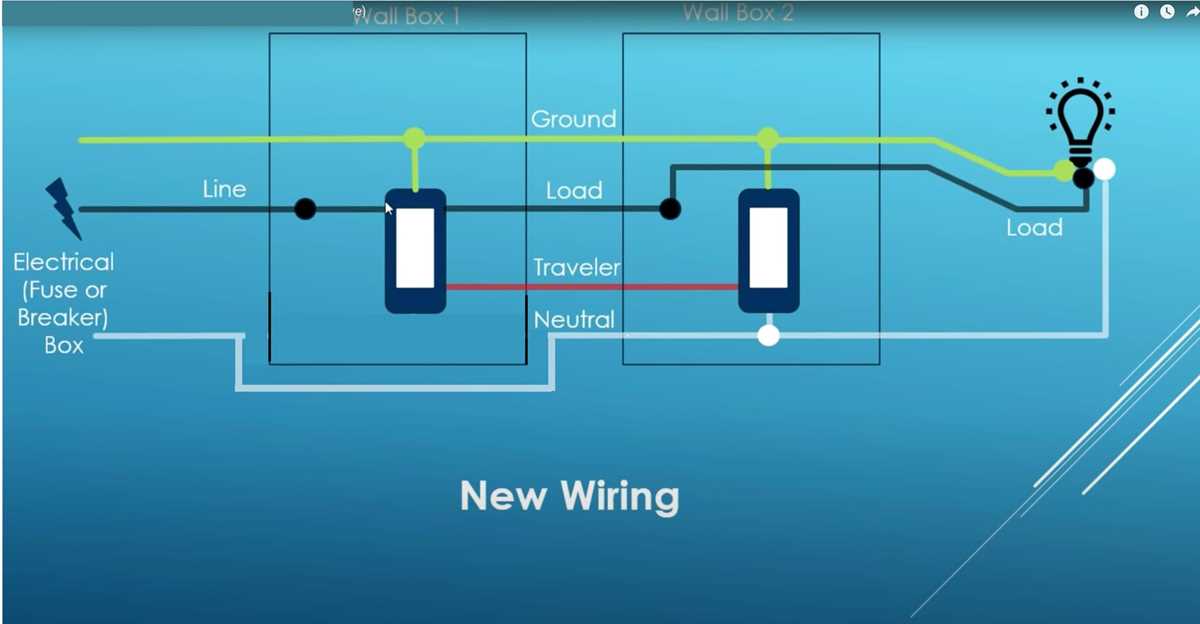
Ensure each connection point is clearly identified before beginning the setup process. Label all terminals and verify the existing conductors with a multimeter to prevent accidental short circuits or misconnection.
Use the provided color codes and terminal markings to match conductors precisely. For example, black or red wires typically carry the main load, while white indicates neutral and green or bare copper represents grounding paths.
Maintain consistent routing between all control units. Avoid crossing conductors in tight spaces and secure cables with clamps or ties to reduce mechanical stress and accidental dislodgement during operation.
Test each control point individually before connecting the load. Engage the toggles at one end while monitoring the lamp or fixture at the other to confirm that the circuit responds correctly in both positions.
Inspect all fasteners and terminal screws. Loose connections can cause intermittent operation or overheating. Tighten to manufacturer torque specifications and recheck continuity after securing each conductor.
Document the final layout for future maintenance. Note the routing, terminal assignments, and color codes in a reference sheet to simplify troubleshooting and prevent errors when modifications or expansions are required.
3 Position Control Installation Guide for Home Use
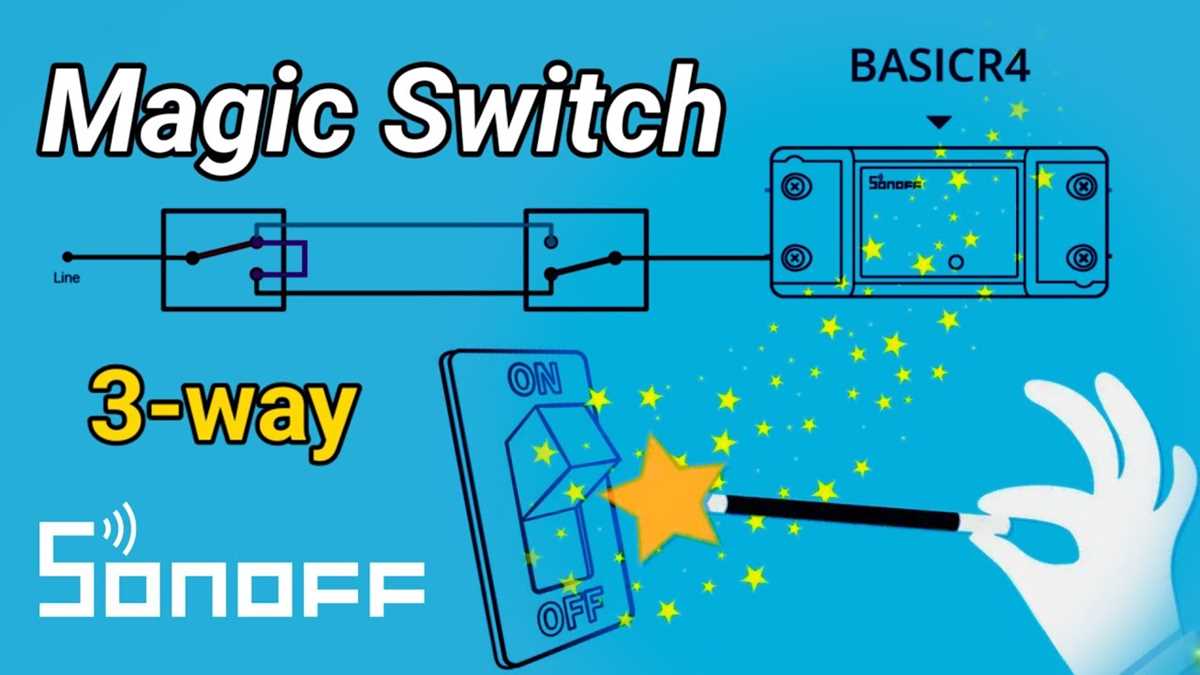
Confirm the power supply is turned off before handling any terminals. Use a non-contact voltage tester to verify the absence of live current at all points where connections will be made.
Identify all conductor colors and their respective paths. Black or red typically carry the main load, white serves as neutral, and green or bare copper provides grounding. Match these consistently across all control units.
Connect each terminal according to its function. Line terminals should attach to the incoming feed, traveler terminals link to other control points, and the ground terminal must securely connect to the metal backplate or grounding bus.
Secure all fasteners and check for solid contact. Loose screws or improperly seated connectors can cause flickering or failure. Tighten to manufacturer specifications and verify continuity before restoring power.
Test the entire network in sequence. Engage each toggle position at all locations to ensure the lighting load responds correctly and consistently. Record the terminal layout and conductor routing for future reference and maintenance.
Identifying Terminals and Conductor Functions for Accurate Setup

Begin by labeling each terminal according to its role in the control unit. Line terminals receive the incoming voltage, traveler terminals connect to alternate control points, and ground terminals attach to the protective conductor.
Verify the color codes of all conductors. Black or red usually indicate live lines, white indicates neutral, and green or bare copper signals grounding. Consistent identification prevents misconnection and operational faults.
Check continuity between terminals with a multimeter before securing connections. This step ensures each path is functional and avoids unintended cross-connections that could trip the system.
Use insulated tools when handling conductors. Even with the supply off, residual charge may exist. Keep metallic tools away from adjacent terminals to prevent short circuits.
Confirm mechanical stability of terminal screws. Loose fasteners can create intermittent contact, causing flickering or failure. Tighten to the recommended torque and ensure wires remain firmly clamped.
Map the connection sequence for multi-point installations. Record which conductors link to which control points to streamline troubleshooting and reduce errors during future adjustments.
Test each toggle position individually. Activate the control from all locations and confirm consistent operation across the network. Note any variations and correct them before completing the setup.
Document all terminal assignments and conductor routes. Keep this record near the installation for maintenance reference. Accurate records prevent accidental misconnection when modifying or expanding the system.