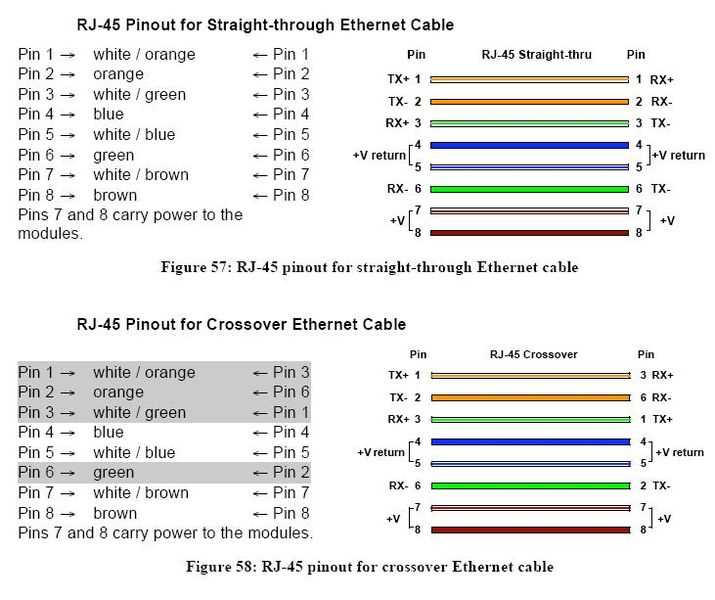
Ensure consistent alignment of the colored pairs to avoid connectivity failures when linking devices. The A standard places the green pair in positions 1 and 2, while the B standard swaps the orange pair into these positions.
Use a precise crimping tool to secure each conductor into the connector slots. Misaligned pins can result in intermittent signal loss or complete network failure, especially over runs exceeding 100 meters.
Label both ends of the cable according to the chosen standard before testing. Maintaining uniformity across all patch panels and endpoints simplifies troubleshooting and reduces cross-talk in high-speed transmissions.
Check each pair with a continuity tester after termination. Verify that each colored conductor maps exactly to its counterpart, ensuring reliable performance for gigabit and higher connections.
Cat 6 Cable Layouts for A and B Pin Configurations
Follow the color order precisely when arranging conductors for the A standard. Pair 1 (green/white and green) occupies pins 1 and 2, pair 2 (orange/white and orange) pins 3 and 6, pair 3 (blue/white and blue) pins 4 and 5, and pair 4 (brown/white and brown) pins 7 and 8.
For the B configuration, swap the positions of pairs 1 and 2. The orange pair moves to pins 1 and 2, and the green pair shifts to pins 3 and 6. This layout is more common in residential networks and ensures compatibility with standard patch panels.
Maintain consistent pair twisting to reduce electromagnetic interference. Keep twists intact as close as possible to the connector ends, but avoid untwisting more than 0.5 inch, which can degrade signal quality over long distances.
Use a clear labeling system for each cable end. Marking A or B configuration helps network technicians quickly identify endpoints, preventing mismatched terminations that could cause intermittent connectivity issues.
Test each terminated cable using a cable tester that verifies continuity and pair mapping. Confirming correct pinout for both standards avoids network downtime and ensures gigabit performance across the entire installation.
Color Coding Differences Between A and B Standards
Identify the green and orange pairs carefully for the A standard. Pins 1 and 2 carry the green/white and green conductors, while pins 3 and 6 carry orange/white and orange. Blue and brown pairs remain consistent on pins 4, 5, 7, and 8.
For the B layout, swap the green and orange pairs. The orange/white and orange pair moves to pins 1 and 2, while green/white and green shifts to pins 3 and 6. This adjustment maintains compatibility with most commercial patch panels and network devices.
Blue and brown pairs retain identical positions in both standards. Pins 4 and 5 handle the blue/white and blue conductors, while pins 7 and 8 handle brown/white and brown. Maintaining these positions reduces crosstalk and preserves signal integrity.
Check each cable end to confirm the intended standard. Misalignment of green and orange pairs can cause connectivity failures or degraded throughput, particularly in gigabit connections that rely on all four pairs being accurate.
Use consistent labeling to mark A or B terminations. Applying visible labels prevents accidental mismatches during installation, especially in environments with multiple network runs or patch panels serving different floors or sections.
Test completed runs using a pair tester to verify continuity and mapping. Ensuring color pairs match their designated pin positions guarantees stable performance, reduces troubleshooting time, and avoids unexpected data errors in active network systems.