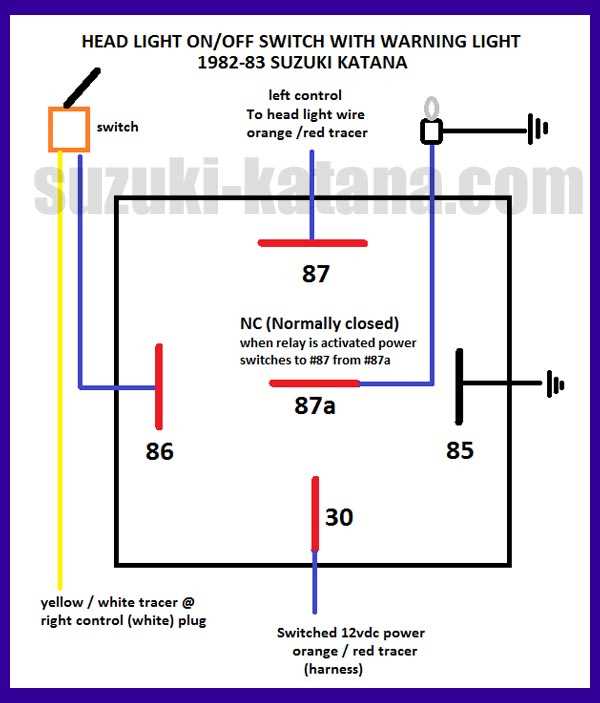
Connect the main power lead to the designated terminal first and verify voltage with a multimeter. Ensure polarity matches the control switch to prevent damage to the bulb assembly.
Identify the low and high beam circuits by color coding: blue for high and white for low. Confirm continuity with the load side before tightening connectors to prevent short circuits.
Secure the ground conductor to a solid frame point using a torque-rated screw. A reliable ground eliminates stray current and protects the electrical system from surges.
After completing connections, operate the switch to test illumination intensity and beam selection. Check for flickering, uneven voltage, or abnormal heat to ensure proper installation.
Label all leads with durable tags for future reference. Regularly inspect terminals for corrosion or looseness to maintain safe and consistent lighting performance.
Motorcycle Lighting Connection Guide
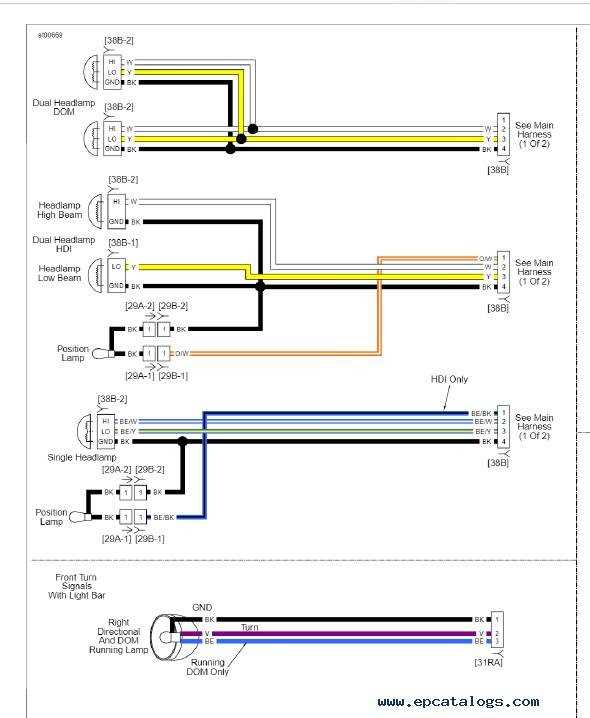
Start by connecting the main power lead to the designated terminal. Verify voltage with a multimeter and ensure polarity matches the control switch to prevent damage to the bulb assembly.
Identify the low and high beam circuits before making connections:
- Low beam: usually marked with white insulation, responsible for standard illumination.
- High beam: often blue, delivers brighter light for long-range visibility.
Secure the ground conductor to a solid frame point using a torque-rated screw. Proper grounding prevents stray voltage and protects the control module from electrical surges.
Route all leads through insulated paths and use cable clamps to avoid contact with hot engine parts or moving components. Loose connections may cause flickering or intermittent lighting issues.
After connections, operate the toggle or pull switch to test both illumination levels. Observe for correct beam selection, consistent brightness, and absence of unusual heat or vibration from the assembly.
Label each lead for future maintenance and inspection. Periodically check terminals for corrosion or looseness to maintain safe and reliable lighting operation over time.
Identifying Power and Ground Terminals
Connect the main positive lead to the terminal labeled for incoming voltage. Use a multimeter to confirm the presence of current before attaching any load to prevent shorts or component damage.
Locate the negative or ground terminal by tracing the frame connection points. A reliable ground ensures stable operation and eliminates stray voltage that could affect other circuits.
Color coding often distinguishes the terminals: red or black with stripes usually indicates power, while solid black or green marks ground. Verify with a continuity tester to avoid misconnection.
Inspect terminals for corrosion, oxidation, or paint layers that can block proper contact. Clean with a fine abrasive pad or contact cleaner to maintain low-resistance connections.
Secure leads with torque-rated screws or clamps. Loose terminals can cause flickering, voltage drops, or intermittent illumination that reduces visibility and safety.
When connecting additional modules, route power and ground separately to minimize interference. Keep leads clear of heat sources, moving parts, and sharp edges to prevent wear or shorts.
Test the voltage drop across each terminal under load. A difference greater than 0.2 volts indicates a poor connection that must be tightened or cleaned for proper operation.
Label each terminal with a durable tag or marker for future maintenance. Regular inspection ensures continued reliability and prevents electrical faults in critical lighting circuits.