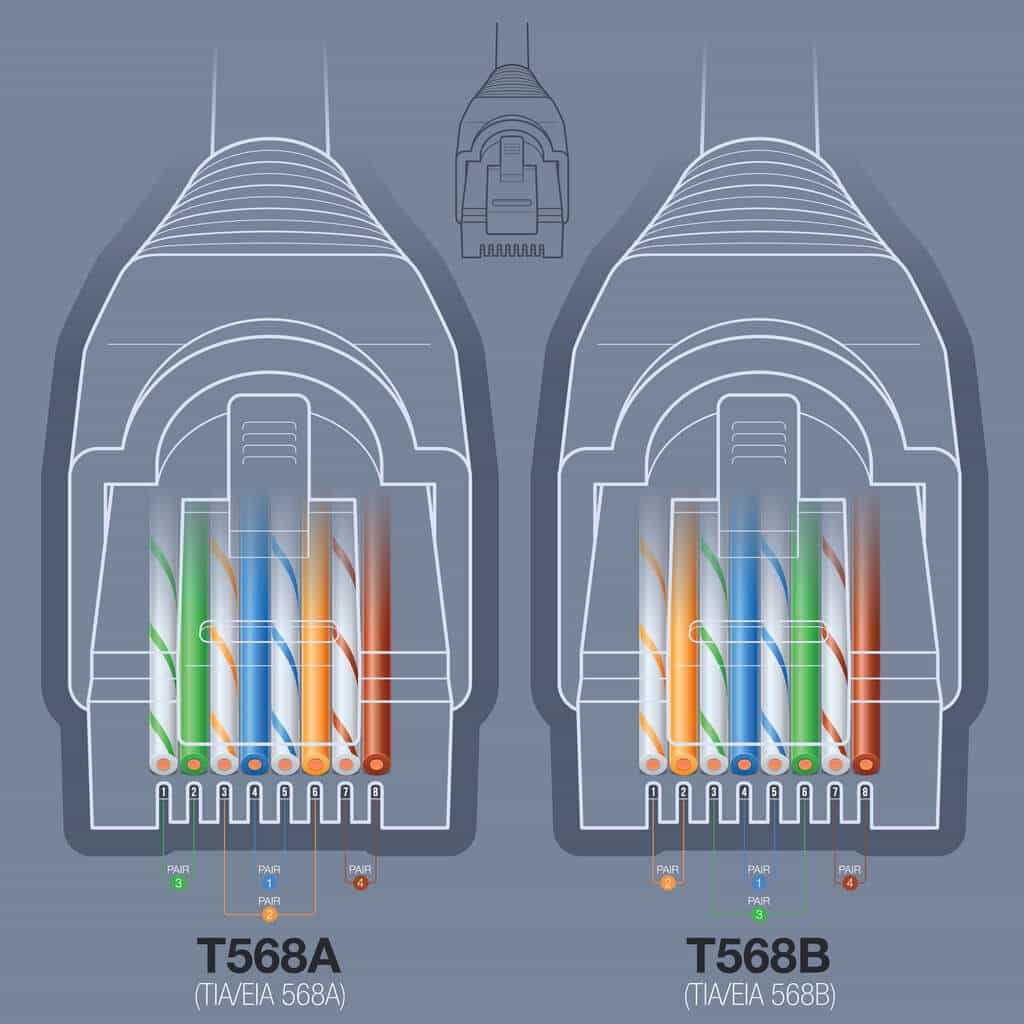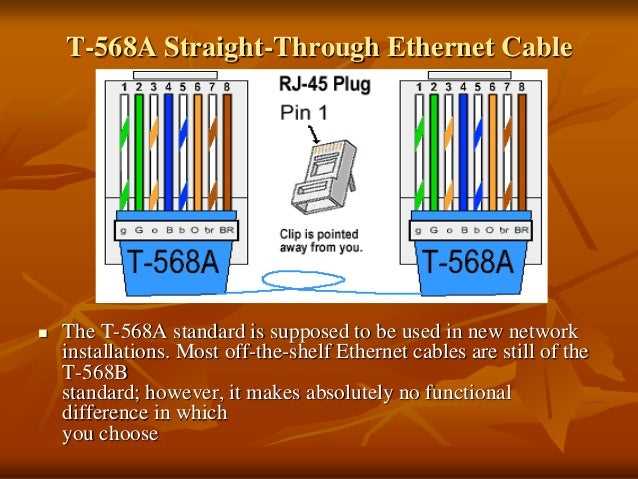
Always begin by separating the twisted pairs accurately according to the T568A or T568B sequence. Each colored pair must maintain its twist length until insertion into the terminal to prevent crosstalk and signal loss.
Trim each conductor precisely so that no excess copper is exposed beyond the connector housing. Exposed wires can cause short circuits or unreliable connectivity in high-speed data transmissions.
Insert the conductors firmly into the slots of the connector while keeping their order intact. Misalignment will result in faulty connections and can disrupt network communication across multiple devices.
Use a quality crimping tool to secure the contacts to the conductors. Ensure the tool applies even pressure to prevent loose connections that may degrade the signal over time.
After termination, test continuity with a network tester to verify all pairs are correctly linked. Identify any miswired or open connections before deploying the cable to avoid network interruptions.
Label both ends of the cable clearly to match the network topology. Proper identification reduces troubleshooting time and ensures consistency in structured cabling installations.
Maintain consistent bending radius and avoid kinks along the cable run. Sharp bends can damage insulation, weaken signals, and shorten the lifespan of the connection.
Step by Step Ethernet Connector Assembly and Wiring
Begin by stripping the outer sheath carefully to expose the twisted pairs without cutting the insulation. Leave about 1 inch of exposed pairs to ensure proper seating in the connector.
Untwist each pair individually and align them according to the chosen termination standard. Keep twists as close to the connector as possible to reduce signal interference and maintain consistent data transmission.
Trim the ends evenly so each conductor reaches the contacts without protruding. Uneven lengths can prevent full insertion and lead to intermittent connectivity issues.
Insert the conductors into the connector slots firmly while maintaining the correct color sequence. Ensure each wire reaches the end of its channel to avoid open circuits or cross-connections.
Use a reliable crimping tool to secure the metal pins to each conductor. Apply consistent pressure until the contacts fully pierce the insulation and establish a solid electrical connection.
Test the completed cable with a continuity tester or network cable tester to confirm all pairs are correctly terminated. Label both ends and inspect for any exposed wires or loose contacts before final deployment.
Identifying Cable Pairs and Color Codes for Ethernet Plugs
Separate each twisted pair carefully before inserting into the connector. Maintaining the integrity of each pair prevents crosstalk and ensures stable data transfer.
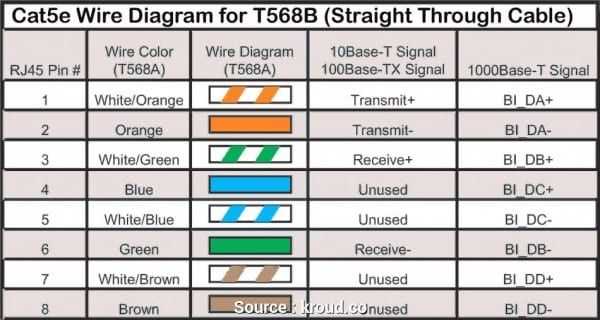
Use the standard color sequence to match conductors with their respective slots. Common arrangements include green, orange, blue, and brown pairs with their respective stripes for consistency.
- Green pair: solid green and green with white stripe
- Orange pair: solid orange and orange with white stripe
- Blue pair: solid blue and blue with white stripe
- Brown pair: solid brown and brown with white stripe
Inspect each wire to confirm there are no nicks or frayed ends. Damaged insulation can cause shorts or degrade signal quality.
Align pairs precisely when inserting into the slots. Misalignment can cause open circuits or inconsistent connectivity over long runs.
- Verify color coding matches both ends of the cable
- Ensure that twisted pairs remain tightly twisted as close to the connector as possible
- Check for any untwisted or crossed wires
Label each end after terminating to avoid confusion during installation. This is particularly useful for patch panels or multiple network runs in the same area.
Test each line with a continuity or network tester to confirm correct pair alignment. Correct identification of conductors and adherence to color codes prevents connectivity issues in complex networks.