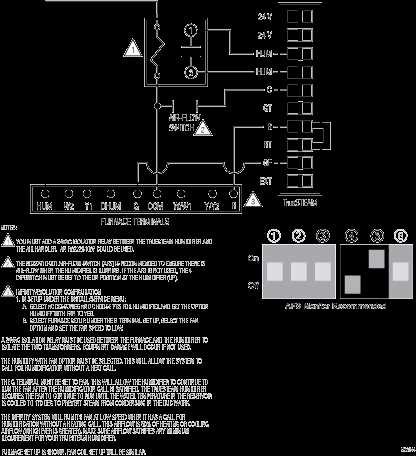
Before starting any electrical work, make sure to switch off the power at the main breaker panel. This is a necessary safety precaution to avoid any risks of electrical shock or short circuits. Once the power is off, confirm that no current is running through the system with a voltage tester.
To begin connecting your device, strip about 1 inch of insulation from the end of each wire. This will expose enough copper to make a solid connection without leaving excess wire that could touch other components. The black wire (hot) should be connected to the brass terminal, while the white wire (neutral) connects to the silver terminal. If a grounding wire is present, connect it to the green screw or the designated grounding terminal.
Check the alignment of the wires before tightening the screws. Properly secured connections ensure the unit functions correctly and safely. After completing the connections, turn the power back on and use a multimeter to verify the current is flowing as expected. If any issues arise, double-check the wire placement to ensure each one is properly connected to the correct terminal.
Wiring Guide for Your Air Treatment Device
Start by identifying the live, neutral, and ground terminals on the device. The live terminal should be connected to the black wire, while the neutral terminal takes the white wire. The ground wire, often green, should be attached to the ground terminal to ensure safety.
Proper wire placement is key to avoid electrical issues. Make sure each wire is tightly wrapped around its terminal and secured with the corresponding screw. Check the wire connections thoroughly before re-energizing the system. If the wiring setup is correct, test the unit with a multimeter to ensure the power is flowing as expected.
Step-by-Step Instructions
- Turn off the power at the breaker panel.
- Strip 1 inch of insulation from each wire.
- Connect the black wire to the brass terminal and the white wire to the silver terminal.
- Attach the ground wire to the green screw or designated terminal.
- Once all connections are secure, restore power and test with a multimeter.
Troubleshooting Tips
- If the unit doesn’t turn on, double-check the wire placement to ensure correct connections.
- Inspect for any loose wires or exposed copper that could cause a short circuit.
How to Connect the Power Supply to Your Device
Start by turning off the power at the circuit breaker before working with any electrical connections. Use a voltage tester to ensure that no current is flowing before proceeding.
Next, prepare the wires by stripping about 1 inch of insulation from each end. This exposes the copper wiring, which will allow you to make solid connections at the terminals.
The live wire (usually black) should be connected to the terminal marked with a brass or gold screw. This is where the current flows into the device. Make sure the wire is tightly wrapped around the screw and securely fastened.
The neutral wire (typically white) connects to the silver terminal. This wire completes the circuit and ensures that the power flows back to the source safely. Be sure the wire is properly secured and no copper is exposed.
If your setup includes a grounding wire (usually green or bare), attach it to the ground terminal or the green screw. Proper grounding helps prevent electrical shock and reduces the risk of damage to the unit.
After connecting the wires, check all connections carefully to make sure they are secure and that no wires are loose or touching unintended terminals. Any loose connections could lead to faulty operation or safety hazards.
Finally, restore power to the device and test it by switching it on. Use a multimeter to confirm that the unit is receiving power correctly and that the connections are functioning as expected.