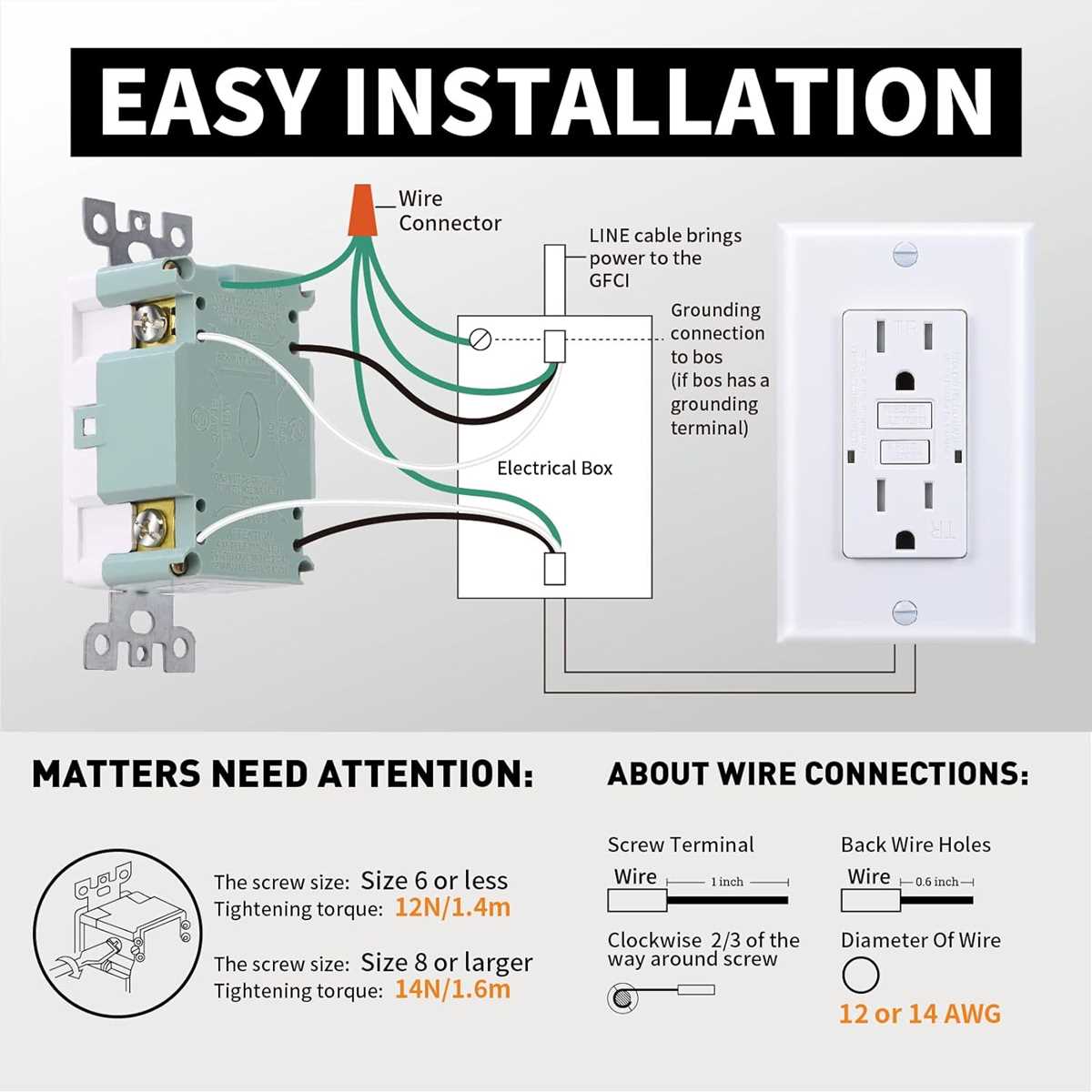
Connect the hot and neutral conductors to the correct terminals to prevent electrical faults. Use copper wires rated for 15 or 20 amps depending on the branch circuit and verify the connections are secure before energizing the line. Incorrect attachment can lead to tripping or hazardous conditions.
Attach the grounding wire firmly to the green screw to maintain a continuous path for fault currents. Ensure that the grounding path extends to the main panel and all downstream devices. Loose or missing ground connections can render the protection function ineffective.
Test the outlet immediately after installation using the built-in test button or an external tester. The mechanism should trip when the test is activated and reset without resistance. Regular testing every few months confirms the outlet maintains proper fault detection and keeps the circuit safe.
GFCI Outlet Installation and Connection Guide
Begin by turning off the power at the breaker panel and verify with a voltage tester that the line is de-energized. Confirm the correct circuit is isolated before touching any conductors to prevent electric shock.
Identify the line and load terminals on the outlet. The incoming power must connect to the line terminals while downstream devices, if present, attach to the load terminals. Mixing these connections can disable the protective function.
Secure the neutral and hot wires under the screws or push them into the backstab holes if permitted. Ensure that each connection is tight and the bare conductor is fully captured under the terminal for reliable contact.
Attach the grounding wire to the green screw on the outlet frame. This ensures that any fault current has a direct path to earth, maintaining protection for all connected equipment.
Mount the outlet into the electrical box without pinching any wires. Tighten the mounting screws evenly, ensuring that the device sits flush with the wall surface to allow proper plug insertion and reduce strain on connections.
Test the outlet after installation by pressing the built-in test button. It should trip immediately and reset without resistance. Regular testing every few months confirms the outlet continues to provide reliable fault protection and safety for the circuit.
Identifying Line Load and Ground Terminals on a GFCI Receptacle
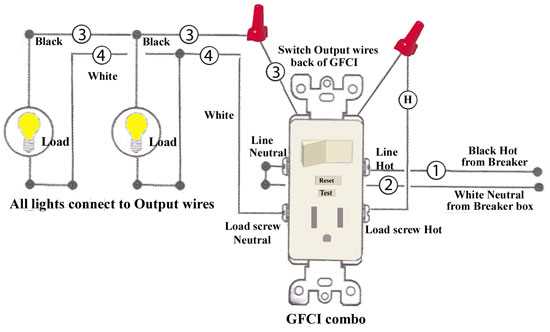
Begin by locating the incoming power source and verify which pair of terminals receives voltage from the panel. These are the line terminals and must always be connected to the supply side to ensure proper operation.
Inspect the markings on the device. Most models label the terminals clearly as line and load. The load terminals connect to downstream outlets or devices that require protection, while the line terminals handle the incoming energy.
Check the neutral and hot wires for proper color coding: typically white for neutral and black or red for hot. Connect each to the appropriate line terminal and double-check for tight and secure attachment to avoid loose contact.
Locate the grounding point on the metal frame or green screw. Attach the bare or green wire here to create a safe path for any stray current, protecting users and equipment from shock hazards.
Use a voltage tester to confirm correct placement before securing the device. Testing both line and load connections ensures that downstream protection is active and the outlet functions safely under load conditions.
Document and label connections if multiple outlets are daisy-chained. Clear identification prevents confusion during maintenance, reduces the risk of reversed connections, and maintains safety for anyone servicing the electrical setup.