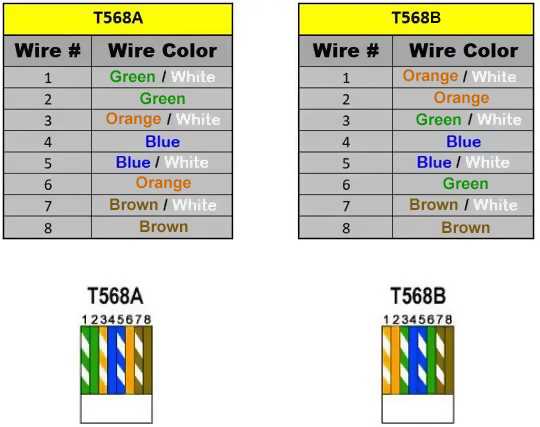
To ensure stable and fast data transmission, it’s important to follow the correct pin configuration for your cable. Use the T568B standard for most home and office installations to achieve optimal results. This setup arranges the wires in a specific order that minimizes signal interference.
First, strip the outer insulation of your cable carefully, exposing the eight inner wires. Arrange the wires in the correct order according to the T568B standard, ensuring the colors match the diagram for each pin. It’s recommended to trim any excess wire to avoid unnecessary exposure.
When attaching the wires into the plug, ensure that each wire reaches the end of the connector, making a solid connection. This step is vital to avoid issues with poor signal quality. Double-check the placement of each wire to confirm proper alignment before crimping the plug.
Cat 5 Wiring Standards and Best Practices
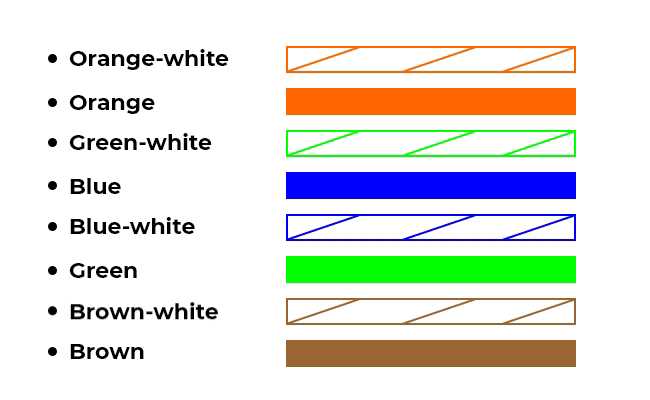
To ensure optimal performance, use the T568B standard for pin arrangement. This configuration is widely used in residential and commercial network setups. The wire color coding for T568B is as follows:
- Pin 1: White with orange stripes
- Pin 2: Solid orange
- Pin 3: White with green stripes
- Pin 4: Solid blue
- Pin 5: White with blue stripes
- Pin 6: Solid green
- Pin 7: White with brown stripes
- Pin 8: Solid brown
Ensure that the order is strictly followed to minimize any loss in data transmission quality. Mixing up the pinout can lead to unreliable performance or a non-functional cable.
Once the wiring is in place, carefully trim the excess wire to avoid any short circuits or signal interference. This step is important for ensuring that each wire is fully seated within the plug, maintaining a solid connection to the pins.
Next, insert the arranged wires into the plug and make sure they reach the end of the connector. A good rule of thumb is to check that the wires are flush with the end of the connector. If any wire is too short, you may risk a poor or weak connection.
When using a crimping tool, apply even pressure to ensure a strong bond between the wire and the metal pins inside the connector. This will help prevent signal degradation over time. A weak crimp can cause intermittent connection issues.
After crimping, test your cable with a network cable tester to verify the correct continuity and pin arrangement. If any pin is misaligned or not connected properly, re-strip the cable and repeat the process until the connection is correct.
For long runs or areas with high electromagnetic interference (EMI), consider using shielded cables to protect the signal from external noise. This can help ensure consistent network speeds and reliability in challenging environments.
Finally, label each cable if you’re working with multiple lines to avoid confusion. Proper labeling can save time and prevent errors when troubleshooting network problems or making future changes to your setup.
Understanding the Pinout for Cat 5 Connectors
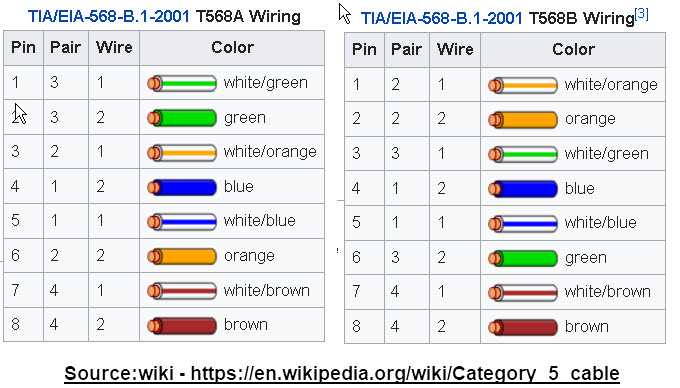
For proper functionality, the eight internal wires must be arranged in the correct order inside the plug. The most commonly used configuration is the T568B standard, which arranges the wires as follows: Pin 1 is white with orange stripes, Pin 2 is solid orange, Pin 3 is white with green stripes, Pin 4 is solid blue, Pin 5 is white with blue stripes, Pin 6 is solid green, Pin 7 is white with brown stripes, and Pin 8 is solid brown. Following this exact order ensures that the signals are correctly transmitted.
Why Pinout Matters
Incorrect pin placement can cause miscommunication between devices, leading to slow speeds or a complete failure to connect. The reason each pin has a specific function is tied to how data is sent over the cables. Even small mistakes in wiring can result in a poor or unreliable connection. When working with multiple cables, it’s particularly important to stay consistent with the pinout across all connections to prevent errors during network setup.
Testing the Pinout
Once the wires are inserted into the plug, use a cable tester to check if each pin is correctly connected. A tester will indicate whether each wire is properly aligned with its corresponding pin. If any wires fail the test, remove the plug, re-strip the cable, and start the process over. This step is crucial to ensure that all connections are intact before finalizing the installation.