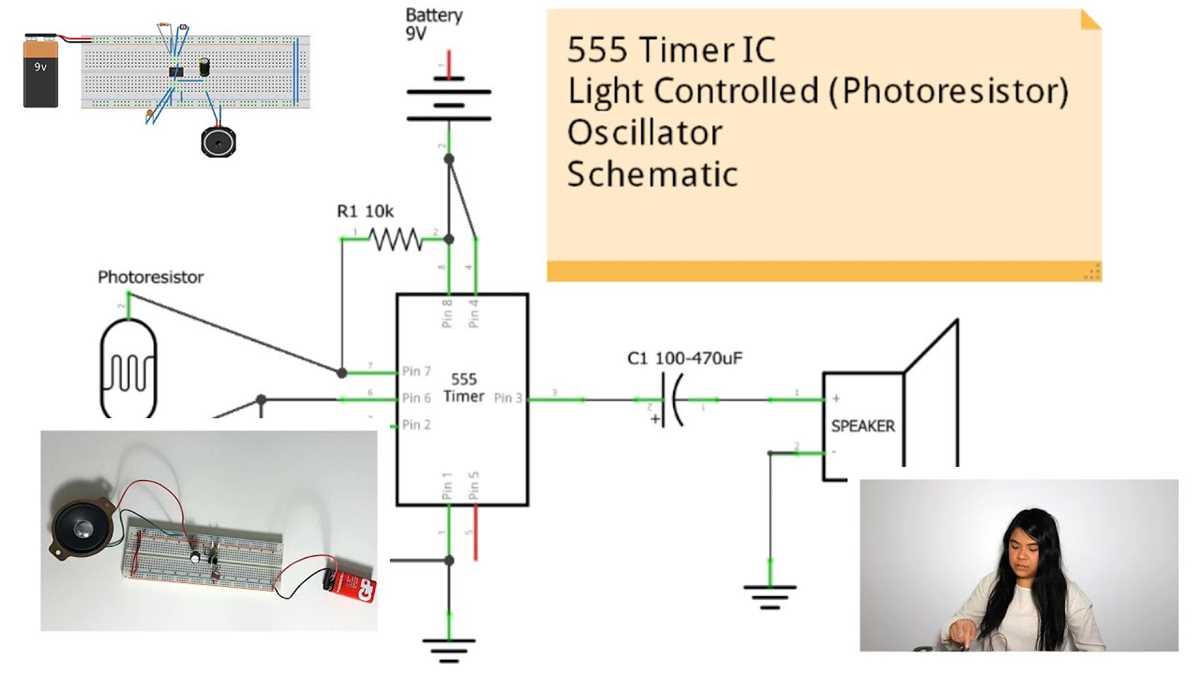
Use a 5V regulated power supply to maintain stable voltage for light-sensitive components. This prevents fluctuations that can affect sensor response and ensures consistent output for measurement or control tasks.
Include a 10kΩ resistor in series to limit current and create a voltage divider. Position the sensing element opposite the light source and ensure the resistor is securely connected to minimize noise and variations in voltage readings.
Test the setup under different lighting conditions using a digital multimeter to observe voltage changes. Adjust resistor values or reposition the element to achieve desired sensitivity, and ensure wires are insulated and firmly attached to prevent loose connections that can distort measurements.
Step by Step Guide to Building a Photoresistor Setup for Accurate Light Detection
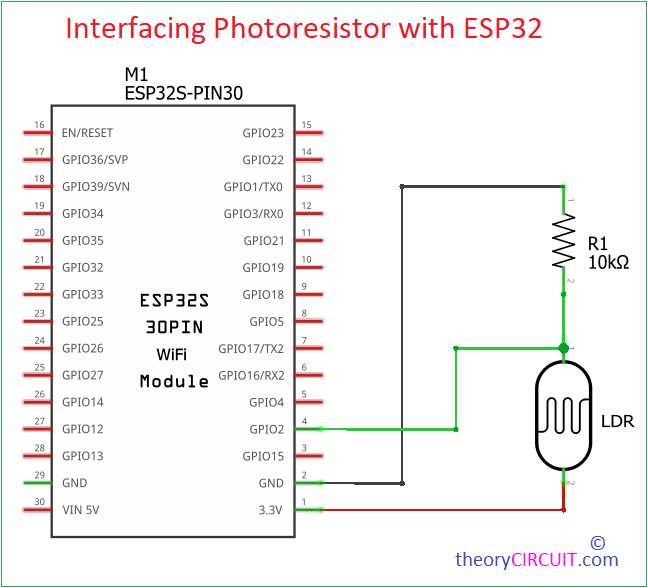
Connect the sensing element to a stable 5V power source to maintain consistent voltage. Use a short, thick wire for the positive lead to reduce resistance and prevent voltage drops that can alter readings.
Include a series resistor to form a voltage divider. A 10kΩ resistor is recommended for standard ambient light conditions. Secure the connections with solder or tight terminal clips to ensure steady contact over repeated tests.
Follow these steps for assembly:
- Place the light-sensitive component on a small breadboard or perfboard.
- Connect one end to the power rail and the other to the series resistor.
- Attach the junction between the element and resistor to the measurement input.
- Keep leads short and insulated to reduce interference and signal noise.
Test sensitivity by exposing the sensor to varying light levels. Measure voltage with a multimeter or data acquisition system. Adjust the resistor or reposition the element to achieve the desired response curve.
Ensure proper grounding for accurate voltage readings. Connect the negative lead to a solid ground point or power supply ground. Avoid loose or oxidized connections that can introduce fluctuations in output.
Final adjustments include:
- Calibrate the system by recording voltage at different lighting conditions.
- Replace the series resistor if maximum sensitivity is not reached.
- Secure all components on a stable base to prevent movement that can change exposure angles.
- Periodically recheck connections and clean terminals to maintain consistent performance.
Selecting Resistors and Power Supply for Light Sensing Projects
Choose a regulated 5V or 3.3V power source to maintain consistent readings. Voltage fluctuations above ±0.1V can cause inaccurate measurements, so using a battery pack or a dedicated DC supply with minimal ripple is recommended.
Select the series resistor based on target sensitivity. For ambient light detection, start with a 10kΩ resistor. If detecting lower light levels, increase resistance up to 50kΩ to enhance voltage changes across the sensor, while ensuring current stays below 20mA to prevent overheating.
Testing and adjustment steps include:
- Connect the sensor with the chosen resistor and measure voltage at the junction.
- Expose the element to different light intensities and record output.
- Swap resistors incrementally to optimize sensitivity without exceeding power limits.
- Use shielded wires for longer connections to reduce interference and maintain stable readings.