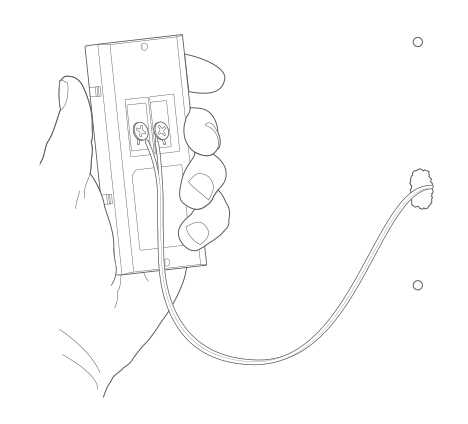
If you’re installing a smart entry device, the first step is to ensure it’s connected correctly to your electrical supply. The device should be linked to a power source that meets the voltage requirements. Begin by turning off the power at the breaker box before proceeding with any installation. Use a voltage tester to double-check that the power is off, as working with live wires can be dangerous.
Next, connect the appropriate wires to the terminals. Usually, you’ll need to connect a power line, ground, and possibly a chime connection, depending on the device model. Ensure that each wire is securely attached to avoid any loose connections that could lead to malfunctions. If the device uses a battery or rechargeable power source, you’ll still need to ensure a backup or constant power supply is available to keep it functioning.
Once your power connection is secure, the next step involves pairing the device to your Wi-Fi network. This is crucial for remote monitoring and using features like video streaming. Follow the manufacturer’s instructions on how to connect your device to the home network, usually via an app or web interface. Once paired, test the device to ensure everything is working as expected.
Wiring Guide for Smart Entry Device Installation
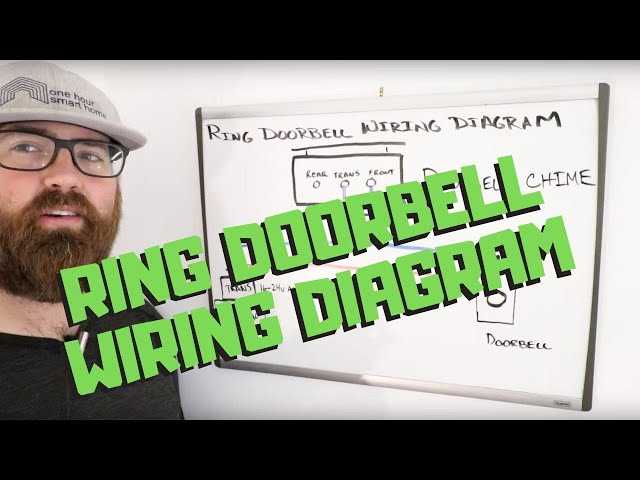
Before beginning the installation, ensure the power is completely turned off at the breaker panel. This is crucial to avoid electric shocks. Use a non-contact voltage tester to confirm that no current is flowing through the wires you’ll be working with.
Start by connecting the power cables to the device. Typically, you’ll need to connect the live (or hot) wire to the designated terminal and the neutral wire to its respective terminal. Make sure each wire is securely fastened to avoid any issues with the connection later on.
If your device is equipped with a mechanical chime, connect the corresponding wire from the chime terminal to the entry system. Ensure that you follow the manufacturer’s instructions closely as there might be slight variations in the terminal configuration based on the model.
For models that use a low-voltage power supply, ensure that the transformer you are using matches the voltage requirements specified in the product manual. A mismatched voltage can lead to malfunctions or damage to the system.
Next, connect the ground wire to the ground terminal. This step is crucial for safety, preventing electrical surges or faults from damaging your new device. Proper grounding ensures the system remains safe and functional.
After completing the physical connections, mount the device on the wall. Ensure that the placement allows for the camera to cover the desired area effectively and that it remains secure. Once the device is mounted, you can move on to the software setup.
Lastly, pair the device with your Wi-Fi network by following the instructions in the mobile app. This step ensures the system is connected to the internet for remote access and functionality. Test the device to ensure the video feed and audio systems are working correctly.
How to Wire a Smart Entry Device to a Power Source
Ensure that the power is completely turned off at the breaker panel before beginning the installation. This is a critical safety step to prevent electrical hazards. Double-check with a voltage tester to confirm the circuit is inactive.
Start by identifying the live and neutral wires coming from the power supply. The live wire should be connected to the appropriate terminal on the device. Use wire nuts or other secure connectors to fasten the wires, ensuring a solid connection.
If your system requires an additional transformer to convert the voltage, make sure the transformer’s output matches the device’s voltage requirement. Incorrect voltage can result in malfunctions or permanent damage to the device.
For models with an integrated chime, connect the chime wire to the correct terminal on the device. The configuration for this may vary depending on the model, so it’s important to follow the manufacturer’s installation guide to ensure compatibility.
Next, connect the ground wire to the grounding terminal. This step is crucial for electrical safety, helping to prevent any potential electrical surges or short circuits. Always double-check that the ground wire is securely connected.
Once the connections are complete, mount the device securely on the wall or mounting surface. Ensure the unit is positioned correctly to maximize its functionality, whether for video recording or sensor detection.
After physically mounting the device, power the circuit back on. Use the mobile app or setup interface to link the device to your Wi-Fi network. Test all features, including video and sound, to confirm proper operation before completing the installation.