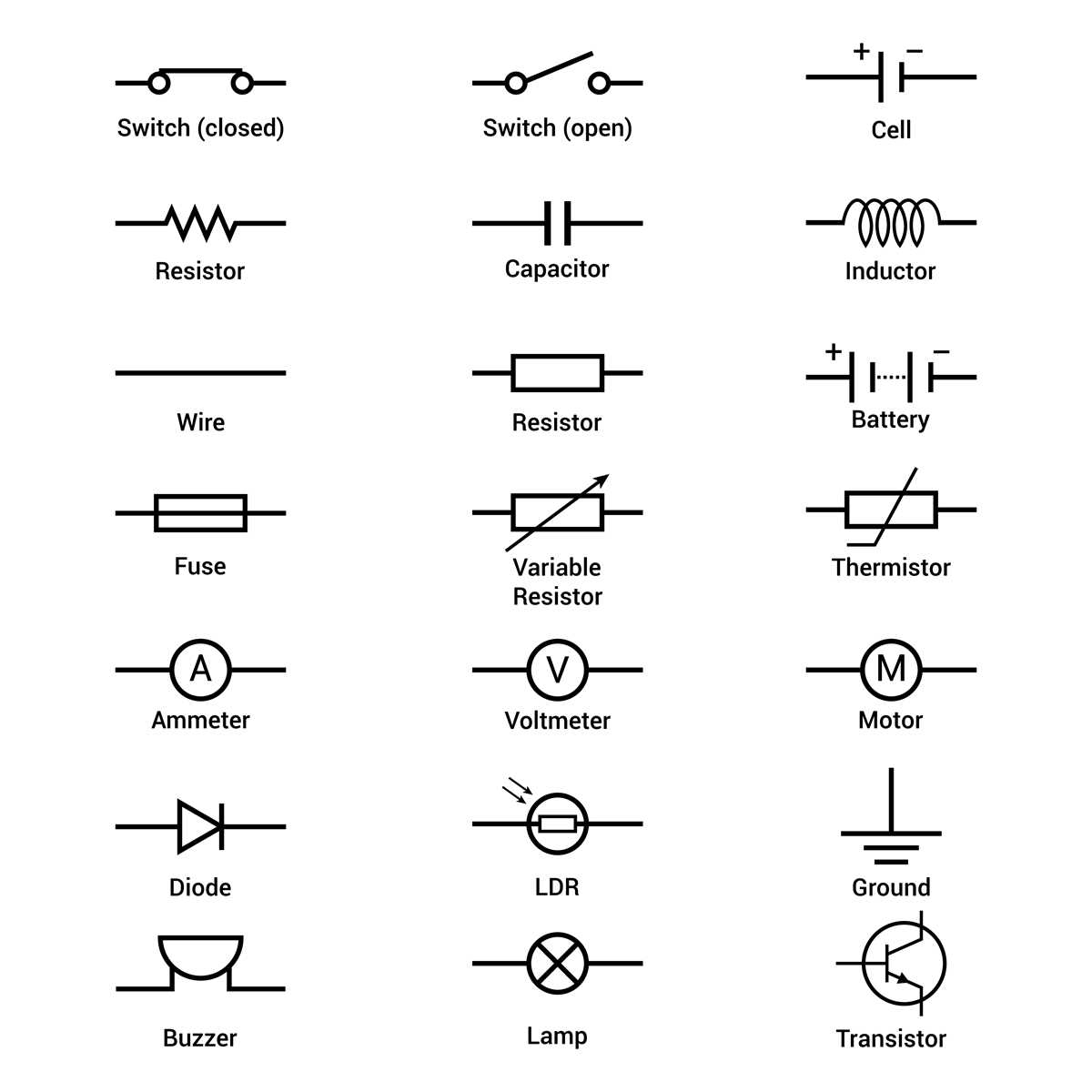
To effectively read and design electrical systems, it’s vital to recognize how different components are represented in technical drawings. A clear understanding of these representations allows you to quickly identify and troubleshoot circuits. Key components like controls and connections are often shown using specific shapes and lines, each with its own meaning. For instance, the representation of a basic on/off control device uses a simple line to indicate the path of electricity when the device is activated.
When working with projects involving electrical connections, be sure to familiarize yourself with the most common depictions used for control devices. These symbols can vary slightly depending on the standard used, but the core shapes and connections remain the same. Understanding these differences will help you decipher schematics and diagrams efficiently, ensuring proper installation and function.
For those starting with electrical schematics, focusing on identifying and interpreting the most frequently used components is a practical first step. Once you recognize these elements, you’ll be able to navigate through complex schematics with ease and avoid mistakes that could impact the project. Pay attention to how power is directed through the system, how devices are controlled, and how circuits are connected to make informed decisions throughout your work.
Understanding Electrical Control Symbols in Schematics
To properly interpret electrical control schematics, start by familiarizing yourself with the common representations of on/off control devices. These are often depicted as simple open or closed lines, indicating whether the current is flowing through the system. When the device is closed, it allows electricity to pass through; when open, it interrupts the flow. Recognizing this basic representation can prevent confusion when analyzing more complex setups.
Next, learn how different types of control mechanisms are visually distinguished. For instance, a momentary switch might be represented with a spring-loaded action, indicating that the control is active only while being pressed. This is in contrast to a maintained switch, which remains in its last position until manually changed. Understanding these nuances will help you quickly identify how various control devices operate within a circuit.
Types of Control Components
Beyond basic open/close representations, it’s important to know how other components are depicted. Push-button switches, rotary switches, and toggle switches all have unique symbols that reflect their function. In addition, specific components like relays or dimmers often require their own distinct icons. Keep in mind that these symbols can vary slightly depending on the standard, such as IEC or ANSI, but their basic meanings remain consistent across most schematics.
When working with diagrams that involve multiple control devices, always check for the key or legend. This will define the exact meaning of each symbol used, especially when unconventional symbols are present. These legends can save time by providing clarity and reducing the need to memorize complex symbol variations.
Finally, practice by reviewing common schematics and identifying each control component. This hands-on approach will improve your ability to read and understand electrical systems more quickly and accurately. Over time, the symbols will become second nature, allowing you to design, troubleshoot, or modify circuits with greater confidence.
How to Identify Common Control Device Icons in Electrical Plans
Begin by recognizing the basic icon for a simple on/off device. Typically, this is shown as a line with two ends, where one side is open and the other closed. The open side signifies that the device is in the off position, interrupting current flow. Once the device is engaged, the connection between the two points closes, allowing electricity to pass through. This fundamental representation is the backbone of most control setups.
Another common symbol to spot is the momentary push-button. It is usually depicted with a pair of small circles or a line with an arrow, indicating a temporary state. This device only remains in the closed position while actively pressed. After releasing, it returns to its open state. Identifying this icon quickly will help in understanding how these devices control electrical flow in systems.
Maintained vs. Momentary Devices

The difference between maintained and momentary devices is crucial. Maintained switches are often depicted as a symbol with a continuous connection, representing that the device stays in its last position until manually switched. Momentary devices, on the other hand, return to their default state once pressure is removed. Understanding these distinctions helps with the proper installation and troubleshooting of various electrical systems.
Next, look for rotary or dimmer switches, which are represented by a circle with a line through it or a dashed line. These control devices adjust the flow of electricity continuously, allowing for variable control of connected devices, such as lights. Recognizing these icons is important when working with devices that require adjustable outputs rather than simple on/off control.
Relay and Other Specialized Components
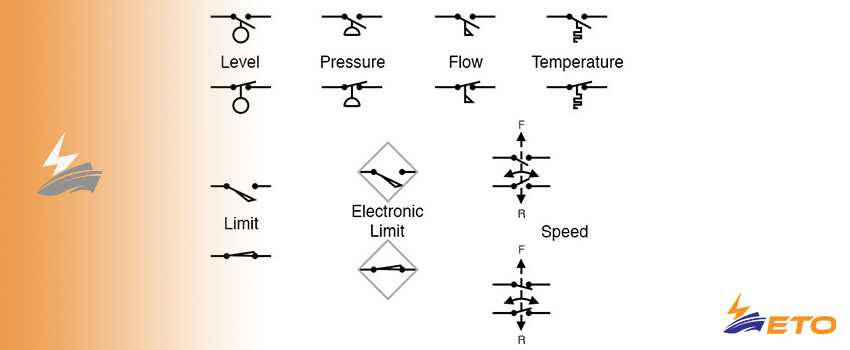
Relays and other specialized devices can be identified by their unique symbols. A relay, for instance, may be shown as a square with a diagonal line or a coil inside a rectangle, depending on the type. These components are used to control high-power circuits with a low-power signal and are commonly found in more complex setups like industrial systems. Pay attention to their distinct shapes to avoid confusion with basic switches.
Lastly, practice identifying the various devices in real-world plans or schematics. With experience, the process becomes faster and more intuitive. Over time, you’ll begin to recognize subtle variations in how different types of controls are represented, making it easier to understand even the most complex systems at a glance.