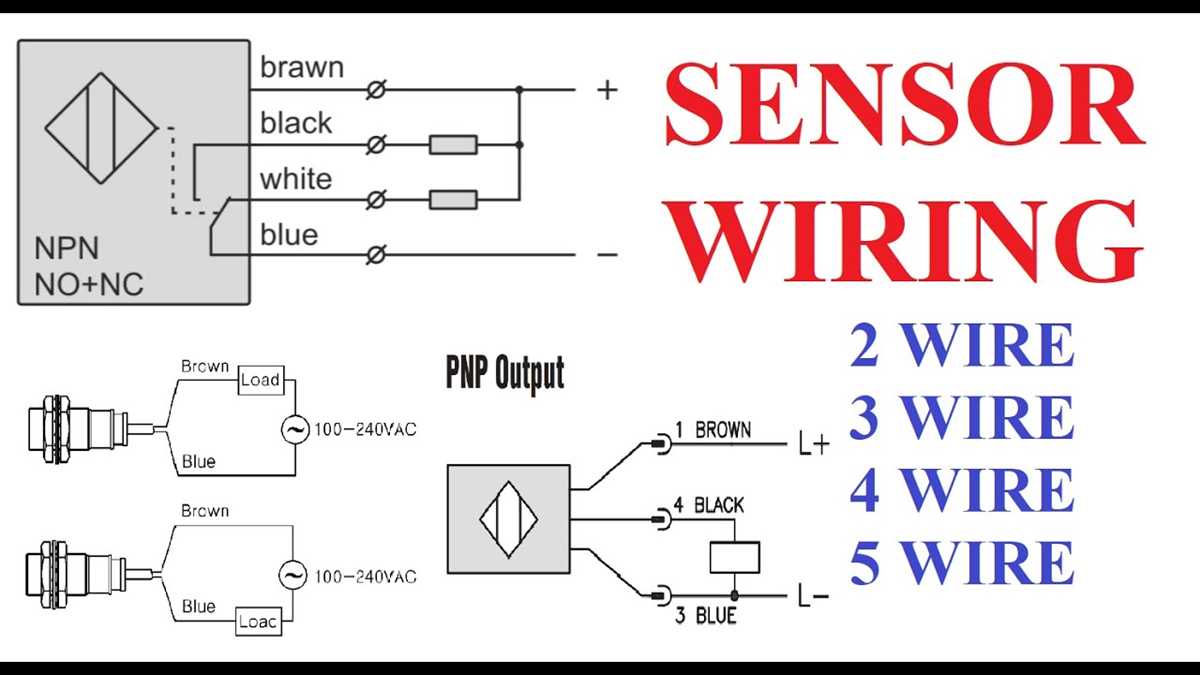
Ensure the positive and negative leads are matched to the designated terminals on the control unit. Using a multimeter, verify the voltage across each conductor does not exceed the module’s rated input of 24 volts DC.
Identify the signal and reference lines before integration. The signal conductor carries the measurement data, while the reference line stabilizes the readings. Incorrect assignment can lead to erroneous outputs or damage the electronics.
Follow a sequential attachment method: first power conductors, then signal lines. Avoid crossing lines with high-current paths to minimize electromagnetic interference. Maintain a separation of at least 5 centimeters from switching relays.
Use properly rated connectors and secure all terminals with torque values specified by the manufacturer, usually 0.5 to 0.6 Nm. Loose connections can create voltage drops or intermittent signal loss.
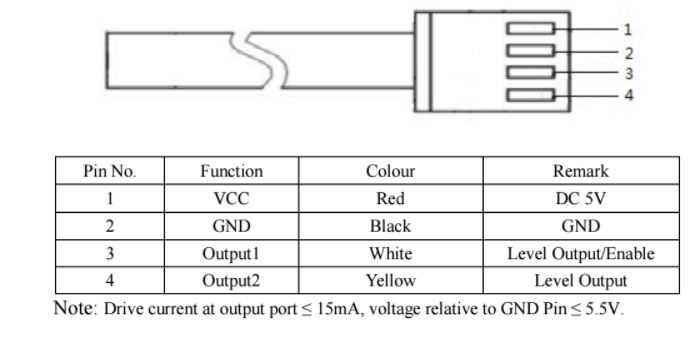
Label each conductor with its function using heat-shrink markers. This reduces the chance of mistakes during maintenance or system expansion. For four-conductor modules, common color coding is red for positive, black for negative, green for signal, and white for reference.
After completing the installation, conduct a functional test by applying known inputs and confirming that the control system registers accurate readings. Measure continuity and resistance along each conductor to detect potential faults.
Document the final configuration and maintain a schematic record. Include the exact terminal points, conductor lengths, and routing paths. This aids future troubleshooting and ensures compliance with operational standards.
Identifying Each Conductor Function and Color Code
Start by confirming the purpose of each strand in the module. The most common configuration uses red for positive supply, black for negative return, green for signal output, and white for reference or shield. Correct identification prevents measurement errors and protects control electronics.
Use a continuity tester to verify that each strand connects to the intended terminal on the receiving unit. Avoid assumptions based solely on color, as some manufacturers may deviate from standard coding.
Recommended Color Assignments
- Red – positive voltage feed
- Black – negative or ground
- Green – primary data signal
- White – reference line or secondary signal
After labeling, document the color-to-function mapping and test under operational conditions. Apply a controlled input and monitor outputs to ensure that each conductor transmits the correct signal. This reduces troubleshooting time and ensures consistent system performance.
Stepwise Connection to Control Units and Power Sources
Begin by confirming voltage requirements for each input line. Ensure that the supply levels match the control unit specifications, typically 5V to 24V DC. Connecting a line to an incorrect voltage can damage the module or the control unit.
Identify the positive and negative leads, then attach the positive conductor to the designated terminal on the control block. Use secure screw terminals or crimped connectors to maintain stable contact during operation.
Mapping Lines to Terminals
| Conductor Color | Function | Target Terminal |
|---|---|---|
| Red | Positive supply | V+ |
| Black | Ground return | GND |
| Green | Primary signal | IN1 |
| White | Reference or secondary signal | IN2 |
Next, route the signal leads carefully to avoid cross-talk with the power lines. Maintain a minimum separation of 50mm between high-current paths and data lines to reduce noise interference.
After physical connections, perform a continuity test to verify that each line reaches its correct terminal without shorts. Use a multimeter to check for unintended connections between supply and signal paths.
Power up the control unit briefly and monitor voltage at each input. Confirm that readings match the expected levels for red, black, green, and white conductors before full operation.
Verification and Adjustment
If any signal fails to appear, disconnect the module immediately and inspect all terminations. Loose or misrouted conductors are the most common cause of incorrect readings. Correct any errors and retest before prolonged operation.
Finally, secure all connections with cable ties or clamps to prevent strain on terminals. Label each line according to the table mapping and document the installation for future maintenance. This stepwise approach ensures consistent operation and reduces troubleshooting time.