
Connect the main power leads to the L and N terminals on the controller, verifying voltage with a multimeter before attachment. Ensure the protective conductor is secured to the green grounding screw to maintain a continuous safety path.
Identify all input terminals including sensors, alarms, and control signals. Use clearly marked conductors and maintain separation from high-voltage connections. Verify each input connection against the manufacturer label to prevent false readings or malfunction.
Attach output conductors to the corresponding relays and actuators. Confirm that the load ratings match the device specifications, and use insulated connectors to secure all splices. Testing each output with a continuity meter before energizing the system prevents equipment damage and operational errors.
Label each conductor with terminal identification to simplify future troubleshooting. Double-check all connections, ensuring no wires are pinched, terminals are tightened, and grounding remains continuous. Proper organization and verification ensure reliable controller operation and safety compliance.
Controller Terminal Connections and Power Setup Guide
Attach the main line and neutral conductors to the L and N terminals on the controller, confirming voltage with a multimeter before connection. Secure the protective conductor to the green grounding screw to maintain a continuous safety path and prevent electrical faults.
Connect input signals from sensors and control devices to the designated terminals, ensuring each conductor is correctly labeled and separated from high-voltage leads. Attach output conductors to relays and actuators according to the load specifications, and test each connection with a continuity meter before powering the system to verify proper operation and prevent damage.
Power Supply and Ground Connections for Controller Installation
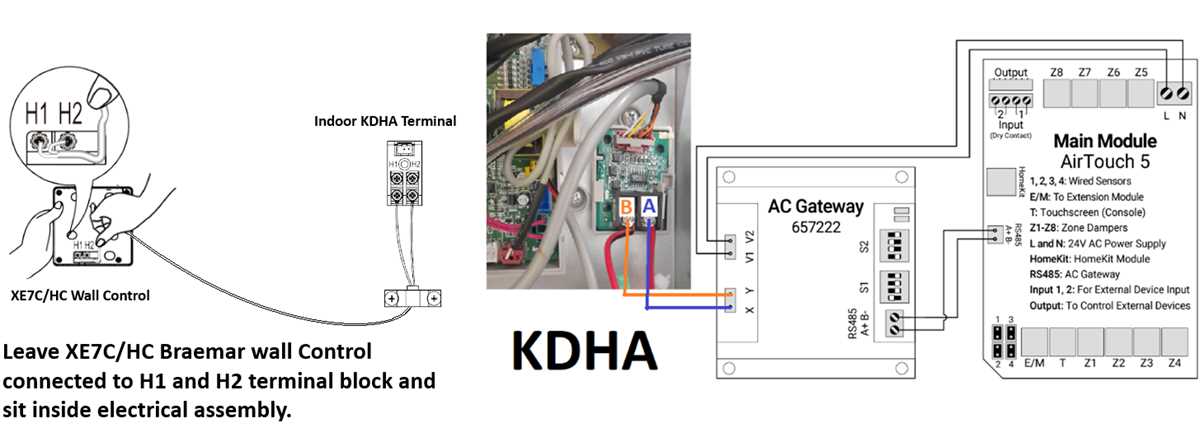
Connect the incoming line conductor to the L terminal and the neutral conductor to the N terminal. Verify voltage with a multimeter before securing the connections to prevent accidental short circuits or reversed polarity.
Attach the protective grounding conductor to the green screw on the controller chassis. Ensure continuity from this terminal to the main building ground to maintain a safe electrical path in case of a fault.
Use properly rated conductors for both line and neutral connections. Check the manufacturer’s specifications for amperage limits and avoid undersized cables that could overheat or cause voltage drops during operation.
Route conductors neatly within the enclosure, keeping high-voltage leads separate from low-voltage signal cables. This reduces electromagnetic interference and ensures accurate operation of connected devices.
Secure all connections with appropriately sized screws or terminals.
- Do not over-tighten as it can strip threads or damage terminals
- Do not leave loose connections that can cause arcing
Regular inspection of these terminals prevents operational failures.
Label the line, neutral, and ground conductors using colored tape or permanent markers. Red or black for line, white for neutral, and green for ground helps maintain clarity and simplifies troubleshooting in future maintenance.
Before energizing the controller, double-check all terminations. Use a continuity tester to ensure line, neutral, and ground connections are correct and isolated from unintended terminals.
After confirming proper connections, mount the controller securely in its enclosure. Ensure no wires are pinched or strained and that the grounding conductor remains continuous to provide reliable long-term safety and operation.