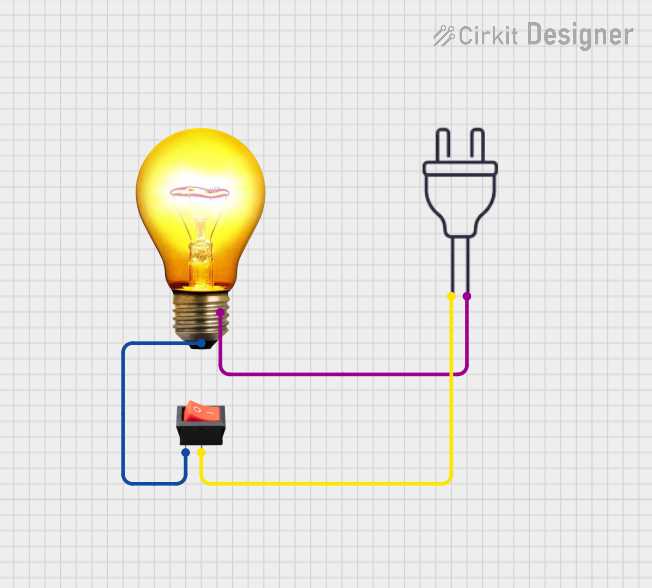
Start by identifying the primary components involved in connecting a light to a power supply. You’ll need a power source, a switch, and the lighting element. The power supply typically provides direct current (DC) or alternating current (AC), depending on the setup. Make sure to use the correct type of connection to avoid power issues.
The next step is ensuring the proper connection from the power supply to the light. Begin by connecting the positive terminal of the power source to one side of the light. The other side should be connected to a switch, which controls the flow of electricity to the light. The switch can either allow or interrupt the electrical path, turning the light on or off.
After establishing the flow, connect the ground or negative terminal back to the power source to complete the loop. This return path is crucial for the safe and efficient functioning of the setup. Always check for loose or exposed wires to prevent short circuits.
Finally, confirm the setup by testing the light. If the system doesn’t work, review the connections carefully, ensuring that all elements are properly linked and that the switch is in the correct position. Understanding these connections is fundamental to troubleshooting and ensuring proper functionality.
Light Connection Setup Guide
Begin by connecting the positive terminal of the power source to one end of the light. The other terminal should be linked to a switch, allowing you to control the flow of electricity. Ensure that the switch is positioned where it can be easily accessed to turn the light on or off. Once the switch is in place, connect the negative terminal back to the power source to complete the circuit.
Make sure all connections are secure, and check for any exposed wires that could cause short circuits. It’s important to use the proper gauge wire for the power requirements to avoid overheating. After everything is connected, test the system by turning the switch on. If the light does not function, double-check the wiring connections and ensure there is no break in the electrical path.
Identifying Key Components in a Light Setup
First, locate the power source, which is the starting point of the system. It provides the necessary voltage for the entire system. In most setups, the power supply is shown as a pair of lines, where the positive line is usually longer and marked with a plus sign (+), while the negative is shorter and marked with a minus (-).
Next, identify the light element. This is usually represented by a simple shape or symbol indicating the presence of the lighting device, often with a filament or LED symbol. Ensure this component is connected to the power source through a conducting path.
The switch is another key element. It controls the flow of current to the light. The switch is commonly depicted as a gap in the line, where the flow is either interrupted or allowed based on its position. A closed switch completes the circuit, and an open one disconnects the flow.
Don’t forget to identify the ground or return path. The ground typically appears as a symbol with multiple horizontal lines stacked, representing a direct connection to earth. This path ensures that excess electricity safely dissipates, preventing electrical shocks or system damage.
Finally, review the connecting wires. These are depicted as lines between components. It is important to check for any variations in the lines, as dashed lines often indicate a different type of connection or an auxiliary path, like a control wire or sensor.