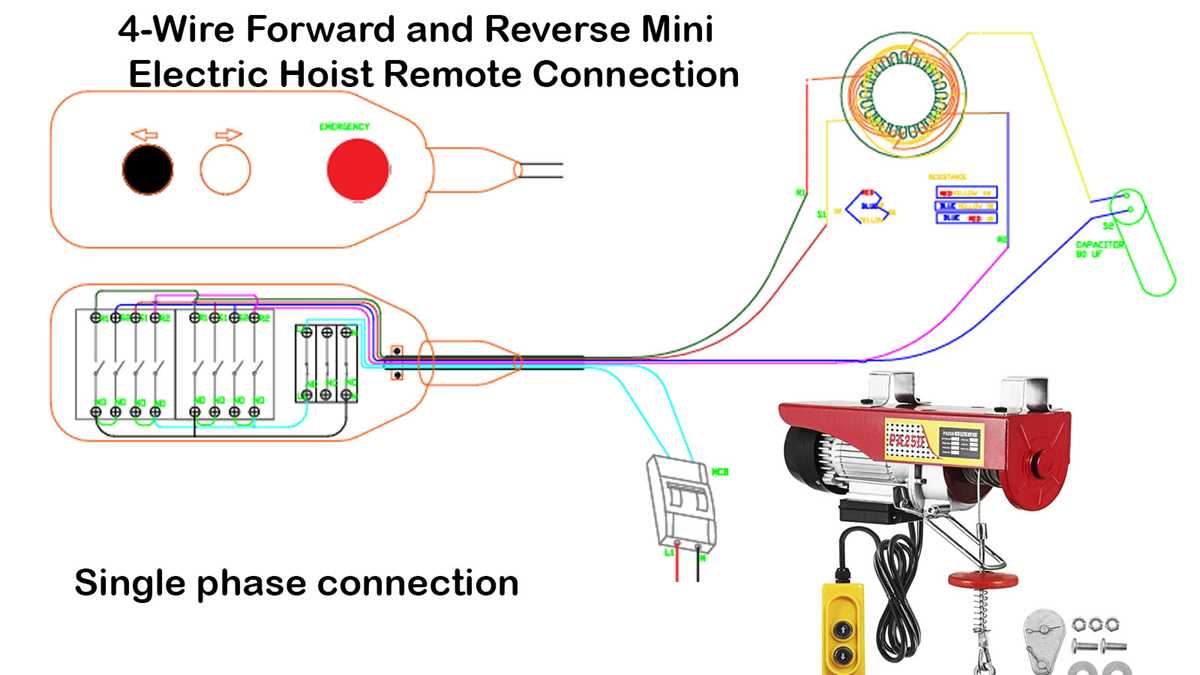
To change the direction of an electric unit, swap the connections on the two terminals controlling the direction of rotation. This will reverse the current flow through the winding, causing the unit to rotate in the opposite direction.
Before making any changes, disconnect the power supply to ensure safety. Use a multimeter to confirm that there is no current running through the system. Identify the terminals responsible for the rotation change, then carefully switch their positions. This simple adjustment will alter the direction without affecting performance.
When testing the system, make sure all connections are secure. Loose or improper connections may lead to malfunction or short circuits. After the wiring adjustment, verify that the unit rotates as expected by applying power and observing its operation.
Wiring Guide for Reversing the Direction of a Motor
To change the rotational direction of an electric unit, begin by identifying the two terminals that control the direction. These are typically connected to the stator windings. Swap these terminals to reverse the current flow and alter the motor’s rotation. This simple action is commonly used in applications like conveyors or fans that require direction change.
Disconnect the power supply completely before starting any adjustments. This ensures safety and prevents the risk of electric shock. Use a multimeter to verify that the motor is not receiving any current before making any modifications to the connections.
Identifying the Key Terminals
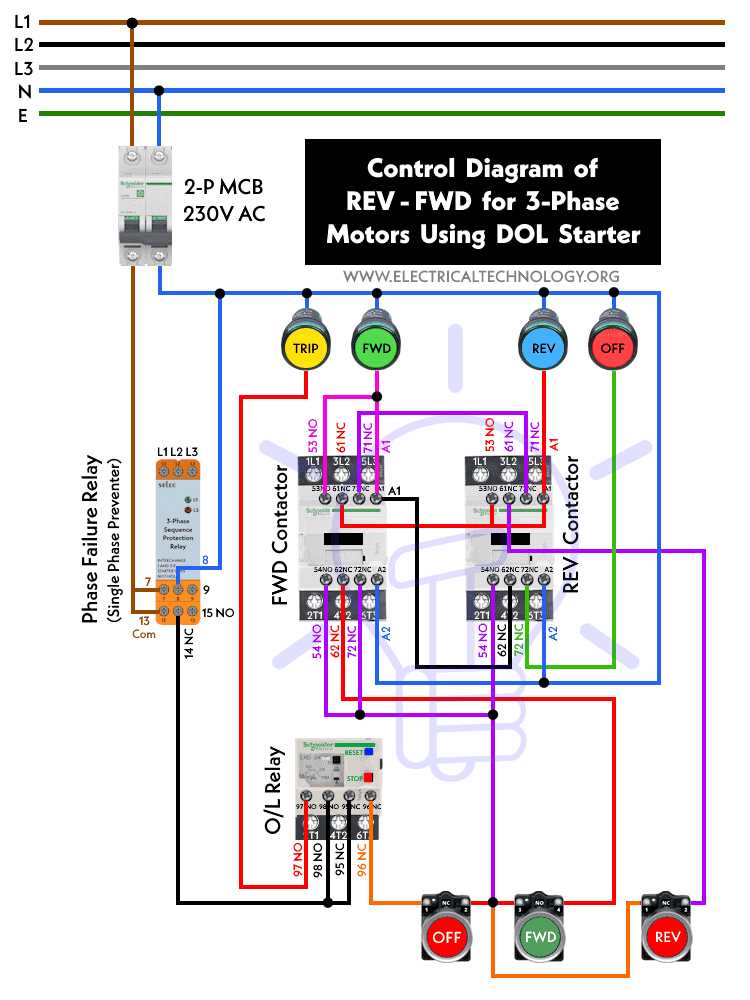
The first step in the process is to locate the terminals responsible for the direction. These are often labeled clearly on the motor housing or in the motor’s manual. In most cases, there will be a pair of terminals that control the forward and backward rotation. These are typically the two that must be swapped.
- Terminal 1: Power input, usually connected to the line voltage.
- Terminal 2: Ground or neutral connection, often tied to the motor frame.
- Terminal 3: Signal or control input responsible for direction change.
Making the Adjustment
Once you’ve identified the terminals that need to be swapped, disconnect any existing connections carefully. Swap the positions of the two terminals that control the rotational direction, then reattach the wiring securely. Double-check that each wire is connected properly to its respective terminal to avoid electrical faults.
After the wiring has been modified, it’s time to check that everything is securely connected. Use a multimeter to test the resistance of each wire, ensuring there are no shorts or interruptions. A common issue during this process is the accidental disconnection or misplacement of wires.
Once you’re sure the motor is wired correctly, power it up and observe the direction of rotation. It should change immediately when the wires are swapped. If the unit doesn’t rotate as expected, recheck the connections to ensure the terminals were swapped correctly.
If the motor doesn’t respond, you may need to verify whether the wiring is correct, or if there’s an issue with the power supply. Make sure the motor is receiving the correct voltage and the wiring is intact. If problems persist, inspecting the control panel for any issues with the circuit may be necessary.
How to Identify and Connect the Correct Wires for Reversal
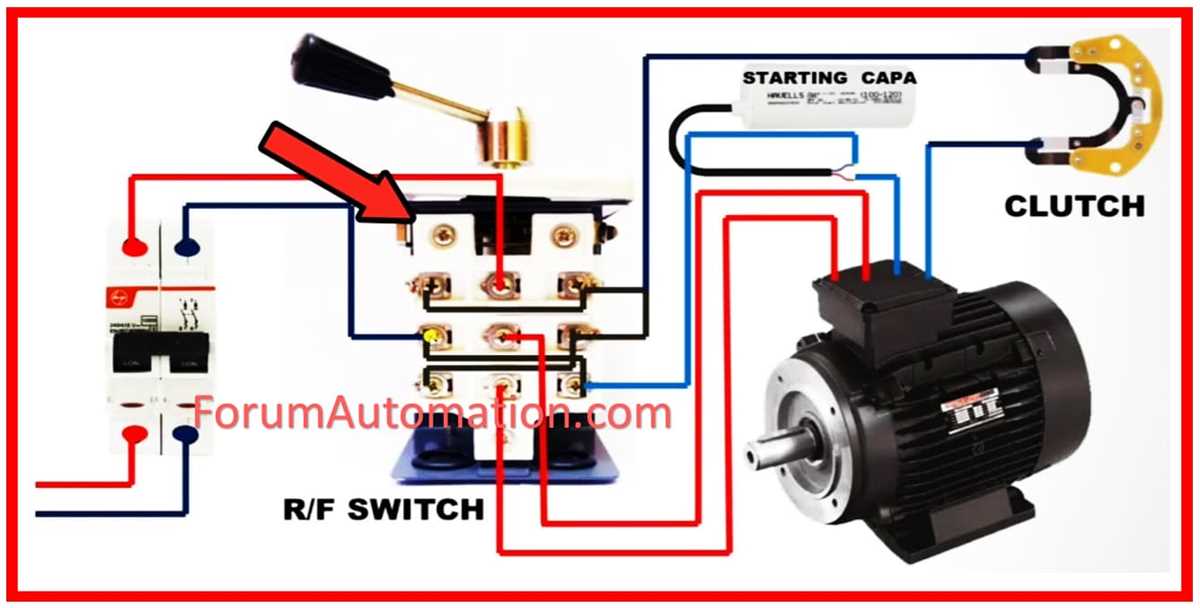
To properly connect the correct wires for a change in direction, first locate the two terminals responsible for controlling the rotation. These are typically marked on the unit or indicated in the user manual. The terminals will usually correspond to the power input and the direction control, which are vital for adjusting the flow of current. Identify the terminals connected to the stator winding, as they need to be swapped to reverse the motion. Mark each wire for easy reattachment, especially when working with a multiple-wire configuration.
Steps to Ensure Correct Connections
Once identified, remove the current connections and swap the two terminals controlling the direction. Reattach the wires securely to their new positions. Check the connections for any signs of damage or wear, as a poor connection can prevent proper operation. After making the changes, test the setup by powering the system on and checking the unit’s rotation. If the motion is as expected, the wires have been correctly swapped. Always double-check the connections before powering on to prevent electrical hazards.