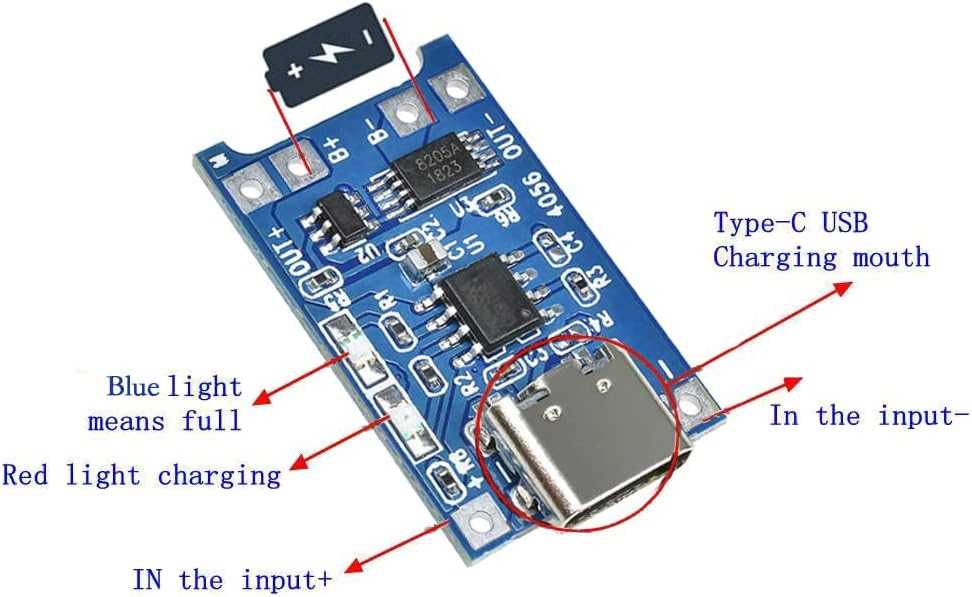
Connect a single 3.7-volt lithium cell to the BAT+ and BAT− pads of the small linear charge controller board while feeding 5-volt input through the USB port or VCC pads. This arrangement allows controlled current flow into the cell and prevents over-voltage once the battery reaches about 4.2 volts.
Use the resistor attached to the PROG terminal to define charge current. A resistor value of 1.2 kΩ sets roughly 1 ampere, while 2 kΩ lowers the rate to about 580 mA. Selecting the correct value prevents overheating and protects small lithium cells that cannot tolerate high current.
Observe the two indicator outputs connected to onboard LEDs. One LED lights during the charge process, while the second turns on after the battery voltage reaches the termination threshold. These status outputs allow quick visual confirmation of the battery state.
Include a protection board between the cell and the load if the battery pack lacks built-in safeguards. Such protection boards monitor over-discharge, over-current, and short-circuit conditions, preventing damage to the lithium cell.
Route input power from a stable 5-volt supply capable of delivering at least the programmed current. Weak USB adapters often drop voltage below 4.5 volts, which causes the controller chip to reduce current or stop operation entirely.
TP4056 Charging Module Circuit Diagram Pin Layout and Lithium Battery Connections
Connect the positive terminal of a single 3.7-volt lithium cell to the BAT+ pad and the negative terminal to BAT−. These pads lead directly to the controller chip that manages current flow and stops the process when cell voltage reaches roughly 4.2 V.
Input Power and Main Pads
Supply power through the VCC and GND pads or the onboard Micro-USB port. The input source should provide a stable 5-volt level and enough current for the programmed rate. If the resistor on the PROG terminal is set for 1 ampere, the adapter should deliver slightly more than that to prevent voltage drop.
The PROG terminal defines the current using a single resistor connected between that pad and ground. Typical values include 1.2 kΩ for about 1 A, 2 kΩ for roughly 580 mA, and 3 kΩ for around 400 mA. Lower current settings reduce heat on the board and suit smaller lithium cells.
Status Indicator Outputs
Observe the two status outputs connected to indicator LEDs. One output activates the red LED while the cell receives current. The second output lights the blue or green LED once the voltage threshold is reached and current tapers down to the termination level.
Attach a protection board between the lithium cell and the load when the battery lacks built-in safeguards. The protection board monitors over-discharge below about 2.5 V and interrupts current during short-circuit conditions.
Keep the lithium cell close to the board and use short conductors between the battery pads and the cell terminals. Long leads increase resistance and heat, which can interfere with the controller chip and cause unstable operation.
TP4056 Pin Layout and Function of VCC BAT PROG and Status Output Pins
Feed a regulated 5-volt source into the VCC pad and connect the lithium cell directly to BAT+ and BAT−. These terminals form the main power path on the small linear charger board. The controller chip monitors battery voltage and limits current through an internal transistor so the cell rises gradually toward about 4.2 V before termination.
Configure and monitor operation through the remaining terminals:
- PROG – resistor to ground sets the current level
- STAT1 – output that drives the red indicator during charge
- STAT2 – output that activates the blue or green LED after completion
- GND – common return path for input supply and battery negative
Select the resistor connected to PROG according to cell capacity. A value near 1.2 kΩ produces roughly 1 A, while 2 kΩ drops the current to about 580 mA, which suits smaller lithium cells used in portable electronics.