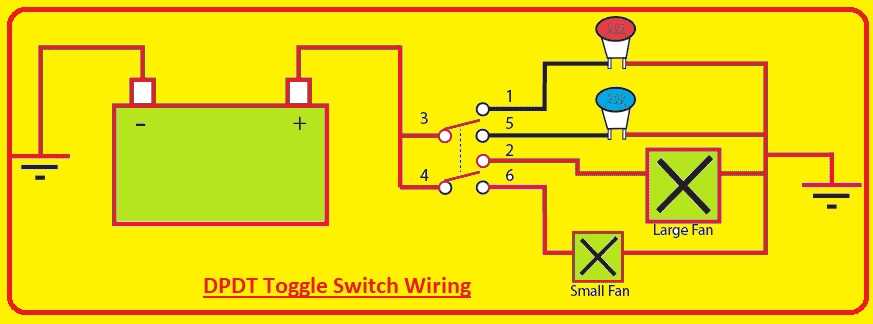
Connect the central contact of the three-terminal lever control to the incoming power line, while the two side contacts route current toward separate load paths. This arrangement allows one position of the actuator to energize the first circuit and the opposite position to energize the second. Before attaching conductors, confirm the voltage rating stamped on the housing, commonly 12 V, 24 V, or 120 V depending on the device type.
Inside the housing, a movable metal bridge links the middle terminal with either side terminal depending on lever position. When the handle shifts left, continuity appears between the center and the left contact; shifting right links the center with the right contact. A multimeter set to continuity mode helps identify the active contacts if markings are missing. Touch one probe to the center pin and move the lever while testing the outer pins.
Use insulated female blade connectors or soldered joints rated for the current expected in the circuit. Small panel-mounted controls often support 3–10 A. For loads above 5 A, copper conductors of at least 0.75 mm² (18 AWG) reduce heating and voltage drop. Secure each lead firmly; loose contacts generate resistance and heat during operation.
Mounting orientation also affects usability. Many technicians place the incoming line on the middle terminal so the lever simply redirects power between two outputs. In lighting panels this allows selection between two lamps; in automotive dashboards it can alternate between accessories such as auxiliary lights and cooling fans.
After completing the connections, test the assembly without load using a low-voltage supply. Move the lever across both positions and confirm that only one output receives power at a time. This quick verification prevents short circuits and ensures the three-contact control unit behaves exactly as intended.
3-Terminal Lever Control Connection Layout
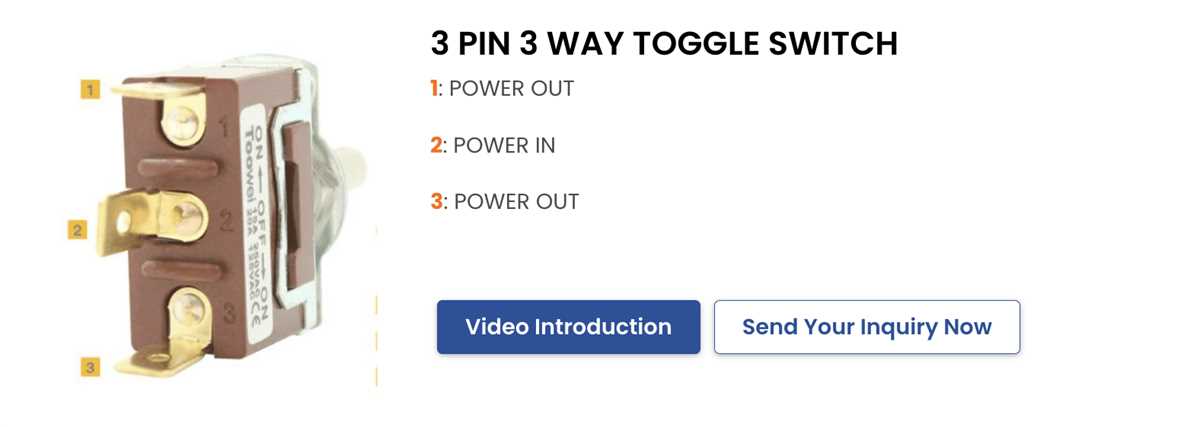
Connect the center contact of the three-terminal lever control to the power feed line; this middle pin usually serves as the common conductor. One outer contact routes current toward the load device, while the remaining outer contact may serve as an alternate output or remain unused depending on the circuit role. Use copper conductors rated for at least 300 V insulation when the control operates within standard residential 120–240 V systems. Secure each lead using crimped spade connectors sized 4.8 mm or 6.3 mm, which fit most miniature lever units.
The middle terminal acts as the transfer point for current. When the lever moves to one side, the common pin links internally to the first side contact; moving it the opposite direction redirects current to the second contact. This behavior allows a single mechanical actuator to direct electrical flow between two paths. Typical applications include small DC motor direction control, auxiliary lighting selection, or power routing between battery sources.
- Center contact – incoming power conductor (often labeled COM).
- Side contact A – output path toward the primary device.
- Side contact B – secondary output or alternate circuit line.
- Ground conductor – connected directly to the device chassis, not the lever component.
For low-voltage circuits (12–24 V DC), stranded copper wire between 18 AWG and 16 AWG maintains reliable current flow up to roughly 10 A. Higher loads require thicker conductors such as 14 AWG. Many panel-mounted lever controls are rated 6 A at 125 V AC or 3 A at 250 V AC; exceeding these values leads to contact overheating. Mount the device through a 6–12 mm panel hole and secure it with the supplied threaded collar to prevent mechanical stress on the terminals.
- Attach the supply conductor to the center terminal.
- Attach the load lead to one outer terminal.
- If dual-path selection is required, attach the second circuit lead to the remaining outer terminal.
- Cover exposed connectors with heat-shrink tubing.
- Test continuity using a multimeter while moving the lever between positions.
This configuration allows a single mechanical actuator with three contacts to route current between two independent electrical paths, forming a compact control solution used in vehicles, control panels, hobby electronics, and battery-powered equipment.
Identifying the Three Terminals on a 3-Terminal Lever Control and Their Electrical Roles
Locate the common contact first: it is the middle lug on most three-terminal lever controllers and acts as the power entry or exit point. Use a multimeter in continuity mode, place one probe on the center lug, and move the handle between positions. The meter will alternately connect the center lug to one of the two outer lugs, confirming its role as the shared conductor.
The center connection distributes current toward one of two outer contacts depending on lever position. In a simple DC circuit, supply voltage often enters through this middle lug, while the remaining two contacts route power to different loads such as two lamps, two relays, or two motor directions.
The outer lugs serve as selectable paths. When the actuator is moved to one side, the center point links electrically with the left outer contact; when moved to the opposite side, it links with the right outer contact. No direct connection exists between the two outer contacts unless the design specifically includes a bridging mechanism, which standard single-pole double-throw lever units do not.
Visual inspection helps confirm identification. Manufacturers frequently place the center lug slightly offset or aligned differently from the side contacts. Many metal-frame units also stamp a small “COM” marking near the shared terminal, while the selectable outputs may carry labels such as “L1” and “L2”.
Current flow follows a simple route: supply → center terminal → selected outer terminal → load. With a 12 V system powering two indicator lamps, the middle lug receives the positive feed, one side lug connects to lamp A, and the opposite lug connects to lamp B. Moving the lever changes which lamp receives voltage.
Testing before installation avoids misidentification. Set a digital tester to resistance mode, touch one probe to the middle contact, then probe each outer contact while moving the lever. The reading will drop near 0 Ω on the active path and remain open on the inactive path. This method works for both miniature panel units and larger 15–20 A rated hardware.
Orientation can vary between manufacturers. Some mount the common lug at the bottom when viewed from the rear, while others place it centrally in a triangular arrangement. Because of that variation, relying on position alone may lead to incorrect connection, especially with imported hardware that lacks clear markings.
In AC mains control panels the same structure appears, though rated for higher voltage such as 120 V or 250 V. The shared terminal receives the phase conductor, while each side terminal routes it toward separate circuits or control inputs. Correct identification prevents cross-feeding and reduces risk of unintended energizing of equipment.