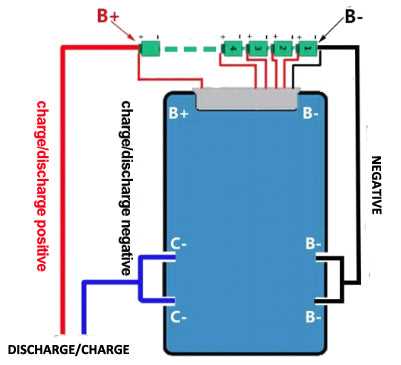
Connect the positive and negative terminals of the first cell directly to the designated input points on the protection board to ensure accurate monitoring and safety. Use wires rated for at least 5A to handle peak current without overheating.
Install a jumper wire between the midpoint of the two cells and the balancing input on the board to maintain equal charge distribution. Verify that the connections are tight and free from corrosion to prevent voltage drops or false readings.
Ensure the load output terminals are connected using short, thick conductors to reduce resistance and maintain stable current flow. Polarity must be checked twice before powering on to avoid permanent damage to the protection components.
Place a small ceramic capacitor (0.1µF–1µF) across the power input pins to filter voltage spikes and smooth transient fluctuations. This step improves response time for overcharge and overdischarge detection circuits.
Secure all connections with heat shrink tubing or insulated clips to prevent accidental shorts and provide mechanical stability during vibrations or movement of the battery pack.
Test the board with a low-current source first to confirm proper activation of protection features. Monitor the voltage levels at each cell and at the output terminals before applying full load to ensure the setup operates correctly.
Document each connection point and label the wires for future maintenance or troubleshooting. Clear labeling prevents miswiring during replacements or upgrades, maintaining the reliability of the two-cell power configuration.
2s Connection Setup and Component Guide
Start by connecting the positive terminal of the first cell to the board’s main input and the negative terminal of the second cell to the corresponding output point. Ensure tight connections to prevent voltage drops and overheating during high current draws.
Use the midpoint connection between the two cells for balancing input. This wire must be short and well-insulated to allow accurate monitoring of individual cell voltage differences and maintain uniform charge levels.
Install a protection resistor or fuse inline with the main input to safeguard against overcurrent situations. Choose a resistor with a power rating above the expected maximum load to avoid thermal damage.
Attach a small ceramic capacitor (0.1µF–1µF) across input terminals to suppress voltage spikes and provide a smoother response from the monitoring components.
Ensure the output load terminals are connected using thick wires with minimal length to reduce resistance. Proper polarity verification at this stage prevents permanent damage to the sensing and switching elements.
Secure all connections using heat shrink tubing or insulated clips to prevent shorts and maintain mechanical stability during vibration or movement of the battery assembly.
Test the assembly with a low-current source first to confirm proper function of overcharge and overdischarge detection. Measure each cell individually to verify accurate readings before applying full load.
Label each wire and document all connection points to simplify future maintenance, replacement, or upgrades. Clear labeling reduces the risk of miswiring, ensuring reliable operation of the two-cell setup over time.
Understanding Pin Functions for a 2s Battery Management System
Connect the main positive input pin to the first cell’s positive terminal and the main negative pin to the second cell’s negative terminal. This ensures the system receives correct overall voltage and allows proper current flow for charging and discharging operations.
The midpoint monitoring pin must link between the two cells. This connection tracks individual cell voltages, preventing overcharge and undercharge conditions, and helps maintain balance across both cells during operation.
Output load pins should be wired with cables rated for peak current. Confirm correct polarity to avoid reversing current, which could damage both the monitoring module and the battery pack, and keep wiring lengths short to minimize voltage drops.
Signal pins for overvoltage and undervoltage alerts require proper connections to indicators or control devices. These pins provide real-time status and can trigger LEDs or external relays when thresholds are exceeded, protecting the cells from harm.
If present, temperature sensor pins must connect to thermistors near the cells. Proper thermal monitoring allows the module to reduce or stop charging when temperatures rise above safe limits, preventing thermal stress or cell damage.
Short-circuit protection pins may need current-limiting components. Ensure resistors or fuses are installed according to the manufacturer’s ratings so the system reacts quickly under fault conditions without permanent damage.
Verify each pin individually before full system assembly. Measure voltage across the midpoint pin, test load pins under small current, and confirm signal pins activate indicators correctly to ensure reliable operation under all conditions.
Label all connections and maintain a wiring record. Clear documentation reduces errors during maintenance, replacement, or future upgrades, and ensures safe, repeatable assembly for long-term use.