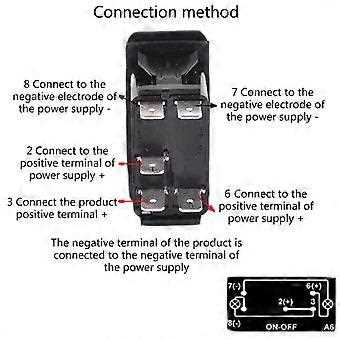
Identify the five terminals on the control unit before connecting any conductors. Most models include a power input, load output, ground terminal, and two contacts dedicated to the internal indicator lamp. Terminal markings often appear as numbers or small symbols molded into the housing.
The incoming supply usually connects to the center terminal of the contact assembly. When the actuator moves to the ON position, internal contacts bridge this input to the load terminal, sending current to the accessory. This layout allows a single control unit to handle lighting bars, fans, pumps, or auxiliary electronics.
Indicator illumination requires a separate ground path. One contact of the built-in lamp attaches to chassis ground while the other connects to the switched output. Once the accessory receives power, the lamp lights up and signals that the circuit is active.
Correct conductor size prevents overheating. A 12-volt accessory drawing 15 amps should use 14-gauge copper leads, while higher loads such as compressors may require 12-gauge. Matching fuse rating with conductor gauge protects both the control device and the connected equipment.
Mount the control unit in a panel opening sized according to the manufacturer template. Tight placement keeps the housing stable when the actuator is pressed. Secure connections and proper terminal identification reduce risk of short circuits and indicator malfunction.
Wiring Diagram for 5 Pin Rocker Switch With LED Indicator and Power Connections
Connect the incoming 12V supply to the common terminal located at the center contact of the control unit. This point feeds internal contacts that distribute power to the accessory when the actuator moves to the ON position. Use a fused line placed within 20–30 cm of the battery or main distribution block.
The load terminal sends current to the device being controlled. When the actuator tilts forward, internal metal contacts bridge the supply input and the output contact. This allows the accessory to receive full system voltage without routing current through separate relays in small installations.
Typical terminal roles inside a five-contact control unit
- Power input from battery or distribution block
- Output lead feeding the accessory
- Ground return for internal LED
- Indicator positive tied to output contact
- Illumination feed connected to dash light circuit
The LED inside the housing normally operates with two dedicated contacts. One receives ground from the chassis while the other attaches to the output line. Once the accessory receives power, current flows through the indicator and the lamp lights up.
Ground connection must attach to bare metal on the vehicle frame. Paint or corrosion between the terminal and metal surface increases resistance and can prevent the indicator lamp from operating.
Recommended conductor sizes for 12-volt accessories
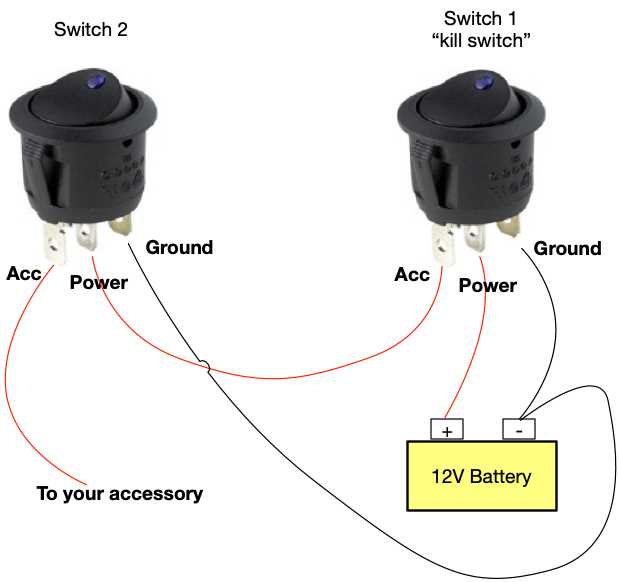
- 16 AWG copper for loads up to 10 amps
- 14 AWG copper for loads around 15 amps
- 12 AWG copper for loads near 20 amps
After completing all connections, test the control unit using a multimeter. With the actuator OFF, the output contact should read zero volts. Moving it to ON should deliver the same voltage measured at the supply lead, confirming proper internal contact engagement and indicator operation.
Identifying Power Input Load Output and LED Terminals on a 5 Pin Rocker Switch
Inspect the markings molded into the plastic housing before attaching any conductors. Many control units include small numbers or symbols near each blade connector. These markings indicate the supply input, accessory output, ground return, and the two contacts serving the internal indicator lamp.
The supply input usually sits on the center blade. This terminal receives 12-volt power from the battery or fused distribution block. When the actuator moves to the ON position, an internal contact links this input to the accessory output terminal.
The accessory output terminal sends current to the device being controlled. Examples include auxiliary lamps, air compressors, cooling fans, or interior electronics. This contact carries the full load current, so the conductor size must match the accessory demand.
Common terminal arrangement
Typical five-terminal layout often follows this structure:
Center blade – incoming power supply
Upper blade – accessory output
Lower blade – chassis ground
Side blade – indicator positive feed
Remaining blade – illumination input
The internal LED requires a ground return to operate. The dedicated ground blade connects to a clean metal point on the vehicle body. If the surface has paint or corrosion, the indicator lamp may remain dark even while the accessory works normally.
Some units include two lighting functions. One LED lights only when the accessory receives power, while another connects to dashboard illumination so the actuator symbol glows when the vehicle lights turn on.
Verify terminal roles using a multimeter before installation. Measure continuity between blades while moving the actuator between OFF and ON positions. The test reveals which contacts join together during operation and confirms the correct path for supply and accessory output.