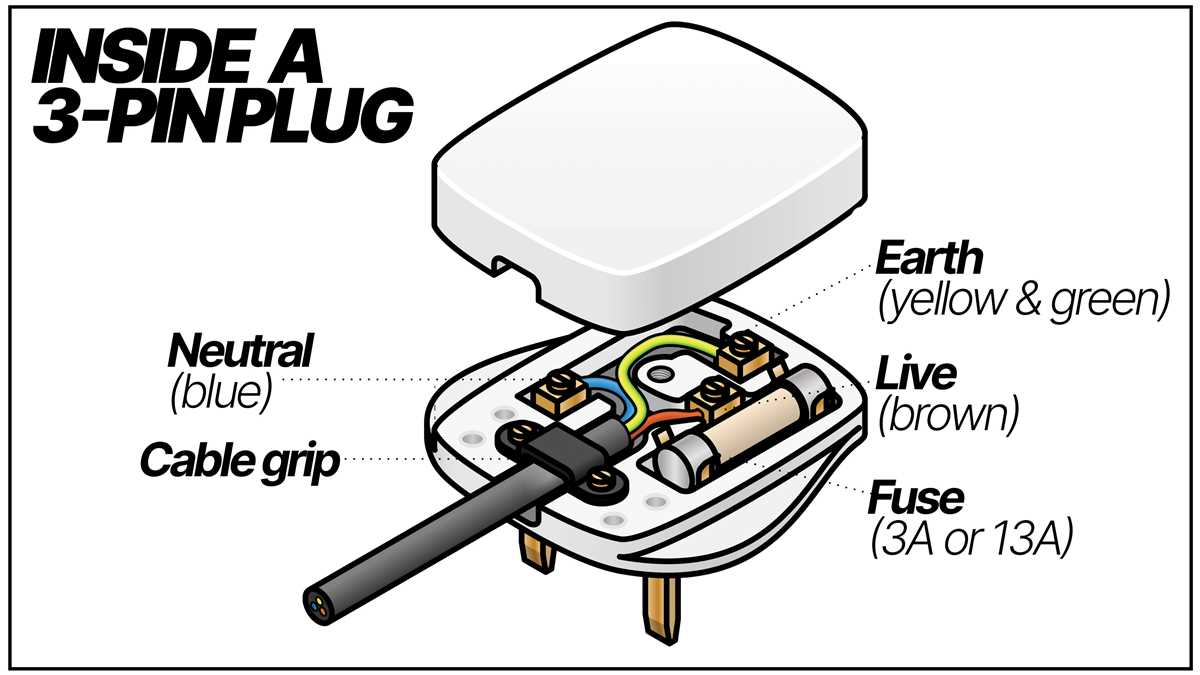
When dealing with household electrical connections, the proper setup of connectors is crucial for safety. For devices that require a reliable power connection, understanding how to correctly wire an electrical connector is key. The correct method of attaching wires ensures functionality and reduces risks like short circuits or electrical hazards.
Start by identifying the three crucial connections: live, neutral, and earth. Each has a designated position inside the connector, and it is important that each wire is securely attached to the correct terminal. The live wire carries current from the power supply, the neutral wire provides a return path, and the earth wire is a safety feature that prevents shocks.
Ensure that the insulation on each wire is stripped carefully, exposing just enough to make a good connection without leaving exposed wire. Additionally, double-check that the connections are tight, as loose wires can lead to overheating or sparks. If you’re unsure about the process, always use a tester to verify that the connector is wired correctly before using it.
Three Pin Plug Wiring Guide
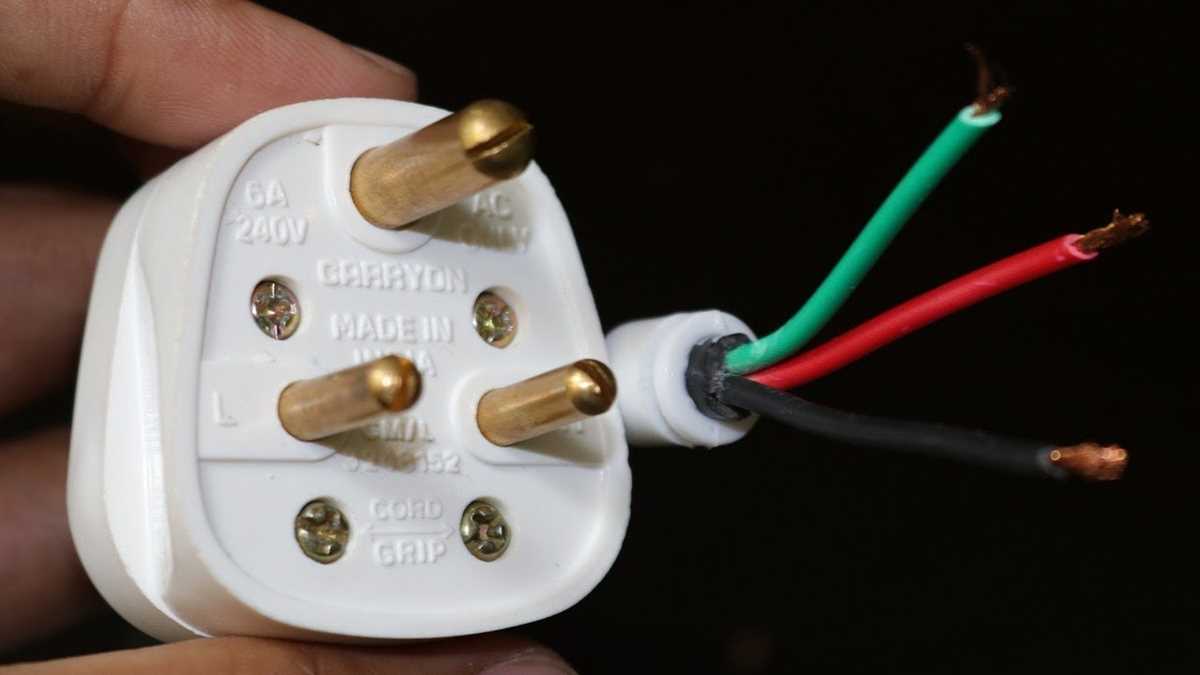
For safe and reliable connections, begin by identifying the terminals: live, neutral, and earth. The live terminal usually connects to the brown wire, the neutral terminal to the blue wire, and the earth terminal to the green/yellow wire. Make sure each wire is securely attached to its respective terminal to prevent accidents.
Before connecting the wires, ensure they are stripped to expose enough copper without damaging the insulation. It is crucial to remove just the right amount of insulation from each wire, so the connection is firm but the rest of the wire remains insulated. This will help in maintaining safety and functionality.
Once the wires are correctly stripped, insert them into the respective terminals. Make sure the wires are tightly secured under the terminal screws. Loose connections can lead to overheating or arcing, which can cause fires or electrical shock hazards. Tighten the screws securely, but avoid overtightening, which could damage the wire or the terminal itself.
The earth wire is an important safety feature, preventing electrical shocks. It should always be the longest wire, ensuring it connects first, before the live or neutral. This way, in the event of an internal fault, the earth wire will be the first to make contact with the ground, preventing the user from experiencing electric shock.
When assembling the outer casing of the connector, ensure that the cord grip is properly tightened. The cord grip holds the cable in place and prevents any stress on the internal wiring. A loose grip could result in the wires pulling out from their terminals, causing the connector to malfunction.
Double-check the connections before closing the cover. Ensure that there are no exposed wires that could potentially touch other metal parts or create a short circuit. A thorough inspection helps in avoiding common mistakes, such as incorrectly attached wires or damage to the connector’s internal components.
After completing the assembly, it is recommended to test the setup with a voltage tester or plug it into a working outlet. This will confirm that the connection is secure and that the power flows correctly. If any issues arise, revisit the assembly process to ensure all connections are properly made and there are no exposed wires.
Understanding the Components of a Three Pin Plug
The primary components of a standard electrical connector include the outer casing, internal terminals, and the pins themselves. Each part serves a critical function in ensuring safe and efficient power transmission. Understanding each component’s role will help you with assembly, troubleshooting, and ensuring proper functionality.
The outer casing, usually made from durable plastic, protects the internal connections from environmental factors such as moisture, dust, or physical damage. It also acts as a safety feature, preventing direct contact with live terminals. When assembling, ensure that the casing is properly fitted and secured to prevent exposure to the internal wiring.
Live, Neutral, and Earth Terminals
Inside the casing, you’ll find the terminals, each assigned to specific wires. The live terminal is typically marked with the letter “L” and handles the current flow to the device. The neutral terminal, marked “N,” provides the return path for the current. Lastly, the earth terminal, marked with an earth symbol or “E,” is essential for safety. It connects to the grounding wire, which protects against electrical shock in case of a fault.
Each terminal has a specific purpose, and proper connections are crucial. The live wire should never be connected to the neutral or earth terminals, as this can cause short circuits or even pose a fire risk. Double-check your connections before closing the casing to avoid accidental miswiring.
Internal Pins and Cord Grip
The internal metal pins are responsible for making contact with the socket to deliver power to the device. These are typically made of brass or copper for good conductivity. When wiring the plug, ensure that each wire is securely attached to its respective pin to prevent arcing or loose connections.
The cord grip, located at the base of the casing, holds the cable in place and prevents strain on the internal connections. It is important that the grip is tight enough to prevent the cable from being pulled out accidentally, but not so tight that it damages the wires inside the cable. A loose grip could lead to wire movement, causing internal shorts or connection failure.
The casing and terminals should be checked for any signs of wear or damage before use. Over time, plastic may crack or become brittle, especially if exposed to excessive heat or sunlight. Likewise, internal components such as terminals can become corroded or loose, which may result in unreliable or unsafe operation.
Finally, always ensure that the components are compatible with the power rating and application requirements. Using a plug with the wrong specifications can lead to overheating, malfunction, or even electrical fires. Check the manufacturer’s instructions to ensure all parts match the device’s power needs and voltage requirements.