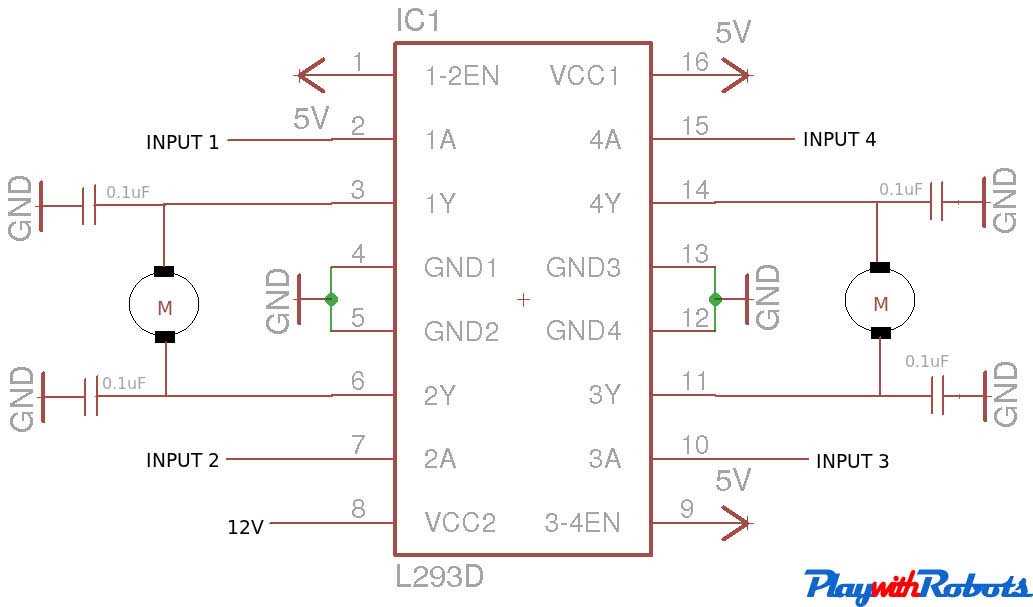
Connect the input pins directly to a microcontroller to manage the rotation direction and speed of two DC motors. Ensure the enable pins receive a stable high signal to activate the H-bridge channels.
Use separate power sources for logic and motors to prevent voltage drops and overheating. A 5V supply is recommended for control logic, while the motors can handle up to 12V depending on specifications.
Include decoupling capacitors near the power terminals to reduce voltage spikes during rapid direction changes. Capacitors of 100nF to 470µF are suitable for typical small motor setups.
Verify pin connections before powering the module to avoid short circuits. Align the output terminals with the motor leads correctly, matching polarity for expected rotation behavior.
Test with low voltages first and gradually increase to operational levels. This prevents damage to both the driver chip and the motors while confirming correct wiring and control logic.
Motor Driver Connections for Control Projects
Connect the input pins directly to the microcontroller to control each motor independently. Use digital outputs to set high or low states, which determine the rotation direction.
Enable pins must receive a constant high voltage for the H-bridge channels to function. Without this, motors will not respond to input signals, even if other connections are correct.
Power management is critical:
- Use 5V for the logic section to match most microcontrollers.
- Supply 6–12V to the motor terminals based on their voltage rating.
- Include a decoupling capacitor near power inputs to reduce voltage spikes.
Match the output terminals to the motor leads with proper polarity. Incorrect wiring can reverse rotation or create a short, damaging both the driver module and the motor.
For dual motor setups, assign one set of inputs to motor A and another to motor B. This allows simultaneous control and independent direction changes, enabling differential drive in small robots.
Test initial configurations with low voltage and limited current. Gradually increase to operational levels to confirm wiring accuracy and prevent thermal damage. Monitoring heat on the chip can indicate proper or improper load handling.
Wiring the Quad Driver for Single and Dual Motor Setups
For a single motor setup, connect one pair of input pins to a microcontroller or switch. Attach the corresponding output terminals to the motor, ensuring correct polarity for expected rotation. Keep the enable pin high to activate the channel.
Use a separate power source for the motor to prevent voltage drops affecting the logic section. A 5V supply is suitable for the control pins, while the motor voltage can range from 6V to 12V depending on specifications.
Dual Motor Configuration
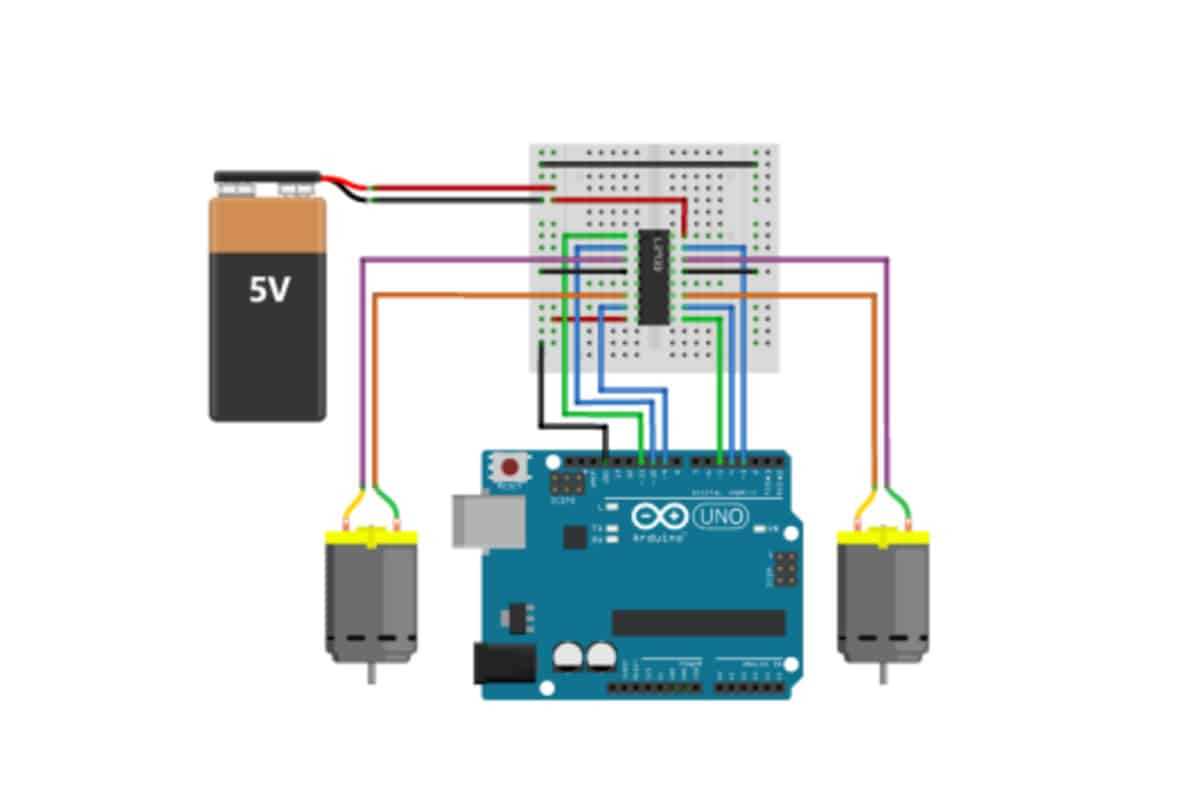
Assign one set of inputs and outputs to motor A and the second set to motor B. Control each pair independently using microcontroller pins. Maintain enable pins high for both channels to allow simultaneous or differential movement.
Include decoupling capacitors near the power terminals to reduce voltage spikes when both motors start or reverse rapidly. Capacitors of 100nF to 470µF are recommended for small DC motors.
Testing and Safety
Test connections at low voltage first and gradually increase to the operational level. Verify rotation directions and monitor the driver chip for overheating to prevent damage to both the module and the motors.