Match each lead from the stereo harness to the correct vehicle conductor using the manufacturer color pattern. The constant power line is usually yellow and connects directly to the battery feed. The switched ignition lead is red and activates the receiver only when the key is turned. The ground path is black and must attach to a bare metal point on the chassis.
Identify speaker pairs before making any connection. Each audio channel uses two conductors: a solid color for positive and the same color with a black stripe for negative. Typical mapping includes white and white with black stripe for the front left speaker, gray and gray with black stripe for the front right speaker, green and green with black stripe for the rear left speaker, and purple and purple with black stripe for the rear right speaker.
Connect auxiliary control leads only if the vehicle supports those features. The blue with white stripe lead activates an external amplifier or power antenna. The orange with white stripe lead links to dashboard illumination so the display dims when headlights turn on.
Protect all joints with crimp connectors or solder followed by heat-shrink tubing. Loose splices create voltage drops that lead to distorted sound or random power loss while driving.
Verify each connection using a multimeter before inserting the stereo into the dashboard slot. Measure constant battery voltage on the yellow lead, ignition-controlled voltage on the red lead, and confirm that the black conductor shows continuity with the vehicle body.
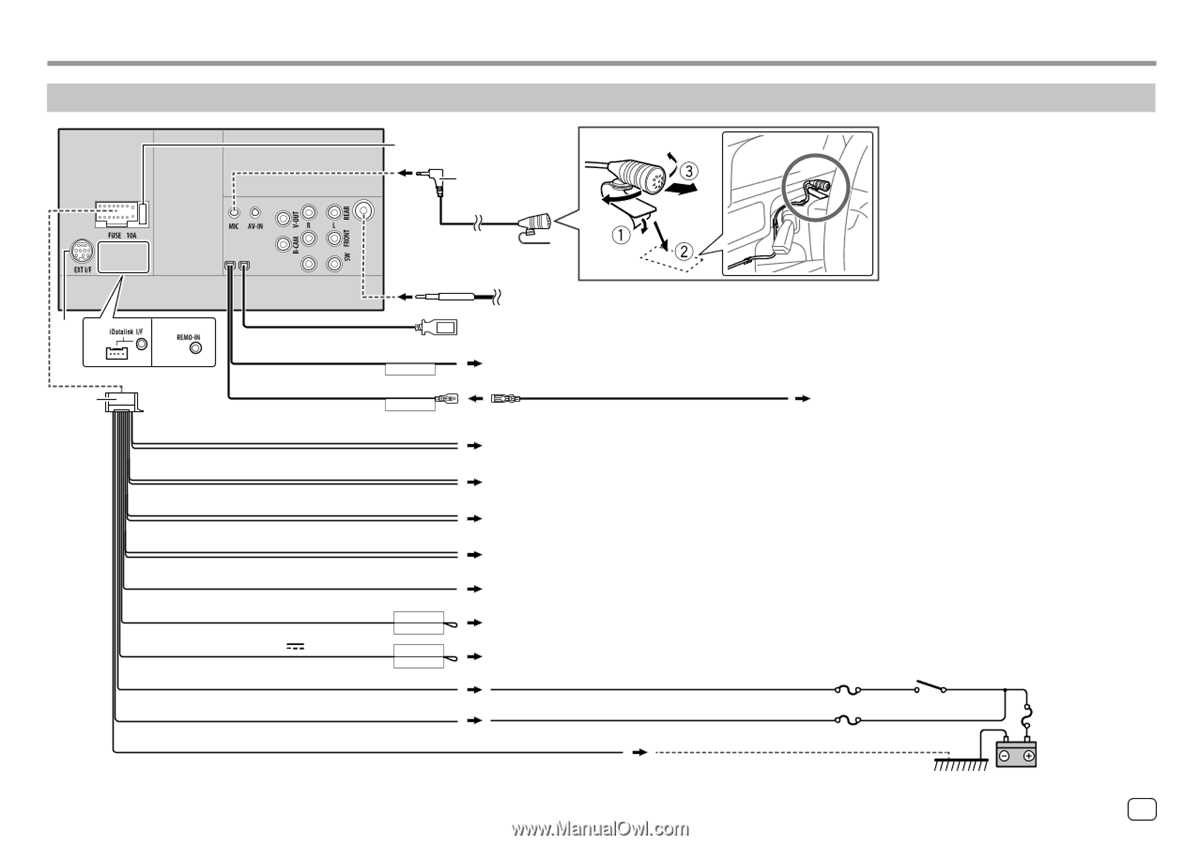
JVC Wiring Diagram Car Stereo Harness Color Codes and Speaker Connections
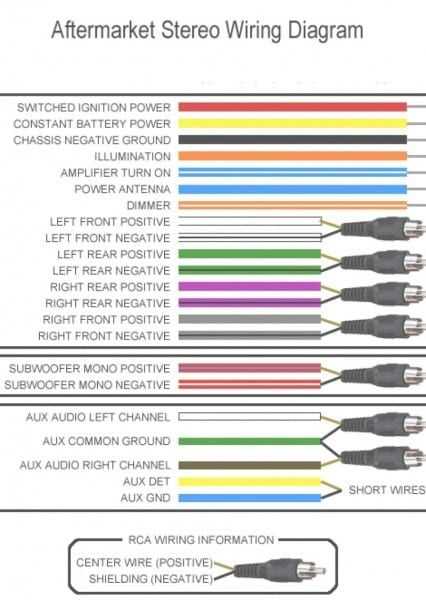
Connect the stereo harness using the standard color mapping supplied with the head unit. The yellow conductor links to the constant battery supply, while the red lead attaches to the ignition-switched power source. The black lead must secure to a clean metal point on the vehicle chassis to provide a stable ground path.
Attach speaker pairs according to the color pattern used in the audio harness. Each channel includes a solid color for positive and the same tone with a black stripe for negative. White and white with black stripe serve the front left speaker, gray and gray with black stripe feed the front right speaker, green and green with black stripe operate the rear left channel, and purple and purple with black stripe handle the rear right channel. Maintain correct polarity across all speakers to avoid phase cancellation and weak bass output.
Secure all connections using crimp sleeves or solder joints covered with heat-shrink tubing. Route the harness behind the dashboard so it does not press against sharp metal edges or HVAC ducts. Verify voltage on the battery and ignition leads with a multimeter before powering the head unit.
JVC Harness Color Codes for Battery Ignition Ground and Illumination Leads
Connect the constant power lead from the stereo harness directly to the vehicle battery supply line. This conductor is typically yellow and must carry uninterrupted 12-volt power so the head unit retains clock settings, radio presets, and internal memory.
Attach the ignition-switched lead to a fuse panel terminal that becomes live only when the key turns to ACC or ON. This conductor is usually red. The stereo powers up only when the vehicle ignition circuit supplies voltage.
Secure the ground conductor firmly to the chassis.
The grounding lead is normally black. Fasten it to bare metal behind the dashboard using a bolt or self-tapping screw. Remove paint around the contact area so electrical continuity reaches the vehicle body structure.
Link the illumination lead to the dashboard lighting system if dimming control is required. The conductor commonly uses an orange with white stripe color pattern and allows the display brightness to change when headlights activate.
Typical power and control lead identification:
- Yellow – constant battery supply
- Red – ignition switched power
- Black – chassis ground
- Orange with white stripe – dashboard illumination signal
Route these conductors away from sharp metal brackets and heater ducts behind the dashboard. Use cable ties every 10–15 cm to hold the harness in place and prevent movement while driving.
Verify voltage levels using a multimeter before inserting the stereo unit into the mounting sleeve. Battery supply should show roughly 12 volts at all times, while the ignition lead should show voltage only when the key is turned.