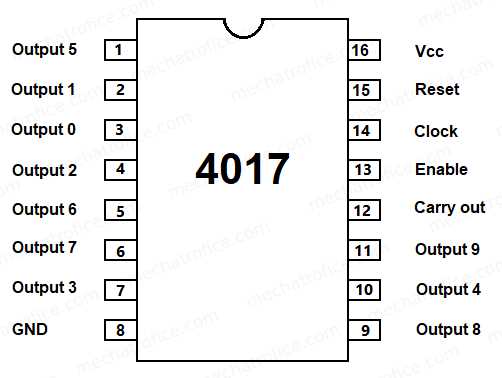
The IC 4017 is a popular decade counter IC that can be used in a wide variety of projects, particularly in creating sequential logic circuits. When using this chip, you can easily generate time delays or divide the frequency of a clock signal. This integrated circuit can be connected in various ways depending on your requirements, whether it’s for creating a basic counting mechanism or driving LEDs in a sequential pattern.
To set up the chip correctly, begin by wiring the pins according to the desired configuration. Make sure to connect the clock input to the pulse generator or oscillator, and use the output pins to capture the divided clock signal. The IC features 10 output pins that produce a high signal in a sequential manner, which is perfect for tasks like running a 7-segment display or controlling lights in a timed pattern.
It’s important to remember that while the 4017 can easily handle various voltages, always double-check the voltage ratings to prevent overheating or failure. Ensure the connections are solid, especially for the reset pin, which will allow you to start the counting sequence over again if necessary.
Building a Basic Decade Counter with IC 4017
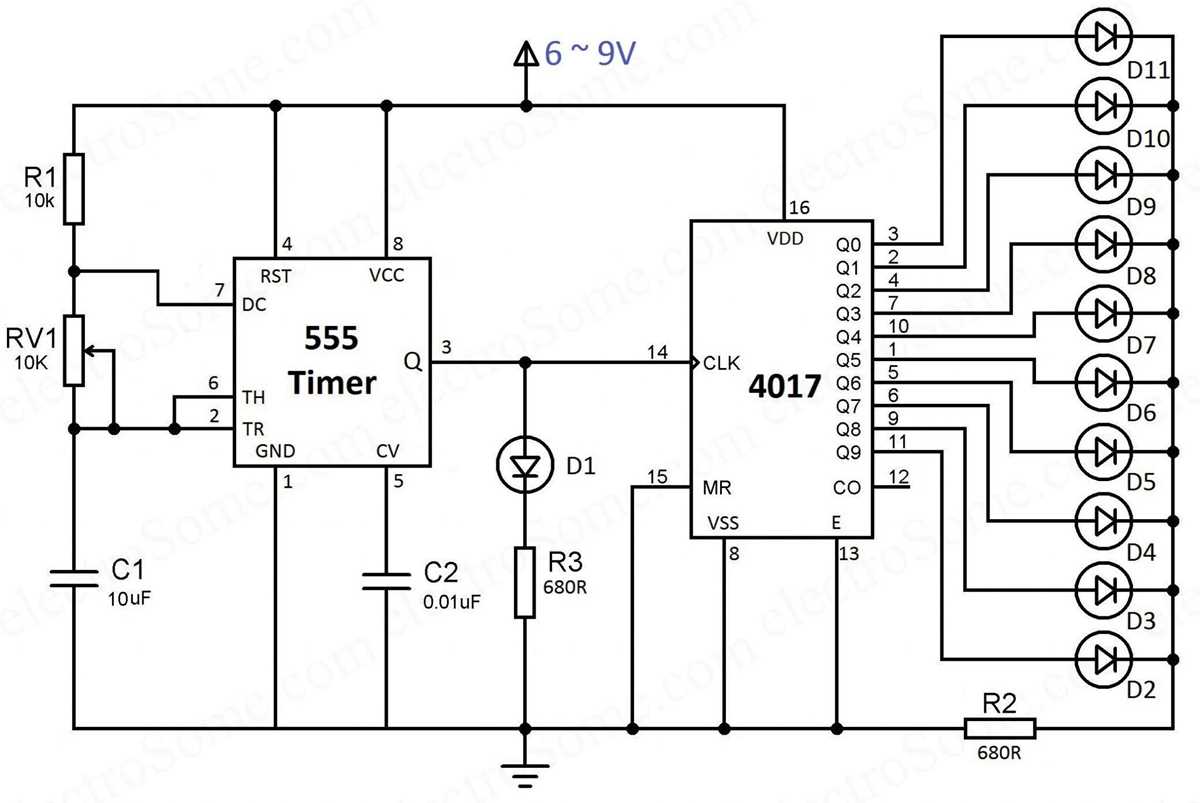
To create a simple counting mechanism, connect the clock pin to a pulse generator and link the reset pin to reset the sequence. Each time a clock pulse is received, the output pin increments, turning high sequentially from Q0 to Q9. This setup can be used for basic applications like controlling LEDs or running a 7-segment display in a countdown sequence.
Pin Configuration Overview
The IC features 16 pins, with key pins being:
- Pin 14 (Clock input): Connect this pin to your pulse generator to trigger the counting sequence.
- Pin 15 (Reset input): This pin is used to reset the counter, sending it back to zero.
- Pin 3 (Q0 output): The first output in the sequence, producing a high signal on the first count.
- Pin 10 (Q9 output): The last output in the sequence, indicating the 10th count.
Example Application for LED Control
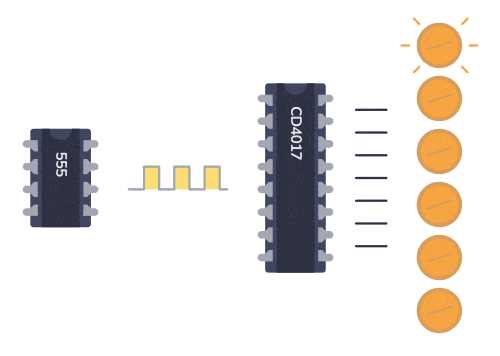
A simple application could be driving LEDs sequentially. Connect each output pin to an individual LED, and as the counter increments, each LED will light up in order. When the reset pin is activated, the sequence will restart from the beginning. This setup can be useful in visual display systems or timers.
Ensure that each output pin is connected to a suitable resistor to limit current to the LEDs and prevent damage to the IC. A 330-ohm resistor is typically recommended for each LED. The value can be adjusted based on the LED’s specifications and the desired brightness.
Common Issues and Troubleshooting
One common issue when using this IC is a failure in proper sequencing, which can be caused by an unstable clock input. To avoid this, make sure that the pulse generator is providing a clean signal with sufficient frequency for the counter to function correctly. Additionally, check all connections to ensure that the reset pin and clock input are firmly connected and functioning as expected.
If the IC isn’t producing the expected outputs, verify the voltage levels, as insufficient voltage can cause erratic behavior. The IC typically operates within a 3V to 15V range, but always refer to the datasheet for your specific model to avoid potential issues.
Understanding the Pin Configuration of IC 4017
The IC contains 16 pins, each serving a specific function to ensure proper operation. The first step is to identify the key pins used for input and output operations. The pinout layout typically follows a standard configuration, but always refer to the datasheet for accuracy in your setup.
Important Input Pins
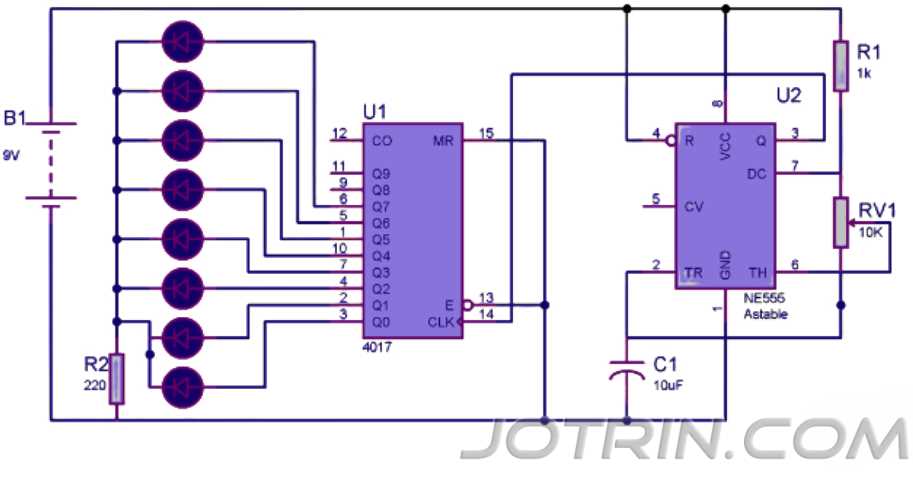
The most important input pins are pin 14 (Clock input) and pin 15 (Reset input). Pin 14 is responsible for receiving the clock pulses that trigger the counting sequence. A clean, stable clock signal is vital for the proper operation of the chip. Pin 15 is the reset input, and it restarts the count from zero when triggered. It can be connected to a manual switch or another logic circuit to control when the sequence should reset.
Output Pins and Their Roles
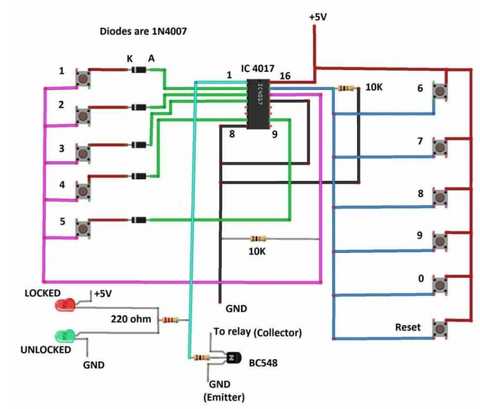
The IC features ten output pins (Q0 to Q9) that provide high signals sequentially, starting from pin 3 (Q0) and moving through pin 11 (Q9). Each of these output pins will go high sequentially with each clock pulse. These are typically used for driving LEDs, relays, or other devices in a timed sequence.
To avoid errors or unwanted behavior, ensure each output pin is connected properly, and consider using current-limiting resistors when driving LEDs to prevent damage to the IC. Each output pin can drive a small load, but if you need to control higher power devices, it’s recommended to use transistors or relays in conjunction with the IC.
It’s also important to understand the ground and power connections: Pin 8 is the ground (GND), and Pin 16 is the positive voltage supply (Vcc). Properly connecting these pins is crucial for the IC to operate within the recommended voltage range, which typically varies from 3V to 15V.
Always check the datasheet for the specific voltage requirements and current limits of the IC. If the supply voltage is too high or low, the IC might malfunction or fail to produce the expected output. Proper handling of these pins ensures that the IC will work efficiently within its design parameters.