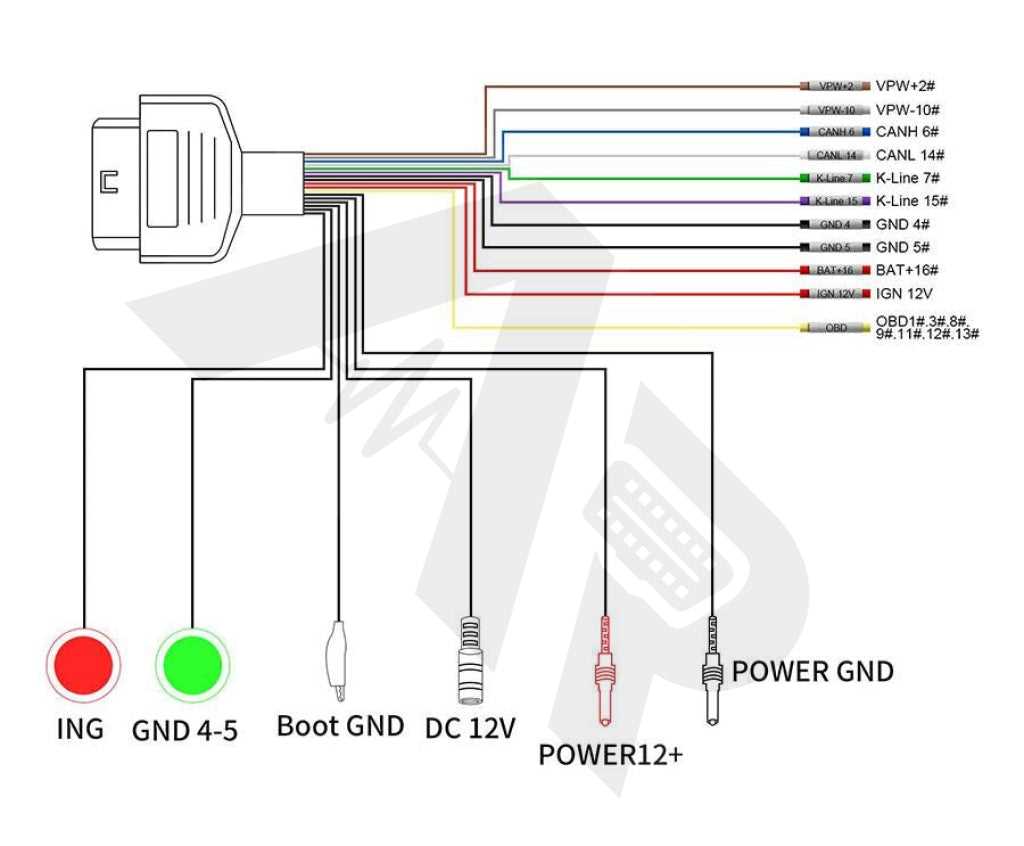
Check the 16-pin vehicle diagnostic port before connecting a scan adapter. Pin 16 normally carries constant battery supply (about 12 V), while pins 4 and 5 serve as chassis and signal ground. Verifying these contacts with a multimeter prevents damage to scanners and Bluetooth readers. A simple voltage check between pin 16 and ground should show stable battery voltage.
Communication lines occupy specific terminals inside the diagnostic socket. Modern vehicles typically use the CAN bus pair on pins 6 (CAN High) and 14 (CAN Low). Older models may route protocols such as ISO 9141 or K-Line through pin 7 and sometimes pin 15. Identifying the conductor shades attached to these contacts helps trace faults, locate broken leads, or confirm that an aftermarket adapter harness is connected to the correct signals.
Manufacturers often assign consistent insulation shades for power, ground, and data lines inside the harness leading to the diagnostic connector. For example, battery supply frequently appears as red, chassis ground as black or brown, and CAN communication as paired green and yellow leads. Checking these visual markers together with the pin numbering layout allows quick verification during retrofit work, scan tool installation, or cable repair.
Color OBD2 Wiring Diagram With Pinout, Wire Colors, and Connector Functions
Identify the 16-pin vehicle diagnostic socket layout before connecting any scan interface. Pin numbering begins at the upper left when looking directly at the port. Battery supply normally appears on pin 16, while ground connections use pins 4 (chassis) and 5 (signal). A multimeter check between pin 16 and either ground contact should show approximately 12–14 V with ignition active. If voltage is absent, inspect the fuse feeding the diagnostic port harness.
Typical terminal layout and functions
- Pin 4 – chassis ground connected to vehicle body
- Pin 5 – signal ground used by diagnostic electronics
- Pin 6 – CAN High data line
- Pin 14 – CAN Low data line
- Pin 7 – K-Line communication used on many older vehicles
- Pin 15 – optional L-Line initialization channel
- Pin 16 – constant battery supply
Harness insulation shades help track these circuits quickly inside the dashboard area. Battery feed often appears as red. Ground conductors are frequently black or brown. CAN communication lines commonly use paired green and yellow insulation. These conventions vary slightly by manufacturer, yet the paired layout for CAN bus is widely maintained because both lines must run together to reduce electrical noise.
Typical insulation shades linked to signal groups
- Power supply – red or red with stripe
- Ground – black or brown
- CAN High – green
- CAN Low – yellow
- K-Line – white, grey, or blue depending on manufacturer
Trace conductors from the diagnostic port back toward the main dashboard harness during troubleshooting. A damaged lead between the port and the vehicle network often blocks communication with scan tools. Measuring resistance between pins 6 and 14 while ignition is off usually returns about 60 ohms, which indicates two 120-ohm termination resistors inside the CAN network.
Check physical connector condition before testing signals. Bent contacts, loose terminals, or aftermarket adapter cables frequently cause intermittent communication failures. Cleaning contacts and confirming that each conductor shade matches the expected terminal layout helps confirm that the diagnostic port harness remains correctly connected to the vehicle data network.
OBD2 connector pin numbers and standard wire color identification
Read the 16-terminal diagnostic port from left to right with the wider side facing upward. The upper row contains pins 1–8, while the lower row carries 9–16. Confirm orientation before testing any circuit; reversing the view often leads to incorrect measurements and misidentified signals.
Check the power circuit first. Terminal 16 normally connects to constant battery voltage supplied through a dedicated fuse. The lead attached to this contact is commonly red or red with a stripe. Measuring voltage between this terminal and ground contacts should produce approximately 12–14 V. If the reading drops to zero, inspect the fuse panel and the harness running beneath the dashboard.
Ground and power contacts
Ground connections usually appear on pins 4 and 5. Terminal 4 links to chassis metal, while terminal 5 supports signal return for control modules. Conductors attached to these contacts frequently use black or brown insulation. Resistance between these pins and the vehicle body should remain close to 0 ohms. Higher values may indicate corrosion or a loose crimp inside the connector shell.
Communication line identification
Data exchange between scan tools and vehicle control units passes through specific contacts. The most common configuration uses the CAN pair on terminals 6 and 14. Harness leads for this pair are often green and yellow. Older systems route diagnostic communication through terminal 7, frequently using a white or grey lead. Some vehicles include terminal 15 as an initialization channel for early ISO communication protocols.
Trace conductor shades from the diagnostic socket back into the dashboard harness during troubleshooting. Matching the insulation tone with the correct terminal number speeds up fault detection. For example, locating the green and yellow twisted pair quickly confirms the presence of the CAN network branch connected to the diagnostic interface.