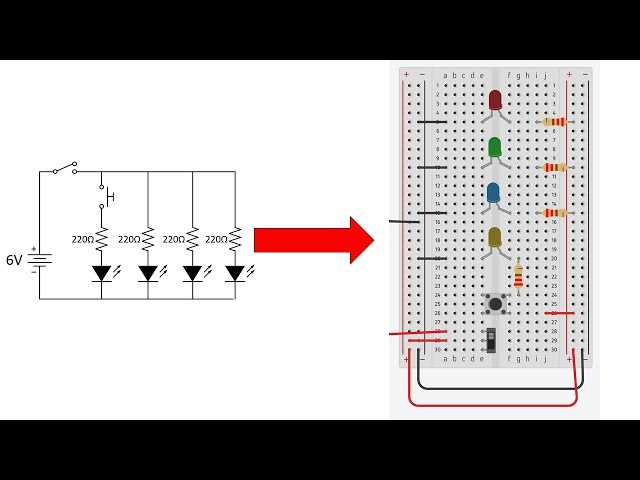
Upload your schematic file to visualize connections for resistors, capacitors, LEDs, and integrated circuits in a prototyping grid. Accurate placement reduces assembly errors and saves time when testing new circuits.
Check component orientation against the reference layout before connecting power rails. Incorrect alignment of polarized components like diodes or electrolytic capacitors can cause short circuits or permanent damage.
Label and color-code each wire in the generated layout to match the schematic’s signals. This simplifies debugging and allows for easy verification of each node, especially in complex arrangements with multiple ICs or sensors.
Simulate signal flow using the generated grid before physical assembly. Observing potential voltage drops and connection paths helps identify conflicts or misrouting that could compromise circuit functionality.
Selecting Reliable Online Conversion Tools
Choose platforms with verified component libraries that include resistors, transistors, LEDs, ICs, and connectors. Ensure the tool supports multiple file formats like PDF, SVG, or proprietary schematic exports to prevent data loss during transformation.
Check the following features before committing to a platform:
- Automatic signal mapping to rows and columns
- Color-coded traces for easier identification
- Support for polarized components with orientation markers
- Exportable layouts for printing or simulation
- User feedback and community ratings for reliability
Test the tool with a small schematic first to confirm accuracy. Compare the generated layout against your original reference, checking all connections, component spacing, and pin assignments before using it for larger or critical projects.
Mapping Components from Schematics to Prototyping Layouts
Place power rails first to establish clear voltage and ground lines. Align positive and negative tracks to match the reference schematic, ensuring consistent polarity across all components before inserting any ICs or passive elements.
Position larger components like microcontrollers, sensors, or voltage regulators centrally. This reduces wire length, minimizes signal interference, and makes it easier to connect smaller parts such as resistors and LEDs around the main modules.
Arranging Passive Components
Lay out resistors, capacitors, and diodes near their corresponding pins on ICs or modules. Maintain clear separation between traces to prevent accidental shorts. Use color-coded jumpers or markers to match the reference sheet for faster troubleshooting.
Verifying Connections
Double-check each link by tracing from the schematic to the prototype grid. Confirm that each pin, node, and junction matches the intended connection. Correct any misaligned or reversed components before powering the assembly to avoid damage.
Document the mapped layout with notes on component values and orientation. Keeping a record helps replicate the setup, simplifies debugging, and provides a reference for future modifications or expansions of the design.
Testing and Verifying Connections After Conversion
Measure voltage at key points before powering the full assembly. Check power rails, IC supply pins, and sensor connections to confirm proper distribution and prevent overloading or reverse polarity issues.
Use a continuity tester to verify all links between components. Identify broken or misaligned connections by tracing each node from the reference layout to the prototype, correcting any interruptions before introducing current.
Functional Checks
Test individual modules such as LEDs, switches, or relays separately. Confirm that each component responds as intended, and validate input and output signals using logic probes or multimeters to detect voltage swings or shorts.
Final Verification
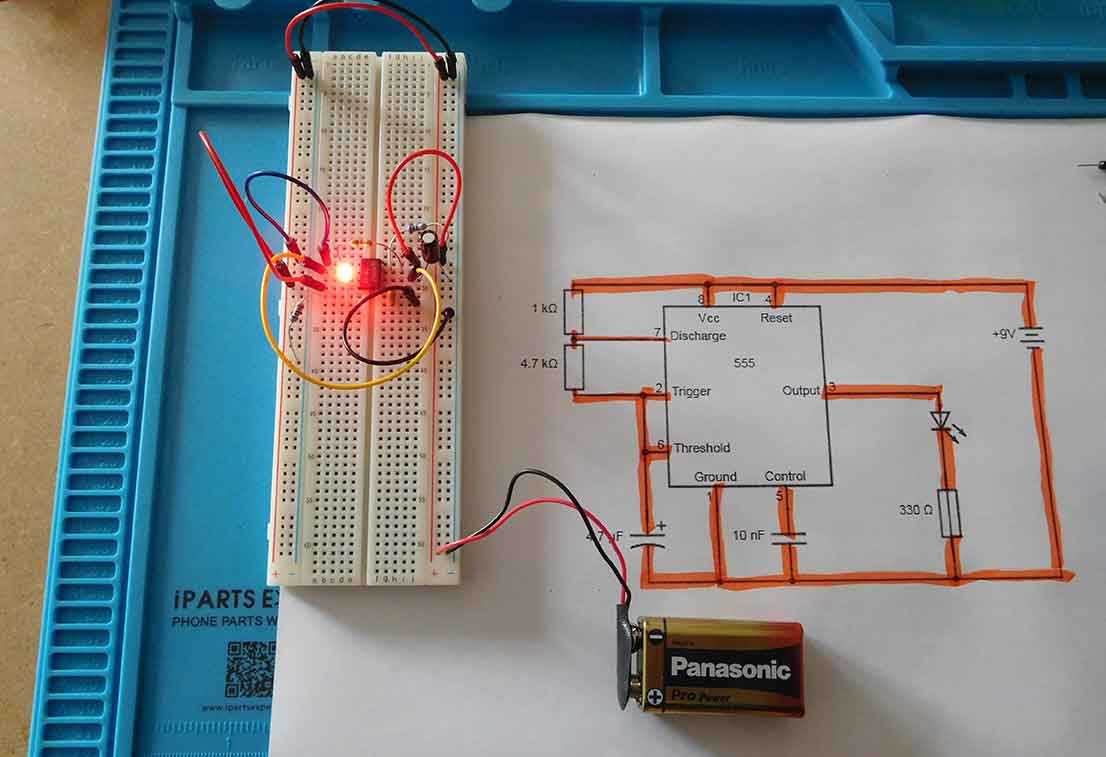
Power the complete assembly briefly and monitor for heating, smoke, or abnormal readings. Check that indicators, displays, and sensors operate correctly. Document any adjustments made to match the reference schematic and prevent future errors.
Record test results including component values, pin connections, and measured voltages. Maintaining a detailed log helps replicate the setup and ensures confidence in the integrity of the assembled prototype for further experimentation or deployment.