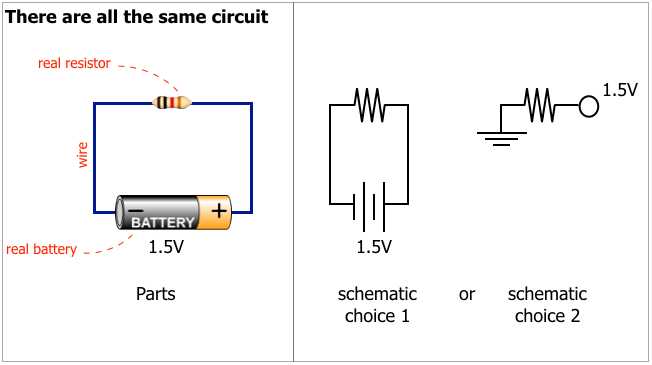
Check polarity marks on the power source before connecting any conductor. A battery, DC supply, or solar module always has two terminals marked with plus and minus. Connect the plus terminal to the input side of the load and route the return line from the device back to the minus terminal. Reversed polarity can damage LEDs, controllers, and semiconductor components within seconds.
Most DC systems use red insulation for the plus conductor and black insulation for the return conductor. This color convention reduces installation mistakes during assembly and maintenance. When tracing connections on a schematic drawing, follow the red path from the power source through switches, resistors, or loads, then track the return path back to the supply reference point.
Voltage values in low-voltage DC installations usually range from 5 V to 24 V for electronics and control equipment, while automotive systems operate near 12 V or 24 V. Cable cross-section must match current demand. For example, a 12 V LED strip drawing 5 A requires at least 1.0 mm² copper conductor to reduce voltage drop across several meters of wiring.
Clear polarity markings in technical drawings show how electrical energy travels from the supply terminal, passes through the load, and returns to the source. Without clear polarity orientation, troubleshooting becomes difficult and measuring voltage with a multimeter often produces confusing readings. Consistent labeling, color coding, and clear line paths prevent miswiring and simplify maintenance tasks.
Positive and Negative Polarity Wiring Diagram for DC Power Connections
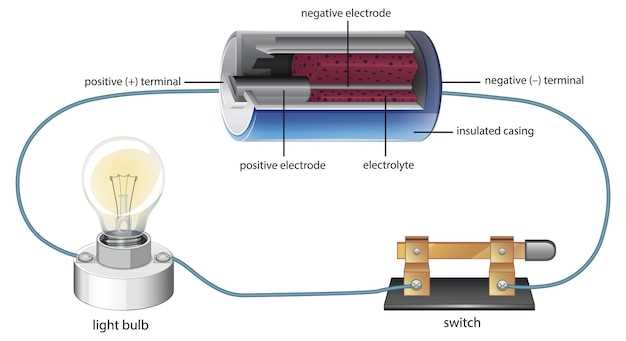
Connect the plus terminal of the power source to the input side of the load and route the return conductor from the device back to the minus terminal. In DC layouts the supply path usually feeds switches, fuses, or controllers before reaching the device, while the return line runs directly back to the source reference point. For example, a 12-volt LED module rated at 2 A should be wired with copper conductors of at least 0.75–1.0 mm². The supply line often uses red insulation and the return path black insulation, allowing quick visual verification during installation and troubleshooting.
- Locate the + mark on the power unit or battery terminal
- Trace the supply line through protection components such as a fuse or switch
- Connect the load input terminal to this supply conductor
- Attach the device return terminal to the − terminal of the source
- Verify polarity using a multimeter before energizing the system
How to Identify Positive and Negative Terminals in DC Wiring Schematics
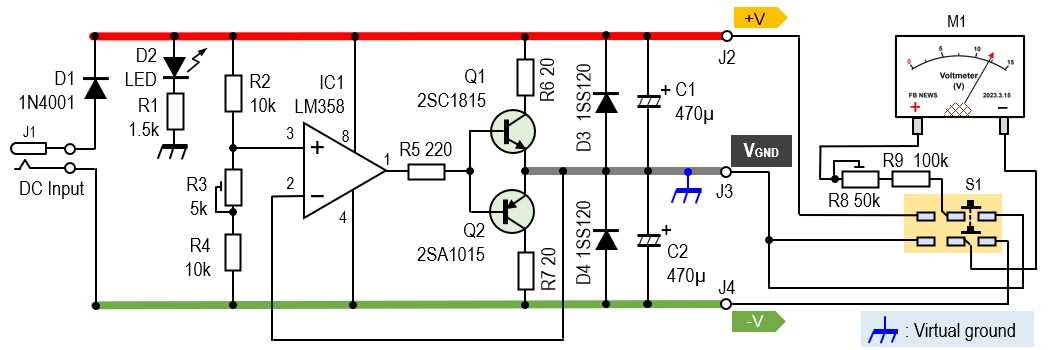
Locate polarity symbols near the power source first. Most DC drawings mark the supply with + and − signs placed beside battery plates, power modules, or terminal blocks. The conductor leaving the + mark carries voltage toward the load, while the line connected to the − mark forms the return path back to the source.
Follow the direction of energy flow across the schematic. In many technical drawings the supply path runs from left to right or from top to bottom. Components such as switches, resistors, LEDs, and controllers are placed along the supply conductor before the return line reconnects to the source reference node.
Use color conventions when the drawing includes conductor labels. Red typically represents the supply line, while black or blue indicates the return conductor. Automotive electrical layouts and small electronics manuals frequently follow this pattern, allowing quick identification of polarity during installation.
Check component polarity markings. Devices such as electrolytic capacitors, LEDs, and diodes include polarity indicators on their symbols. The longer plate on a capacitor symbol represents the supply side, and the arrow orientation in a diode symbol shows the permitted current direction toward the return path.
Verify terminal orientation using measurement tools before connecting hardware. Set a multimeter to DC voltage mode, place the red probe on the suspected supply conductor and the black probe on the return conductor. A positive voltage reading confirms the orientation; a minus sign on the display indicates the probes are reversed.