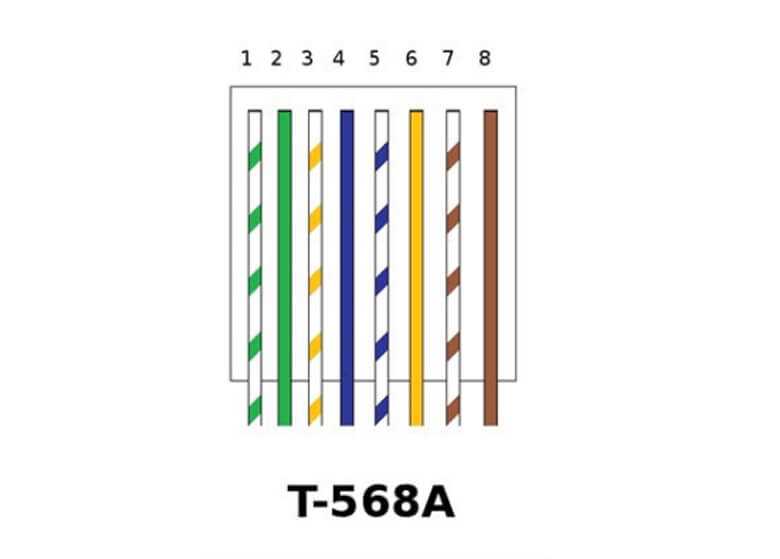
Use T568A or T568B standards to arrange individual conductors when preparing a patch or drop line. Match color sequences exactly to maintain consistent signal flow and prevent cross-talk between pairs.
Trim each strand to a uniform length before inserting into the connector. Even a 1–2 mm difference can cause poor contact and intermittent connectivity issues.
Keep the twisted pairs intact up to the termination point. Untwisting more than half an inch reduces noise rejection and lowers the maximum achievable speed for data transmission.
After crimping, test each line with a continuity tester or network analyzer. Check both pin-to-pin connection and signal integrity to detect reversed pairs, open circuits, or shorts before installing the cable permanently.
Cat5e Ethernet Cable Wiring Diagram
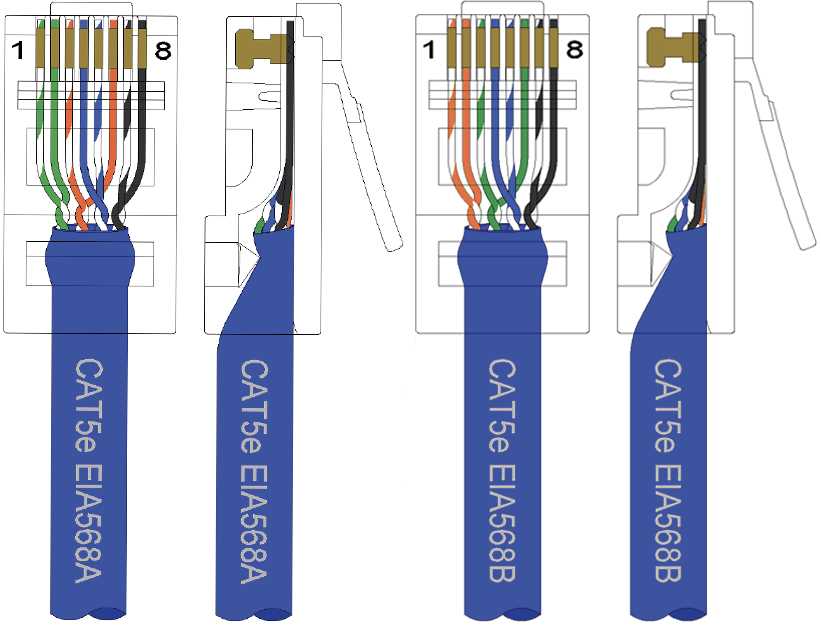
Arrange each conductor according to the chosen T568A or T568B layout. Maintain the exact color sequence from one end to the other to ensure correct signal pairing and prevent data loss.
Trim insulation evenly and insert all strands fully into the modular plug. Incomplete insertion can create intermittent connections and reduce transmission speed, especially over runs longer than 100 meters.
After termination, use a tester to verify continuity and pair alignment. Check for crossed or open connections and confirm the integrity of all eight conductors before routing the line through walls or patch panels.
Pinout Standards T568A and T568B Explained
Follow T568A when connecting lines to telecommunication outlets that require backward compatibility with older installations. Pair 1 starts with white-green and green, followed by white-orange and blue, maintaining consistent color order throughout the run.
Use T568B in corporate or modern network deployments where standardization favors this layout. Pair 2 begins with white-orange and orange, then white-green and blue to align with active networking equipment.
Keep the twist of each conductor pair intact up to the connector tip. Untwisting beyond 0.5 inches can reduce noise rejection and compromise data integrity over long distances.
Both layouts support gigabit transmissions, but mixing standards on opposite ends creates a crossover effect. Label each end clearly to prevent accidental mismatches during installation or testing.
Terminate patch panels and keystone jacks according to the chosen standard. Verify that each conductor reaches its correct pin to avoid signal loss or intermittent connectivity in high-density racks.
Test each segment after installation using a continuity or cable tester. Confirm that all pairs are aligned and no shorts exist, especially when multiple runs converge in network closets.
Document the layout of every run, including the selected standard, length, and termination points. This record simplifies future upgrades or troubleshooting and ensures consistent network performance.
Maintain uniformity across a site by using the same pinout standard for all new drops. Consistency reduces configuration errors and minimizes potential connectivity problems when integrating additional switches or devices.