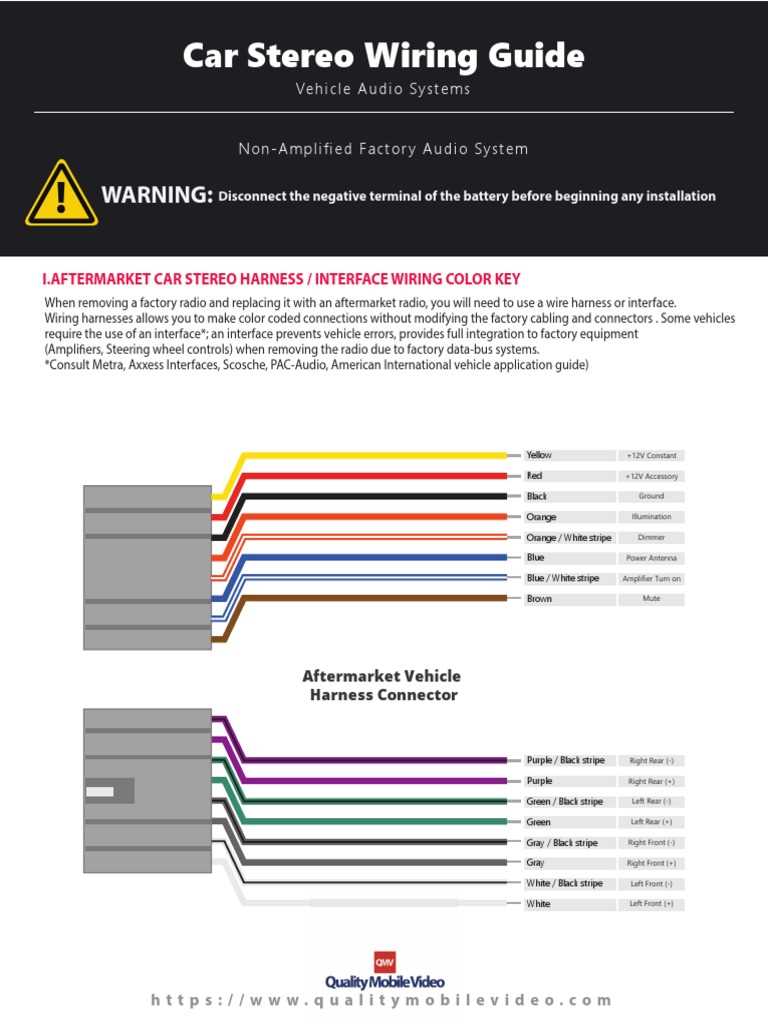
To install a sound system correctly in your vehicle, understanding how to connect the different components is key. Pay attention to the color codes for the wires, as these will guide you through the process and help avoid common mistakes. Each wire has a specific function, such as power, ground, or speaker output. It’s crucial to match these correctly to the corresponding wires on your new head unit. Check the vehicle’s manual for a detailed list of wire colors for your make and model.
Start with identifying the power wire, which supplies the unit with energy. Once connected, the ground wire must be attached to a metal part of the vehicle’s frame to complete the circuit. Ensure that these connections are secure, as loose wires can lead to a malfunction or poor audio performance. After the main power connections are secure, move on to the speaker wires, making sure to connect each speaker’s positive and negative terminals properly to avoid sound issues.
If any of the connections seem unclear, double-check your manual or consult online resources for a specific wiring guide for your car’s system. A multimeter can be helpful in testing connections before finalizing the installation. Taking the time to test everything before securing the unit in place will save you from having to undo and redo steps later.
Car Audio System Installation
Ensure the correct connection of the power and ground cables first. The power cable should be connected to the vehicle’s 12V supply, while the ground cable must be attached to a metal part of the frame to complete the circuit. Double-check that both connections are secure to prevent issues like power failure or static interference in the system.
Next, carefully wire the speakers by matching the positive and negative terminals on both the vehicle and the unit. Incorrect connections can lead to poor sound quality or no sound at all. Always test the system before securing everything in place. If you’re uncertain about any wire, refer to the manufacturer’s guide for your specific unit to ensure a smooth installation.
Understanding the Wiring Color Codes for Car Radios
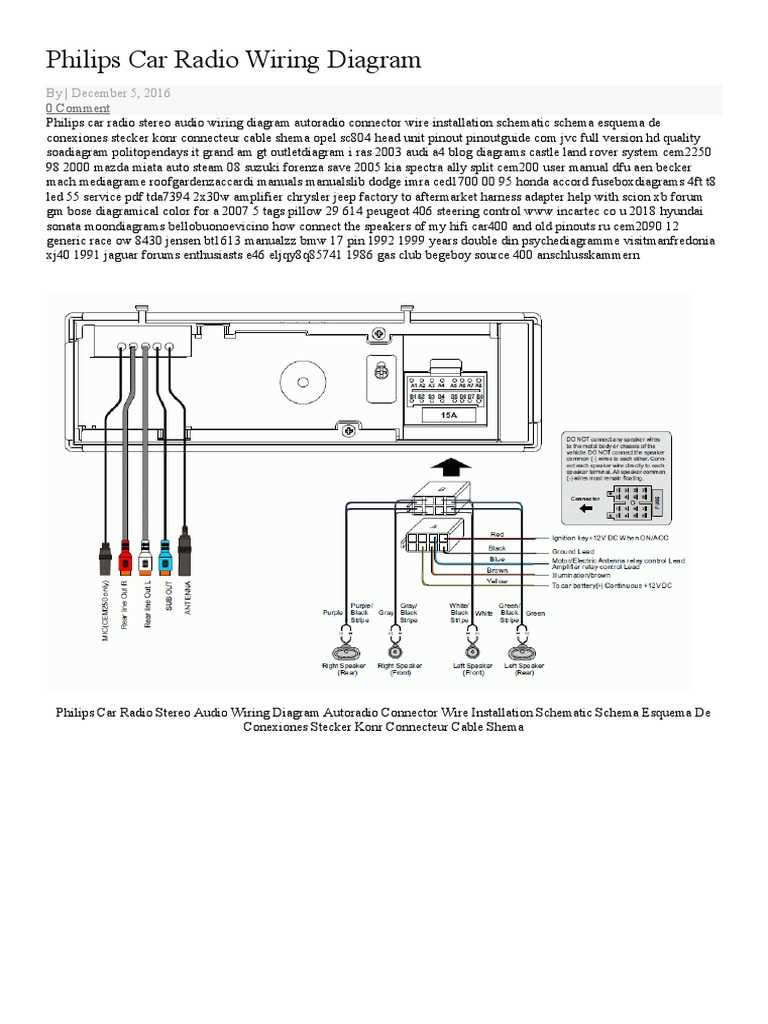
Before starting the installation, it’s crucial to understand the purpose of each wire and its corresponding color code. This will ensure proper connections and prevent any confusion during setup. Most aftermarket audio systems follow a common color-coding standard, but always check the user manual for any specific variations.
The red wire typically indicates the 12V ignition or switched power. This wire is connected to the vehicle’s ignition switch so that the audio unit only turns on when the ignition is in the “on” position. This prevents the system from draining the battery when the engine is off.
The yellow wire usually represents the constant 12V power supply, which maintains the memory of the audio system, including station presets and clock settings. This wire should be connected directly to the battery or a source that has constant power even when the vehicle is off.
Black is almost universally used for the ground wire. It completes the circuit by providing a return path to the vehicle’s chassis. Secure the black wire to a metal part of the vehicle to ensure it is properly grounded, which is crucial for minimizing noise and preventing interference.
Blue or blue/white wires are commonly used for remote turn-on. When the vehicle is powered on, this wire sends a signal to activate an amplifier or other connected accessories. It should be connected to the remote turn-on lead from the amplifier or powered accessory.
Speaker wires typically come in pairs: one for positive (often marked with a stripe or different color) and one for negative (usually black). The most common speaker wire colors are white for the left front speaker, gray for the right front, green for the left rear, and purple for the right rear. Ensure the corresponding positive and negative wires are connected to the correct terminals on both the unit and the speakers.
Finally, it’s important to double-check the connections and wire color codes before powering up the system. Miswiring can cause issues ranging from poor sound quality to complete system failure. If you’re unsure of any connections, consult the manufacturer’s guide for troubleshooting advice.