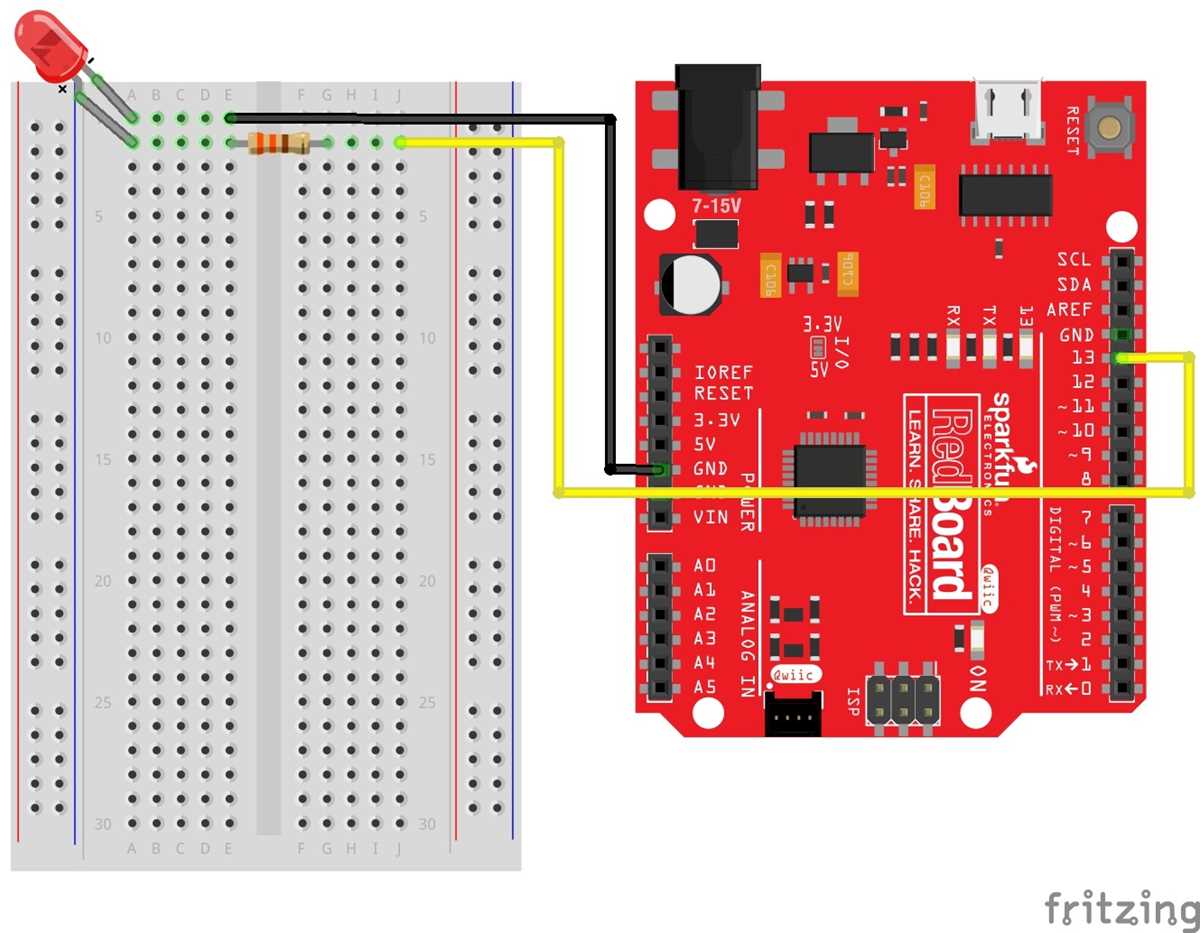
Place each resistor, capacitor, and IC according to the layout plan, ensuring leads enter the correct slots for stable connections. Check polarity on LEDs and electrolytic capacitors to prevent damage during operation.
Use the power rails to distribute voltage evenly across the board. Maintain separation between high and low voltage lines to avoid interference, and keep jumper wires short to reduce resistance and signal loss.
Verify each connection with a multimeter before powering the assembly. Continuity checks help identify misplacements or loose contacts that could cause modules to malfunction or overheat.
Label critical rows and columns for easy reference during testing and modifications. Organized layouts speed up troubleshooting and simplify the process of swapping components without creating shorts or accidental disconnections.
Layout with Step by Step Instructions for Component Connections
Start by identifying the positive and negative rails on the platform. Connect the power supply first to prevent misalignment, and verify polarity on all polarized components such as LEDs and capacitors. Ensure each lead is inserted fully into the slot for stable contact.
Follow this sequence for assembling modules:
- Insert resistors and fixed-value components into their designated rows.
- Place ICs with orientation notch aligned to the marked edge.
- Attach jumper wires to link different rows without crossing high-voltage lines.
- Connect sensors and output devices, checking that ground lines are continuous.
- Double-check all connections before applying power.
After assembly, measure voltage at key points with a multimeter to confirm proper flow. Observe LEDs and displays for correct activation. Label connections for easier adjustments or troubleshooting, and maintain short, tidy wiring to reduce interference and maintain clarity on the layout.
Identifying Power Rails and Connection Points on a Prototyping Platform
Locate the positive and negative rails along the sides of the board. These lines distribute voltage and provide a common reference for all components. Marking them clearly prevents accidental polarity reversals when inserting modules.
Check the continuity of each rail using a multimeter before connecting any power source. Ensure no breaks exist along the line, as gaps can cause voltage drops and inconsistent operation across the layout.
Identify individual rows that serve as connection points for components. Use short jumper wires to link rows to the rails, keeping wire lengths minimal to reduce resistance and avoid tangling.
Color Coding and Polarity Management
Assign red or brown to the positive rail and blue or black to the negative rail. Consistent color coding simplifies troubleshooting and prevents accidental reverse connections on LEDs and polarized capacitors.
Grouping and Organizing Components
Arrange related modules in adjacent rows and connect them to the nearest rail. Maintain spacing between power lines and sensitive signal paths to minimize interference and ensure stable operation for all sensors and ICs.
After all components are placed, perform a final inspection by measuring voltage at multiple points along each rail. Confirm each connection and verify that all grounds link to the common reference. Proper identification of rails and nodes ensures a safe and reliable layout.