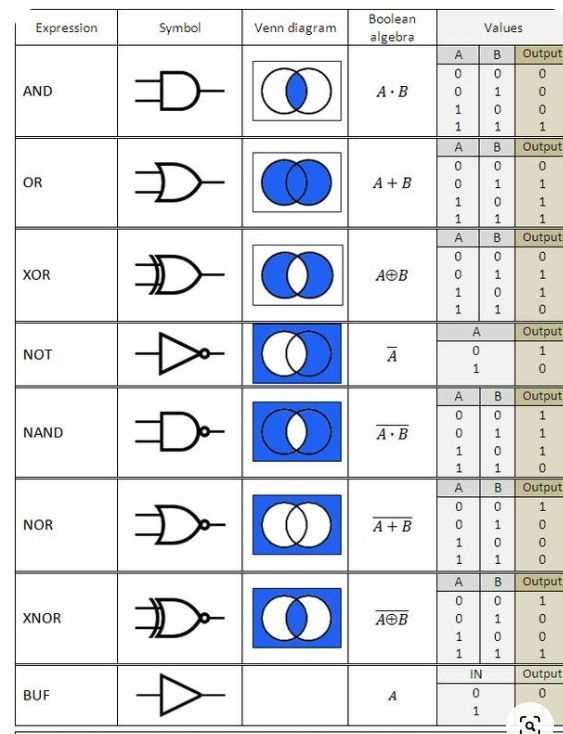
Start by understanding the building blocks of any digital system: gates that perform simple operations. These gates–such as AND, OR, and NOT–are the foundation for more complex circuits. Each gate operates on binary inputs, returning an output based on the specific rule it follows. A solid grasp of these basic components is necessary before you can move to designing practical systems.
When you want to represent these operations graphically, you’ll need to arrange them in a meaningful way. By connecting gates in various configurations, you can create designs that perform specific tasks, from simple tasks like turning on a light to more complex functions like adding numbers in a microprocessor. The arrangement of these elements forms the schematic representation of your system.
After drawing the system, it’s critical to simplify the expressions involved. Simplification helps reduce the number of gates required, saving space and improving efficiency. Use methods like Karnaugh maps or Boolean algebra to minimize the logic. This step is key to making designs that are not only functional but also practical in real-world applications.
Digital Design with Logic Gates
Begin your design by selecting the right gates for the required functionality. The three primary gates–AND, OR, and NOT–form the backbone of most systems. For more advanced operations, you can combine these gates into other types such as NAND, NOR, XOR, and XNOR. Each gate performs a distinct operation based on the input values, which are either 0 or 1.
Building Basic Functions
Start simple. For instance, an AND gate only returns a 1 if all of its inputs are 1. An OR gate returns 1 if at least one input is 1. The NOT gate simply inverts its input. When designing systems, you’ll often start with these basic building blocks to form more complex functions.
Consider a practical example: creating a system to turn on a light when two switches are pressed simultaneously. The AND gate would be the perfect choice here, as it will only output a 1 when both switches are in the “on” position (1). This example demonstrates how combining basic gates allows you to create desired behaviors in digital systems.
Optimizing Gate Count
Efficiency is key. As the complexity of the design increases, you might end up with a large number of gates. To reduce this, apply simplification techniques. Use methods like Karnaugh maps to visually simplify Boolean expressions and reduce the total gate count. This step is crucial for reducing both the space needed for the system and the amount of power it consumes.
- Start by writing out the truth table for the system.
- Identify any patterns or redundancies in the truth table.
- Use Karnaugh maps to minimize the number of terms in the Boolean expression.
After simplification, you’ll likely notice that fewer gates are needed to perform the same function. This not only saves on space but also reduces the overall complexity of the system, making it easier to troubleshoot and maintain.
In more advanced designs, a programmable logic device (PLD) can be used to implement the entire design. PLDs allow you to program the desired function, reducing the need for a large number of discrete gates. This approach is especially useful in large-scale systems or in applications where space and power consumption are critical factors.
How to Draw a Digital System Using AND OR and NOT Gates
Start by identifying the logical relationships in the problem you’re trying to solve. Begin with a truth table that outlines all possible input combinations and their corresponding outputs. This table is a crucial step, as it helps you map out the conditions under which each gate will activate.
Once you have your truth table, you can begin selecting the gates you need. For basic tasks, the AND, OR, and NOT gates are often sufficient. An AND gate will return 1 only when all its inputs are 1, an OR gate will output 1 if at least one input is 1, and the NOT gate inverts its input.
For example, if you need a system where the output is 1 when both switches are turned on, you would use an AND gate. If you need the output to be 1 when either switch is on, an OR gate would be appropriate. The NOT gate can be used to invert the signal, such as turning a “1” into a “0” if needed.
Now that you know which gates to use, draw the gates and connect them according to your truth table. Start by connecting the inputs to the gates, following the logic of the table. The output from each gate will then serve as the input to the next stage of the design. For more complex systems, you may need to cascade gates, connecting the output of one gate to the input of another.
Next, simplify your design. If your design involves multiple gates, check if you can combine or reduce them. Often, you can eliminate unnecessary gates or combine multiple steps into one. This helps in reducing the physical space required for your design and improves performance by reducing the number of operations.
Finally, label the inputs and outputs clearly. For each gate, ensure that you’ve marked its input and output with appropriate variables or labels. This will help you to trace the functionality of your system and identify potential issues during testing or troubleshooting.