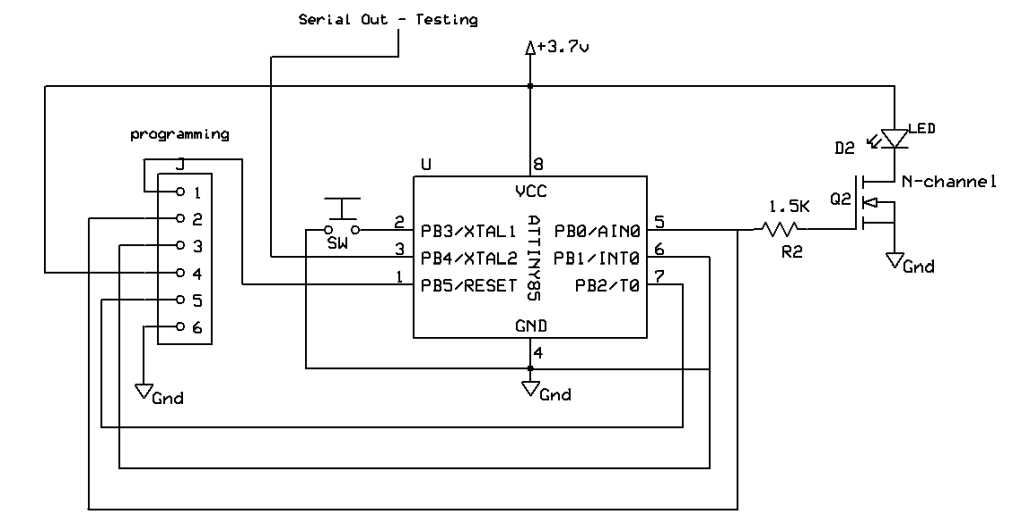
To create a working setup with an Attiny85 microcontroller, start by selecting the right power supply. The chip operates with a voltage range from 2.7V to 5.5V, so ensure your setup falls within these limits for stable operation. A regulated 5V source is most commonly used in small projects to ensure reliability.
Next, focus on the pinout and how components interact with the microcontroller. Properly connect each I/O pin to your sensors, LEDs, or buttons, making sure to respect the voltage and current ratings for each pin. The digital pins on the Attiny85 can handle up to 40mA per pin, but be mindful of overloading the pins, especially when connecting multiple peripherals.
Consider adding passive components like resistors to protect the pins from overvoltage or excessive current. Using capacitors can help filter noise from the power supply, which is crucial for accurate readings and stable performance. If you are designing a more complex system, remember to incorporate decoupling capacitors near the power pins to minimize voltage spikes.
Designing Simple Circuits with the Attiny85 Microcontroller
For basic applications, start by connecting the microcontroller’s VCC and GND pins to your power supply. It’s crucial to select a stable 5V or 3.3V source to ensure proper operation. The VCC pin powers the chip, while the GND pin completes the circuit. This is the foundation for connecting any components to the microcontroller.
Pin Connections and Functions
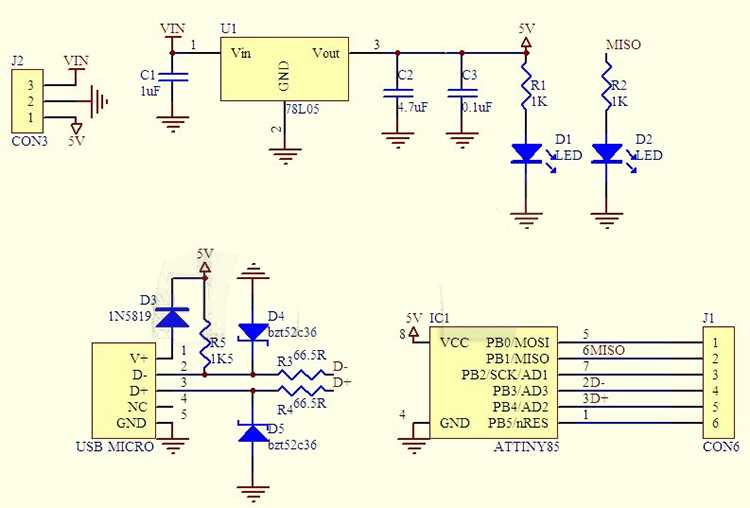
Each I/O pin on the microcontroller serves a specific function. The microcontroller has a total of 8 pins, some of which can be used for digital input/output, while others support analog input or PWM. For example, pins 5 and 6 can be used for analog inputs, while pins 2, 3, and 4 are ideal for digital connections. Carefully mapping out the pinout of the microcontroller ensures that your design operates smoothly and prevents conflicts between components.
For projects involving LEDs, connect the positive leg of the LED to one of the I/O pins and the negative leg to ground through a current-limiting resistor. This prevents damage to the LED and the pin. A 220-ohm resistor is commonly used for this purpose. If you want to control more components, consider using external transistors to prevent overloading the microcontroller’s pins.
Adding Capacitors for Stability
To improve the stability of your setup, add decoupling capacitors across the power supply lines close to the microcontroller. These capacitors filter out noise and voltage spikes that can interfere with the operation of your system. A 100nF ceramic capacitor is a common choice for this purpose and helps to maintain steady voltage levels.
Finally, if you plan to use the microcontroller in battery-operated designs, add a power-saving mode to your program. The microcontroller supports sleep modes that reduce power consumption during idle periods. This can significantly extend the battery life in low-power applications.
How to Connect Components to the Attiny85 for Basic Circuits
To start building basic setups with the microcontroller, first connect the power supply. Use a stable 5V or 3.3V source, ensuring the VCC pin connects to the positive terminal and GND to the ground. This is the foundation for powering the chip and any attached components.
Next, map out the I/O pins. Each pin can either handle digital input/output, analog input, or PWM signals. Digital I/O pins can be used for switches, LEDs, or other binary devices. If using an LED, connect the positive terminal to one of the pins and the negative to ground through a resistor. A 220-ohm resistor is typically sufficient to limit current and prevent damage to the components.
Connecting Sensors and Inputs
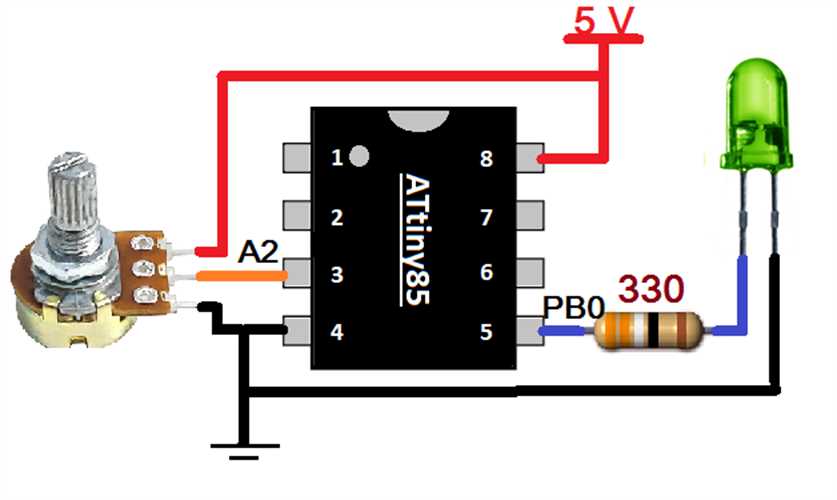
For analog inputs, you can connect a sensor, such as a potentiometer or temperature sensor, to one of the designated analog pins. The sensor’s output should be connected to the input pin, with the power and ground properly linked. For example, if you’re using a light sensor, connect the sensor’s output to one of the analog pins and use the microcontroller to read changes in light intensity.
Digital sensors or switches require similar treatment. For a simple push button, connect one side to the chosen I/O pin and the other side to ground. You may need an external pull-up or pull-down resistor to ensure a stable reading, especially when the switch is open. This keeps the input pin from floating and providing erratic readings.
Using PWM and External Devices
If your setup requires controlling motors or dimming LEDs, you’ll need to use pulse-width modulation (PWM). Some I/O pins support PWM directly, and you can connect the positive terminal of a motor or LED to the pin, with the negative side linked to ground. For larger motors, consider using external transistors to drive the load without overloading the microcontroller.
- For controlling motors: Use a transistor or MOSFET for higher current handling.
- For LEDs: PWM control allows you to adjust brightness smoothly.
When adding more components, always check the current and voltage ratings for the microcontroller’s pins. For high-power devices, like motors or relays, use transistors or MOSFETs to prevent excessive current draw from the microcontroller, ensuring safe and reliable operation.
Lastly, to prevent voltage spikes and ensure stability, add decoupling capacitors close to the power pins. A 100nF capacitor is a typical choice, placed between the VCC and GND pins. This helps filter out noise from the power supply and maintains consistent voltage levels for accurate performance.