Always switch off the main breaker before handling any home power receptacle. Verify the circuit is inactive using a reliable voltage tester to avoid shocks. Never rely on the breaker handle alone.
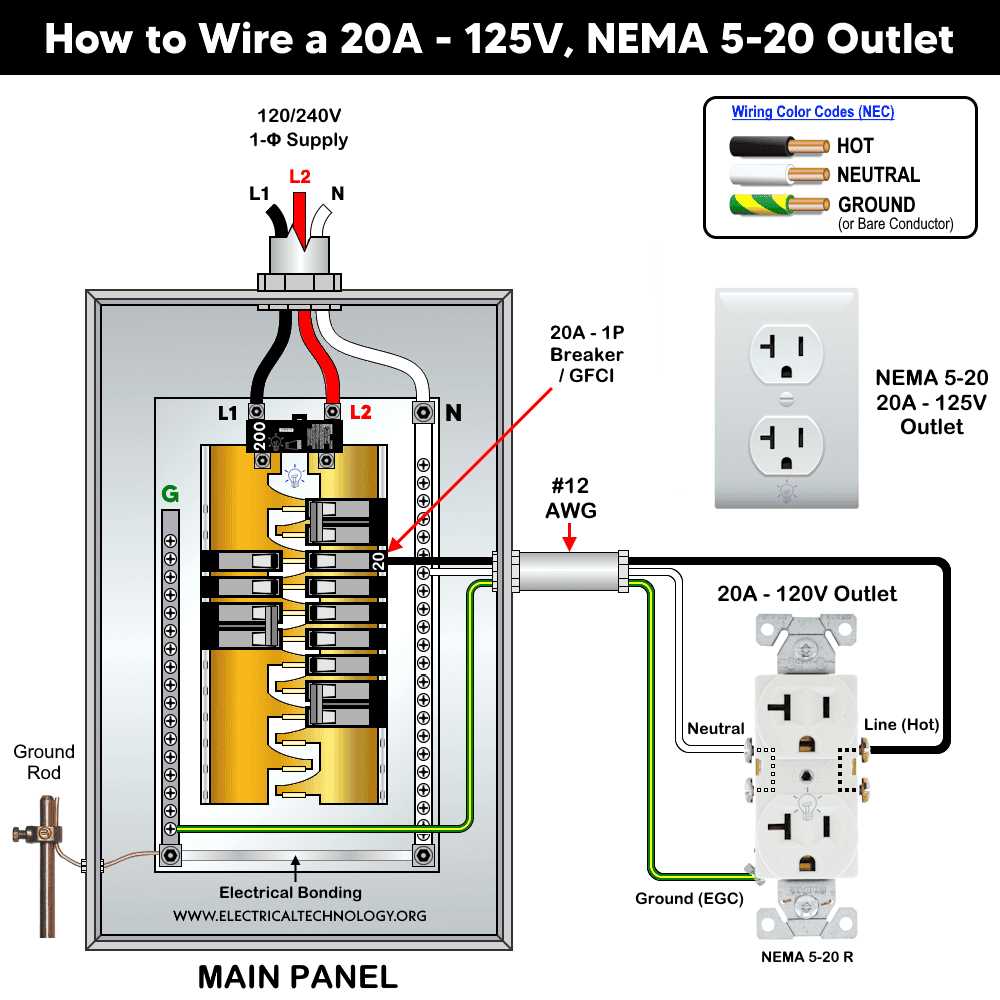
Identify each conductor by color: black or red wires carry live current, white wires are neutral, and green or bare copper wires serve as grounding paths. Correct labeling prevents short circuits and appliance damage.
Use a screwdriver to secure conductors under terminal screws, ensuring no bare wire is exposed. Tight connections reduce resistance and heat buildup, enhancing safety during daily use.
After completing connections, check continuity with a multimeter and confirm grounding integrity. This step prevents electrical faults and ensures devices operate reliably.
Step by Step Electrical Socket Connection
Turn off the main breaker and verify power is off with a non-contact voltage tester before handling any receptacle. Safety checks prevent serious injury.
Separate the conductors carefully. Identify live, neutral, and grounding wires by their insulation color. Black or red indicates live, white is neutral, and green or bare copper serves as the ground. Correct identification avoids short circuits.
Loosen the terminal screws on the socket and insert the stripped wire ends fully under each screw. Ensure no copper is exposed outside the terminal clamp. Tighten screws firmly but avoid over-torquing which can damage the metal.
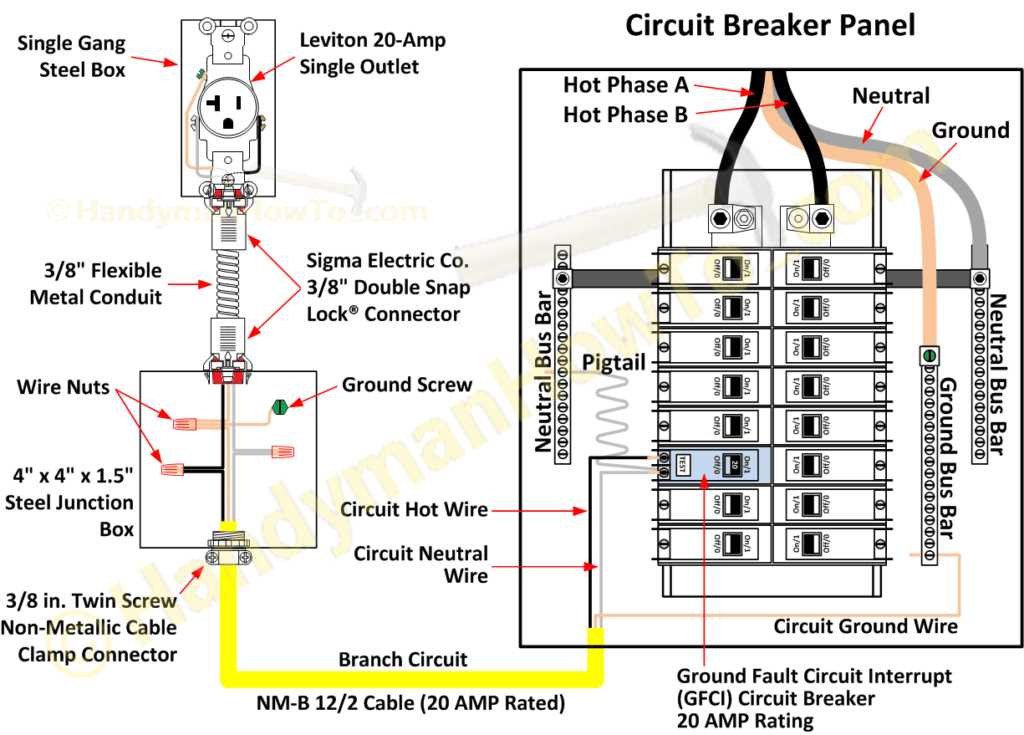
For multi-socket setups, connect additional receptacles in parallel using pig-tail connections. Join conductors with wire nuts and wrap connections with electrical tape to maintain insulation integrity.
Testing and Verification
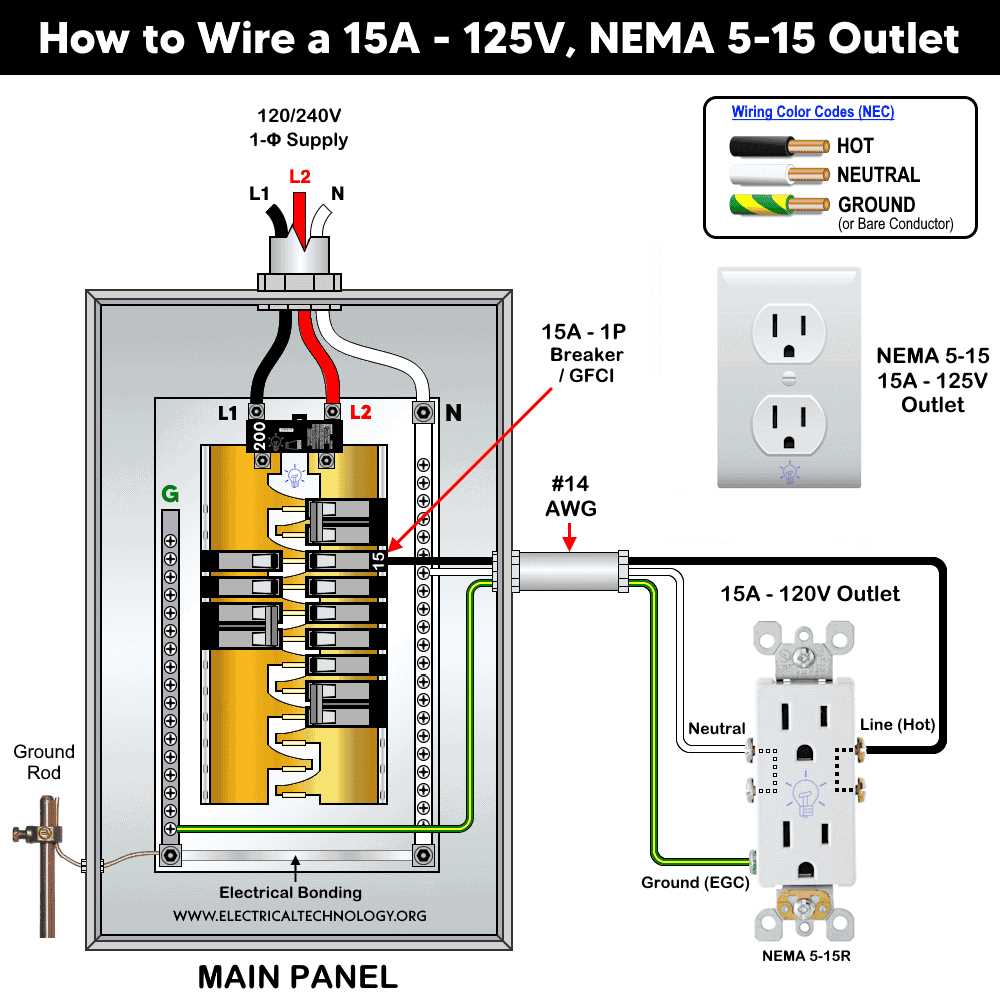
After securing connections, use a multimeter to check continuity between live and neutral, and confirm that the grounding path is intact. This step prevents potential shock hazards.
Carefully mount the socket into the electrical box, ensuring wires are not pinched. Align screw holes and attach the faceplate. Proper placement maintains structural stability.
Switch the breaker back on and test the receptacle with a plug tester or a small appliance. Observe correct voltage readings and ensure the ground functions correctly.
Maintain documentation of the connection layout for future reference or troubleshooting. Label wires if modifications are made, which simplifies maintenance and prevents accidental misconnection.
Identifying Conductors and Their Functions in a Socket
Always disconnect the power at the main panel before touching any receptacle. Confirm zero voltage with a tester to prevent accidents.
Recognize each conductor by color coding to assign its role accurately. Typical color standards are:
- Black or red: live current carrying wire
- White: neutral return path
- Green or bare copper: ground connection
Strip insulation carefully without nicking the copper. Damaged strands reduce conductivity and increase fire risk.
Parallel and Multi-Device Connections
When linking multiple receptacles, ensure that live, neutral, and ground wires remain consistent across all connections. Use pigtail extensions to avoid overloading terminal screws.
- Twist additional conductors together with wire nuts.
- Wrap junction with electrical tape for added insulation.
- Label each conductor to match its function.
Check each connection visually and with a multimeter for continuity. Confirm that grounding is intact before restoring power.
Secure wires neatly inside the box to prevent pinching or abrasion. Proper arrangement avoids short circuits and ensures long-term reliability.
After mounting the receptacle, test with a plug tester or small appliance. Confirm correct voltage and proper grounding operation to guarantee safe usage.