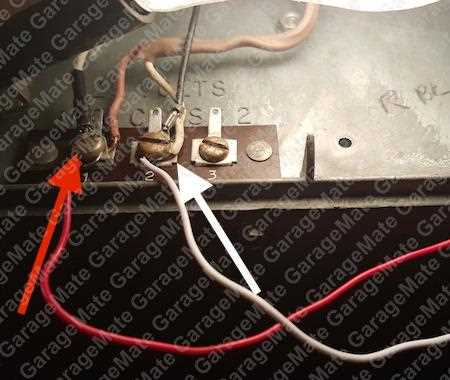
Connect the transmitter and receiver lines following the color coding to prevent misfires. Use the red and white cables for power and signal transmission, keeping a minimum separation of 6 inches from high-voltage lines to avoid interference.
Mount the detection units at a height of 4 to 6 inches above the floor with brackets aligned precisely to face each other. Check the alignment with a level tool to ensure accurate signal reception and prevent false triggers.
Test the circuit by manually opening and closing the entry mechanism, observing that the indicator LEDs illuminate when the beam is interrupted. Replace damaged connectors or frayed cables immediately to maintain safe operation and avoid malfunctions.
Connection Guide for Entryway Safety Components
Start by identifying the control panel terminals. Use the red and white leads for power and signaling, and confirm that polarity matches the markings on the receiver module. Crossed connections can trigger false stops.
Secure the transmitter and receiver units at a height of 4 to 6 inches above the floor. Align the units so the infrared beams meet directly without obstruction from trim, thresholds, or debris.
Check cable runs for interference. Avoid routing near fluorescent lights, motors, or other high-current circuits. Maintain a separation of at least 6 inches from AC lines to reduce signal noise.
Step-by-Step Connection
- Strip ½ inch of insulation from each conductor.
- Insert the red and white wires into the marked slots on the control panel.
- Tighten screws securely but do not overtighten to prevent wire damage.
- Run the wires along the track using clips to prevent sagging or tension.
- Confirm that the receiver LED illuminates when the beam is interrupted.
Test the entry mechanism by manually triggering the units. The system should stop or reverse movement when the beam is blocked. If the LED fails to light, recheck the alignment and cable connections.
Replace any damaged wires or connectors immediately. Use insulated connectors rated for low-voltage applications to prevent shorts. Avoid splicing without proper insulation and strain relief.
- Keep the sensor units clean and free from dust or paint overspray.
- Periodically check alignment every 6 months.
- Ensure power connections remain tight and corrosion-free.
For long cable runs exceeding 50 feet, use 18-gauge wire to maintain signal strength. Avoid using multi-strand speaker wire, which can introduce resistance and reduce reliability.
Identifying Sensor Wires and Color Codes
Use the red and white leads for power and signal connections. Red typically carries positive voltage while white completes the circuit to the control panel. Verify with a multimeter before connecting to prevent short circuits.
Black and green wires often indicate ground and safety return lines. Attach these to the corresponding terminals on the opener unit, ensuring a snug connection without frayed strands.
For units with additional yellow or blue conductors, refer to the markings on the receiver module. These are usually reserved for auxiliary functions like status indicators or remote overrides.
Label each conductor with tape or a marker before making final connections. This prevents confusion during installation or future maintenance, especially when multiple pairs run along the track.
Check the insulation of all conductors for nicks or cuts. Damaged jackets can cause intermittent failures or shorts when the entry mechanism operates under load.
Maintain a separation of at least 6 inches from AC power lines. Low-voltage signal lines are susceptible to interference, which can trigger false stops if routed too close to high-current circuits.
Use color-coded connectors or terminal blocks to match each lead with its corresponding terminal. Avoid twisting wires together without secure clamping, as vibration can loosen connections over time.
After installation, verify each line with a multimeter for continuity. Trigger the system manually to confirm that each unit responds correctly, and that LED indicators light consistently when the beam is broken.