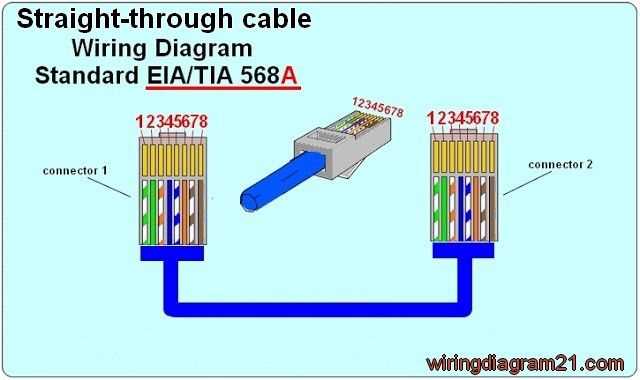
Use the T568A or T568B pin order before terminating any Ethernet line with an RJ45 plug. Both standards define the position of eight conductors inside twisted-pair network lines. Correct placement allows devices such as routers, switches, and computers to exchange data at speeds from 100 Mbps to 1 Gbps or higher depending on the category rating.
Each network line contains four twisted pairs that reduce electromagnetic interference during data transmission. The conductors appear in specific color combinations: white-green, green, white-orange, blue, white-blue, orange, white-brown, and brown. These pairs connect to the eight pins of an RJ45 connector, forming the standard Ethernet interface used in homes and offices.
Two termination layouts exist. T568A places the green pair on pins 1 and 2, while T568B places the orange pair in those positions. Many installations use T568B due to compatibility with existing infrastructure. Straight-through Ethernet lines use the same order on both ends, while crossover links swap transmit and receive pairs between connectors.
A typical installation uses Cat5e or Cat6 twisted-pair network line with an RJ45 plug attached through a crimping tool. The tool presses metal contacts into the insulated conductors and locks the strain relief tab onto the outer jacket. Correct pin placement prevents packet loss, connection drops, and reduced data throughput.
LAN Cable Wiring Diagram With RJ45 Pinout and Ethernet Color Code Guide
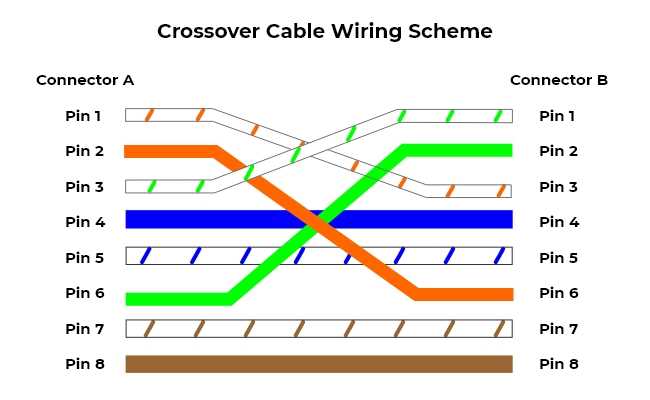
Follow the T568B pin order if building a standard Ethernet patch line for routers, switches, and computers. Hold the RJ45 plug with the contacts facing up and the locking tab pointing away. Insert the eight conductors in the correct sequence so each pin receives the proper twisted pair connection.
The typical color arrangement used in the T568B layout appears in this order from pin 1 to pin 8:
- Pin 1 – white orange
- Pin 2 – orange
- Pin 3 – white green
- Pin 4 – blue
- Pin 5 – white blue
- Pin 6 – green
- Pin 7 – white brown
- Pin 8 – brown
Each pair carries differential signals that reduce electromagnetic noise during data transfer. The orange pair handles transmit signals on many Ethernet interfaces, while the green pair commonly handles receive signals. Maintaining the original twist of each pair as close as possible to the connector improves signal integrity and supports higher speeds such as 1000BASE-T Gigabit Ethernet.
RJ45 Pin Order for T568A and T568B LAN Cable Wiring Standards
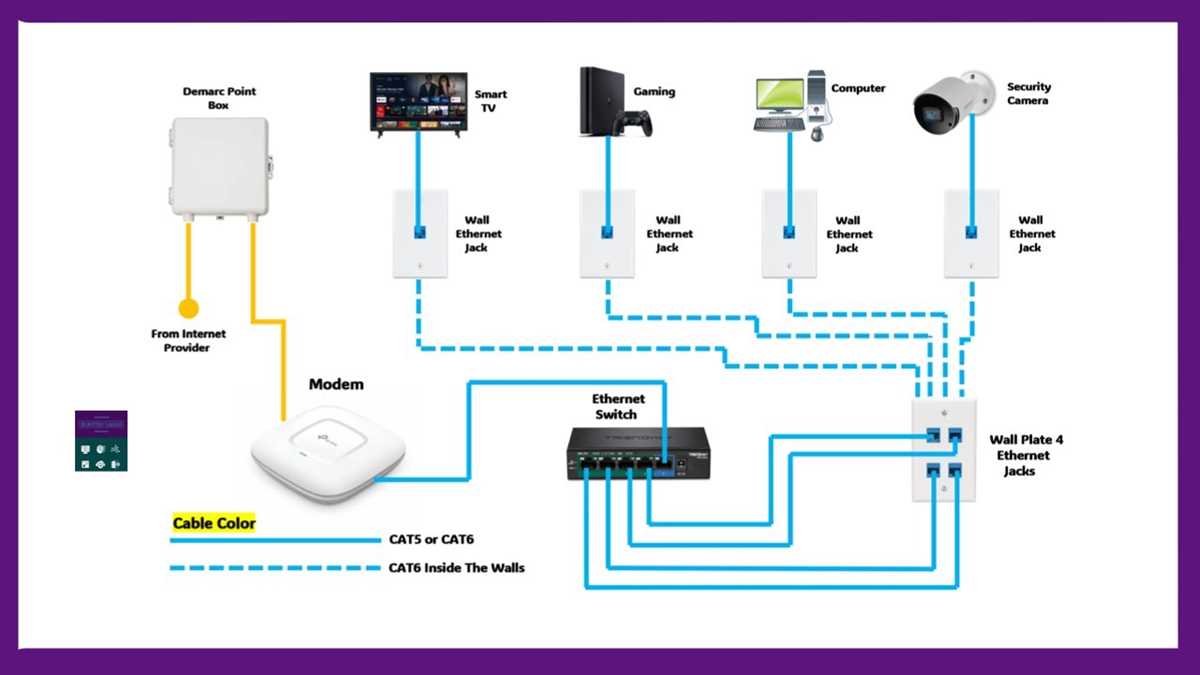
Use the same termination pattern on both ends of a twisted-pair Ethernet line if connecting a computer to a router or network switch. The RJ45 connector contains eight pins, and each pin must align with the correct colored conductor from the four internal pairs.
The T568A arrangement places the green pair at the beginning of the connector. Hold the RJ45 plug with contacts facing up and the clip pointing away. The conductor order from pin 1 through pin 8 appears as follows: white-green, green, white-orange, blue, white-blue, orange, white-brown, brown.
The T568B arrangement swaps the green and orange pairs compared with the previous layout. From pin 1 through pin 8 the sequence becomes: white-orange, orange, white-green, blue, white-blue, green, white-brown, brown. Many office networks use this pattern because older structured installations adopted it widely.
Each colored pair forms a balanced transmission path that reduces electromagnetic interference. The twist rate of each pair differs slightly; this prevents signal overlap between adjacent conductors during data transmission at speeds such as 100 Mbps and 1 Gbps.
Keep less than 13 mm of untwisted conductor near the connector during termination. Longer exposed segments weaken noise resistance and can reduce data reliability, particularly with Cat6 or higher-grade Ethernet lines.
Straight-through network leads use identical pin order on both ends, either T568A-to-T568A or T568B-to-T568B. A crossover connection uses T568A on one end and T568B on the opposite end so transmit and receive pairs swap positions between devices.