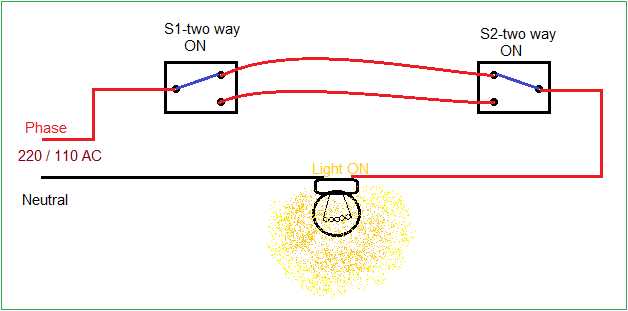
Connect the two-point control units directly to the main power source using three-conductor cables. Ensure the hot and neutral lines are clearly identified and that the traveler line is routed consistently between the control points.
Confirm that each terminal is tightly secured to avoid loose connections that can cause flickering or overheating. Use a torque screwdriver or multimeter to verify continuity before applying full power.
Maintain at least 6 inches of separation between high-voltage lines and any data or low-voltage cables. This prevents interference and maintains stable operation of both control stations.
Label each conductor using colored sleeves or numbered tags to simplify future troubleshooting or expansions. Standardize labeling across all control points for consistent identification and safety.
Dual Control Lighting Setup Guide for Home Installations
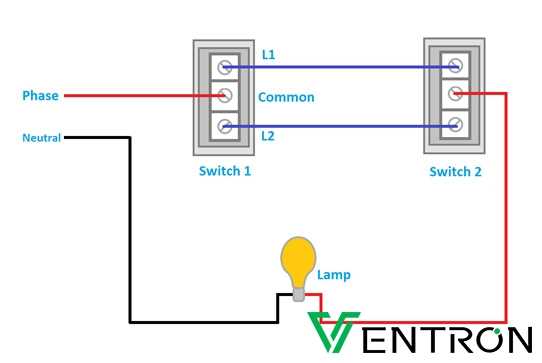
Run three-conductor cables from the main distribution panel to each control point. Ensure that the live, neutral, and traveler lines are clearly identified and maintain consistent color coding throughout the installation.
Secure each terminal with proper torque to prevent loose connections. Loose contacts can generate heat, cause intermittent operation, or trigger tripped breakers.
Position control units at standard heights, typically 48 inches from the floor. This ensures ergonomic access for all users while maintaining uniform appearance across rooms.
Label all conductors with colored sleeves or numbered tags. This simplifies troubleshooting and reduces the risk of misconnection during future upgrades or repairs.
Verify continuity between the two control points before energizing the system. Use a multimeter to check that traveler lines properly connect each unit and that there is no short to neutral or ground.
Install protective covers and strain reliefs on each cable entry. This prevents insulation damage and maintains reliable long-term operation, particularly in high-traffic areas.
Maintain separation between high-voltage and low-voltage lines. Keep at least six inches of distance to prevent interference with sensors, smart devices, or communication wiring.
Test operation multiple times with the main power applied. Cycle each control point independently and together to confirm correct toggling behavior and smooth switching without flicker or arcing.
Understanding Terminal Connections for Dual Switch Systems
Identify the common terminal first and connect the incoming live conductor to it. This ensures proper power distribution to both control points and prevents misoperation or backfeeding into other circuits.
Attach traveler conductors to the remaining terminals with firm and consistent torque. Using a screwdriver with a torque rating appropriate for the terminal type reduces the risk of loose connections that can generate heat or arcing.
Use color-coded or labeled wires for each path. For example, red and black travelers maintain clarity, while green or bare conductors are reserved for grounding. Consistent labeling simplifies troubleshooting and future maintenance.
Double-check terminal tightness after initial connection. Vibration or minor adjustments can loosen screws, so retest after securing all conductors and before energizing the system.
Keep neutral conductors separate from traveler and common terminals. Neutrals should run directly between source and load, avoiding any shared terminal to maintain system integrity and reduce risk of short circuits.
Test each control point independently after installation. Verify that toggling either unit properly energizes and de-energizes the load. Confirm that no flicker, hum, or unexpected operation occurs to ensure reliable performance.