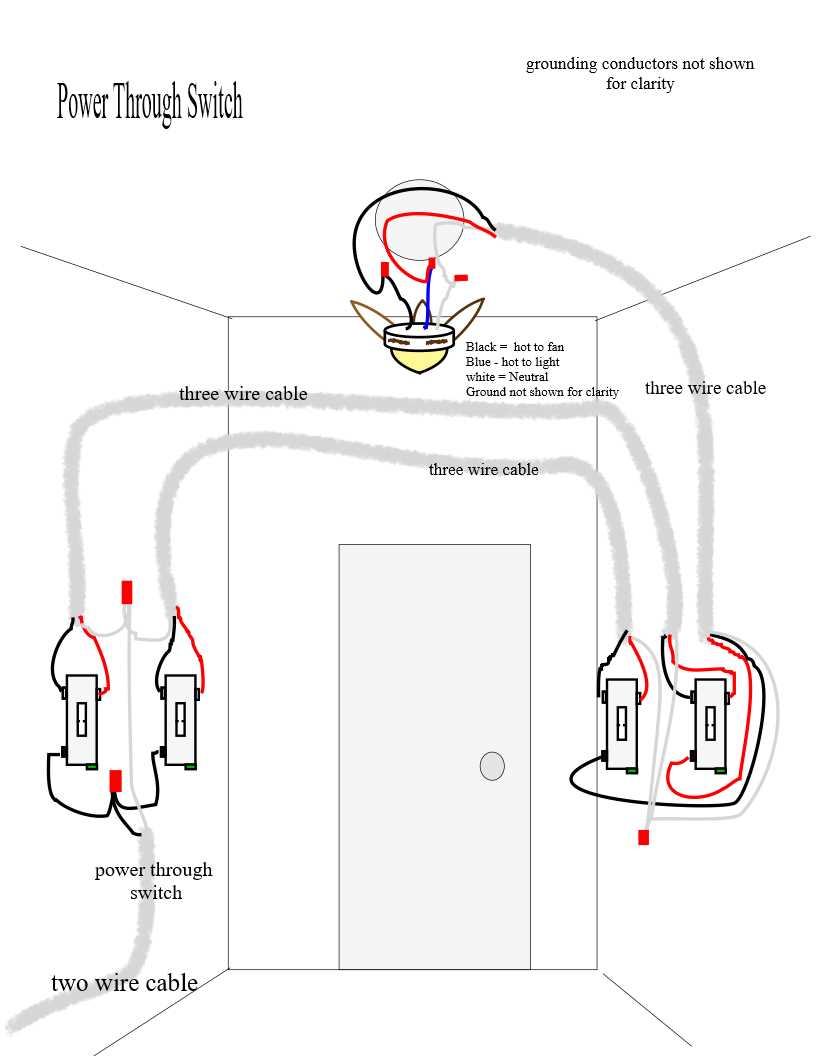
Begin by turning off the main breaker to prevent electric shock before handling any live circuits. Check that the mounting bracket is securely fastened and aligned with the ceiling box rated for the unit’s weight.
Identify each conductor carefully, noting color codes: black typically carries power, white serves as neutral, and green or bare copper is for grounding. Confirm the existing house wiring matches these standards to avoid misconnection.
Use wire nuts and secure clamps for all junctions, twisting wires together before capping. Ensure connections are tight and insulated to prevent arcing and overheating during operation.
For installations with remote modules, locate the receiver and follow its input and output labels. Connect the power feed to the input side and route the motor and light leads to the designated output terminals, avoiding crossed connections.
Test the assembly before finalizing by restoring power temporarily and operating the unit at all speed settings. Confirm lights, pull chains, or remote controls function correctly before securing the canopy and blades in place.
Step by Step Air Circulator Connection for Safe and Accurate Installation
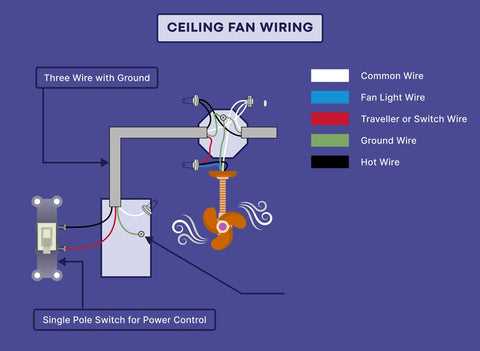
Start by turning off power at the circuit breaker and verify with a voltage tester that no current is present. Secure the mounting bracket to a support-rated junction box capable of holding the unit’s weight. Prepare the conductors by stripping ¾ inch of insulation, keeping the strands intact for solid connections.
Follow these sequential steps for reliable assembly:
- Identify the main power line (typically black) and the neutral line (white) along with the grounding wire (green or bare copper).
- Attach the ground wire to the metal bracket or grounding screw on the mounting plate.
- Connect the power and neutral leads using twist-on connectors, making sure no bare wire is exposed outside the nut.
- If the unit has an integrated control module, connect its input terminals to the house feed and output terminals to the motor and light leads.
- Secure all connections inside the canopy, ensuring wires are neatly routed without sharp bends that could damage insulation.
Before tightening all screws, temporarily restore power and test the unit at each speed and lighting configuration. Confirm the pull chains, wall switches, or remote functions operate correctly. Once verified, switch off the breaker again, fasten the canopy, attach the blades, and ensure all screws and bolts are tightened to manufacturer torque specifications.
Identifying Wires and Connections for Overhead Air Circulator Installation
Begin by confirming power is off using a non-contact voltage tester. Never touch conductors directly until you are certain there is no current. Safety at this stage prevents electric shock during the entire setup process.
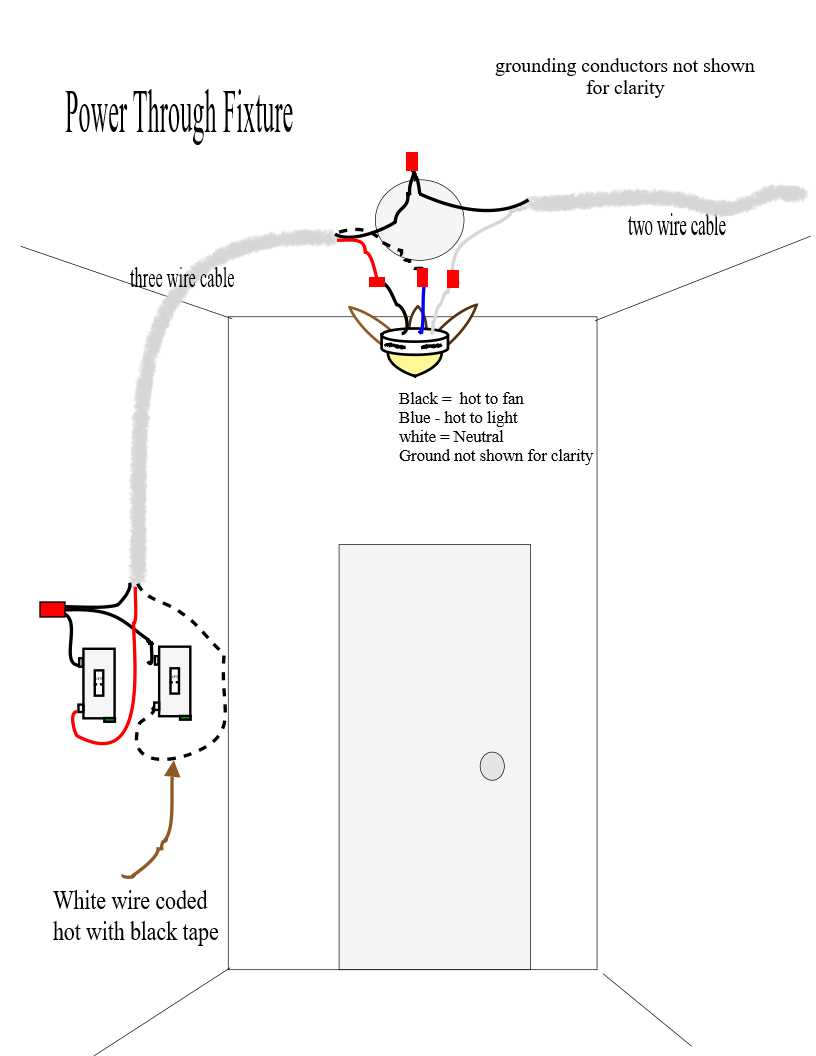
Locate the main line set inside the junction box. Black or red wires generally indicate the live feed, white wires serve as neutral, and green or bare copper is used for grounding. Label each conductor with tape to avoid confusion during assembly.
Check the existing cables for damage or fraying. Replace any worn wires, as compromised insulation can cause short circuits or fire hazards. Ensure that each conductor has sufficient length to reach the terminal points without tension.
Identify the control module connections if the unit includes a remote or integrated speed controller. Input terminals should match the main feed, while output leads are directed to the motor and light circuits. Verify printed markings on the module for proper alignment.
Use a continuity tester to confirm that neutral and ground paths are not crossed. Misconnections here can lead to erratic operation or tripped breakers. Test each wire individually before making permanent connections.
Group wires according to their function before twisting and capping with connectors. Keep the color coding consistent with industry standards to avoid future confusion during maintenance or replacement. Ensure that no copper is exposed outside the connectors.
After all leads are identified and connected, gently push them into the mounting box, arranging them so they do not pinch or bend sharply. Tighten all screws and fasteners gradually, confirming that connections remain secure and the assembly is mechanically stable before restoring power for testing.