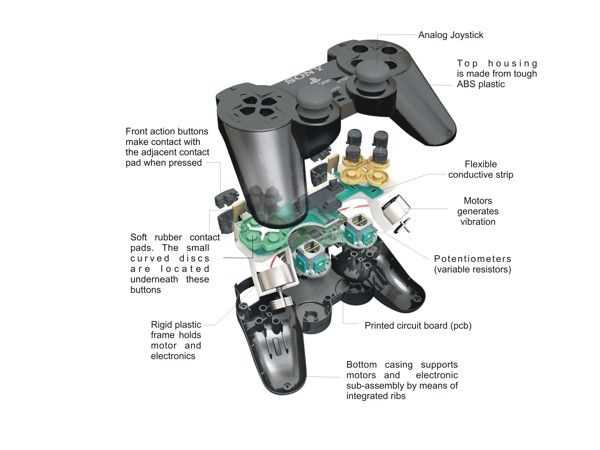
If you’re repairing or customizing your gaming input device, understanding its internal structure is critical. The main sections are the buttons, the analog sticks, and the central circuitry that controls all functions. Each element plays a role in the responsiveness and overall experience, whether you’re tweaking it for performance or simply replacing worn-out components.
The button mechanisms consist of tactile switches that provide feedback to the user. These small switches are often the first part to fail, but they are straightforward to replace. The quality of the switch material will impact its durability and feel, so opting for high-grade switches can ensure a smoother, longer-lasting response.
The analog joysticks are made up of potentiometers that measure the movement of the stick. Over time, these can degrade, causing issues like drift or unresponsive movement. Regular maintenance or replacement of the joystick components can restore smooth, precise control. When replacing, it’s important to check the alignment and calibration to avoid further issues.
The circuit board houses the main processing unit, which translates the mechanical actions into input signals. Proper care should be taken when handling this part, as it is sensitive to static electricity and damage. Always use anti-static mats and wrist straps to avoid damaging the internal components.
Understanding the layout and function of each section allows for more effective repairs or enhancements, improving performance and extending the lifespan of your equipment. Whether you’re dealing with a malfunction or personalizing your setup, focusing on these areas will give you a clear advantage in maintaining a high-quality experience.
Internal Structure of a Gaming Controller
Each unit consists of several key components that ensure its proper functionality. The outer shell offers protection and houses internal mechanisms. Beneath the surface lies the circuit board, which connects various sensors and buttons, transmitting signals between the user and the system. Buttons, including triggers and thumbsticks, are mounted directly on the board, each with its unique contact points. The analog sticks contain sensors that detect movement, while the triggers operate using pressure-sensitive technology.
The vibration mechanism, typically located near the center, enhances the sensory experience, providing feedback in response to in-game events. Battery compartments are designed for easy replacement or charging, allowing for continuous use. The connection ports, whether wired or wireless, are responsible for syncing with external devices, ensuring communication remains seamless.
Each element works in unison to deliver a responsive and immersive experience. Understanding their specific functions helps in troubleshooting or modifying the device when necessary.
Identifying Key Components of the PS4 Controller
To repair or upgrade the PlayStation 4 device, knowing its internal structure is necessary. Recognizing key components will assist in disassembling or replacing elements with precision.
- Battery: The rechargeable battery powers the device. Typically placed near the back, it connects to the circuit board via a small cable. It can be replaced if the device shows signs of short battery life.
- Micro USB Port: Located on the front, this port allows charging and wired connection to the console. A damaged USB port can cause charging or connectivity issues.
- Touchpad: The touchpad is located in the center. It provides multi-touch functionality for user input. Its sensitivity can be adjusted through the console’s settings.
- Buttons: The action buttons (Square, Circle, Triangle, and Cross) work through conductive membranes beneath the button surfaces. These buttons can be replaced if they fail to register input or get stuck.
- Analog Sticks: Located on the left and right, these control movement. They use potentiometers to detect movement. If the analog sticks feel loose or unresponsive, consider replacing the potentiometers or the entire stick assembly.
- Trigger Buttons: The L2 and R2 buttons are responsible for precise input during gameplay. They rely on analog sensors to detect the depth of the press, which can be adjusted through settings.
- Vibration Motors: The dual vibration motors are responsible for providing haptic feedback during gameplay. If you experience no feedback during play, the motor or its connection may be faulty.
- Circuit Board: The main hub that connects all components. It handles the communication between the input devices (buttons, analog sticks) and the console. A malfunctioning circuit board often requires replacement to restore functionality.
- LED Light Bar: This light bar is used for player identification and feedback. It communicates with the console for player recognition or status updates. A faulty LED can sometimes be repaired or replaced with proper tools.
- Housing: The outer shell protects the internal components. It can be easily removed for maintenance or modification. Be cautious when removing the shell to avoid damaging internal components.
Recognizing these components will simplify any repair or maintenance process, allowing for more efficient troubleshooting and upgrades.
How to Disassemble and Reassemble the PS4 Controller Parts
To begin disassembling, gather a precision screwdriver and ensure your device is powered off. Start by removing the screws on the back cover using a small Philips head screwdriver. After unscrewing, gently pry the back panel from the body. Be careful not to damage any clips or break the plastic casing.
Once the back is removed, disconnect the internal battery by pulling the connector gently. Then, proceed with removing the screws holding the internal components. Start with the main circuit board, ensuring you carefully detach any ribbon cables that may be present. Use a plastic prying tool to avoid damaging sensitive areas.
After removing the internal board, take out the analog sticks by unscrewing the surrounding screws. Be mindful of the springs underneath, as they can be dislodged easily. Next, remove the triggers by gently lifting them away from their housings.
For reassembly, reverse the steps carefully. Start by positioning the internal circuit board back into its original housing. Reconnect any cables and ensure they’re securely placed before tightening screws. Attach the analog sticks and reassemble the triggers, making sure they’re correctly aligned with their respective springs.
Finally, secure the back panel and tighten all the screws. Test each button and functionality to confirm everything is working smoothly. Always keep track of the screws and components as you reassemble, ensuring no small parts are left loose or unconnected.
Understanding the Functionality of Each PS4 Controller Component
The thumbsticks control movement and aim. They have sensors that detect even the smallest shifts, ensuring precise input. The varying resistance allows for better tactile feedback, making actions feel more natural and responsive during gameplay.
The action buttons (Triangle, Circle, Cross, and Square) are responsible for executing primary in-game commands such as attacking, jumping, or interacting. Their quick response time ensures efficient execution of actions, particularly in fast-paced scenarios.
The directional pad is used for movement or menu navigation. Its design offers responsive and precise input, ideal for controlling character movement in specific game genres or selecting options with accuracy.
The triggers and bumpers are pressure-sensitive buttons. They allow players to control actions like shooting or accelerating with varying intensity, offering more control over how strongly or gently an action is performed within a game.
The touchpad provides additional control features, such as swiping or tapping, enabling a new layer of interaction. This can be used for gestures, controlling specific in-game mechanics, or navigating menus smoothly.
Motion sensors track the orientation and movement of the device. This allows for physical actions, like tilting or rotating, to be translated into in-game movement, offering a more immersive and interactive gaming experience.
The light bar is used for visual feedback. It changes color depending on events in the game or player status. It also aids in motion tracking, allowing the system to detect movement and positioning, especially in games that rely on physical motion.
The integrated speaker outputs localized audio, enhancing immersion by providing sound directly from the device. This is particularly useful for in-game audio cues, allowing the player to hear sounds linked to specific actions or events.
The battery powers the system during wireless gameplay. It lasts for long gaming sessions but needs regular charging. The charging port ensures the device is always ready for use, providing easy access for recharging.
The connection port allows for both data transfer and charging. This ensures the device can be connected to the system for updates or wired gameplay, offering uninterrupted performance during use.