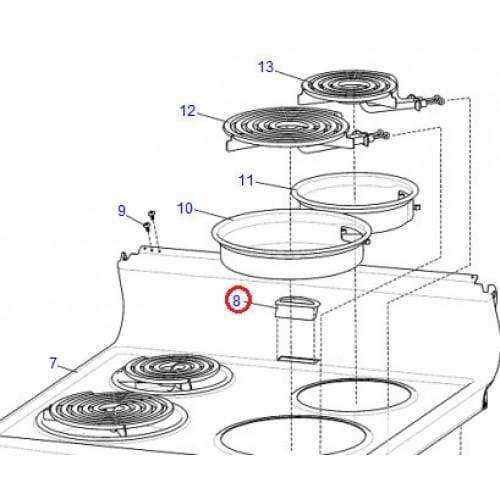
To troubleshoot or repair an appliance, it’s crucial to understand the layout of its internal components. Identifying each element in a schematic can save time and effort when addressing issues or replacing faulty elements.
Start by locating the heating element, which is typically found at the bottom or back of the unit. Understanding its role in temperature regulation will help when diagnosing uneven cooking or temperature inconsistencies.
Another key feature to focus on is the thermostat. It controls the internal temperature by adjusting the heating element’s activity. If you’re facing issues with temperature control, the thermostat might be the culprit.
The power source, such as the electrical connections or gas line, is another critical aspect. Always double-check these connections before attempting repairs to ensure safety and proper function.
Parts of an Oven Layout
When inspecting the layout of any heating appliance, it is vital to identify its key components for proper function and maintenance. Below are the most significant elements to focus on:
- Heating Element: Typically found on the bottom or back, this component is responsible for generating heat. If your appliance is not heating properly, the heating element might be faulty.
- Thermostat: This device regulates temperature by controlling the heating element. A malfunctioning thermostat can lead to erratic temperatures.
- Control Panel: The interface that allows you to adjust settings such as temperature and cooking time. Ensure it is working correctly to avoid issues with operation.
- Electrical Connections: These are the links to the power supply. Ensure that all connections are secure and undamaged for safe and efficient operation.
- Ventilation System: Often found at the top or sides, this system ensures proper air circulation. Blockages in the vents can cause overheating.
Being familiar with these elements will help you maintain and repair any issues with your appliance more effectively. Identifying a specific problem in the system can save you time and money when it comes to troubleshooting or part replacement.
How to Identify Key Components in an Appliance Layout
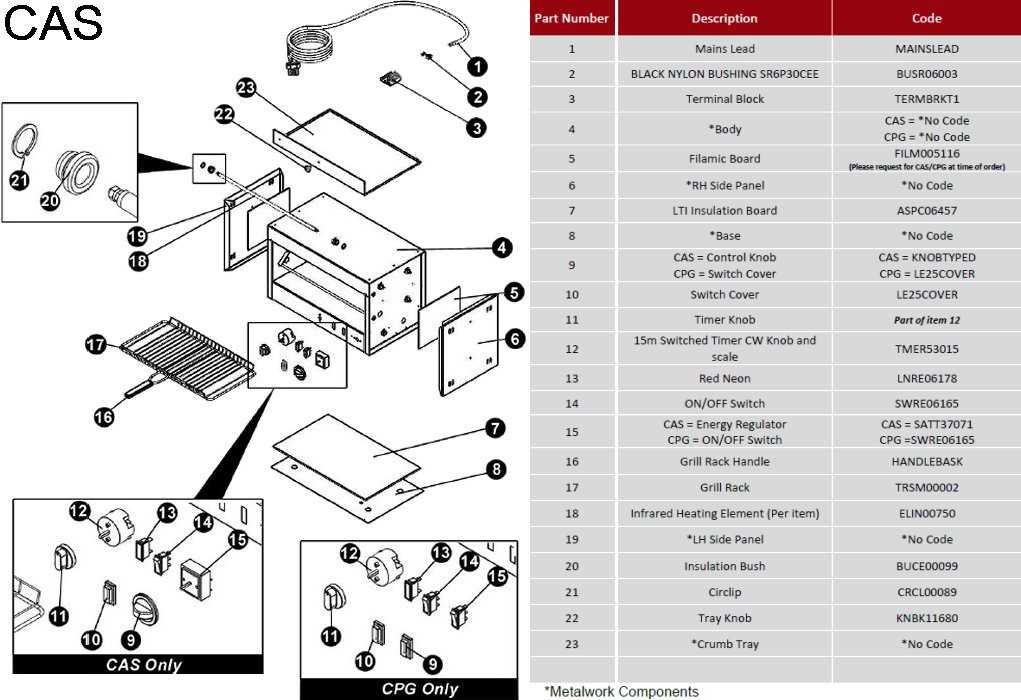
To accurately identify the crucial components in any heating unit, follow these steps:
- Locate the Heating Source: This is typically either a coil or metal plate. It’s responsible for generating heat, and can usually be found on the top, bottom, or back of the unit. If it shows signs of damage or corrosion, replacement is necessary.
- Check the Thermostat: The thermostat regulates the temperature inside the unit. It’s often located near the heating element. If the temperature fluctuates or doesn’t reach the set level, the thermostat may need adjustment or replacement.
- Inspect the Control Panel: The control panel allows you to set the time and temperature. If certain settings don’t respond or the display is malfunctioning, inspect the wiring and switches for wear and tear.
- Examine the Electrical Wiring: Make sure all connections are intact and secure. Loose or damaged wires can lead to malfunctioning of the unit. Check for visible damage, burns, or fraying.
- Inspect the Ventilation System: Ensure air flows freely through the vents, especially near the back. A blocked vent can lead to overheating or improper function, so clear any obstructions that might prevent airflow.
By systematically checking these key areas, you can quickly identify any issues that may arise and address them before they lead to more significant problems.
Steps to Troubleshoot Common Appliance Issues Using a Layout
Follow these steps to identify and fix common issues in a heating unit with the help of a component layout:
- Check the Power Supply: Verify that the unit is receiving power. If the display isn’t lighting up or the unit doesn’t turn on, ensure the power source is working by using a multimeter to test the outlet.
- Inspect the Heating Element: Use the layout to locate the heating element. If the unit isn’t heating properly, check the element for visible damage or signs of wear. A broken element may need to be replaced.
- Test the Temperature Sensor: The temperature sensor monitors the heat inside the unit. Refer to the layout to locate the sensor and test it using a thermometer. If the readings are off, it might need recalibration or replacement.
- Examine the Control Board: If buttons or settings are unresponsive, consult the layout to trace the control board connections. Look for loose wires or burnt components and replace any faulty parts.
- Verify the Ventilation Path: Ensure the vents are clear by using the layout to identify their location. A blocked vent could lead to improper heating or overheating. Clear any debris or obstructions.
By following these steps and referring to a detailed component map, you can pinpoint issues with ease and perform effective repairs to restore functionality.
How to Replace Faulty Components Based on Component Layout
To replace a malfunctioning component, follow these specific steps based on the provided layout:
- Disconnect Power: Before starting any replacement work, ensure the unit is powered off and unplugged to avoid electrical hazards.
- Locate the Faulty Component: Use the layout to pinpoint the malfunctioning part. Identify the exact location of the component that needs replacement, such as the heating element, control board, or temperature sensor.
- Remove Access Covers: Remove any access panels or covers that block access to the faulty component. These panels are usually secured with screws or clips that can be easily undone with the appropriate tools.
- Disconnect the Faulty Part: Once the component is accessible, disconnect any wiring or connections. Carefully note the arrangement of wires or take pictures to ensure correct reinstallation of the new part.
- Install the New Component: Position the new part in place, making sure it aligns with the connections as per the layout. Reconnect the wires or connectors securely, and ensure the new component fits correctly.
- Reassemble the Unit: After replacing the component, reassemble the unit by reattaching any panels or covers that were removed. Ensure all screws are tightened properly.
- Test the Repair: Once everything is reassembled, plug the unit back in and power it on. Test the function of the new component to verify that the replacement was successful and the unit is operating as expected.
By following these steps and referring to the layout, replacing faulty components can be done accurately and efficiently, ensuring proper functionality after the repair.