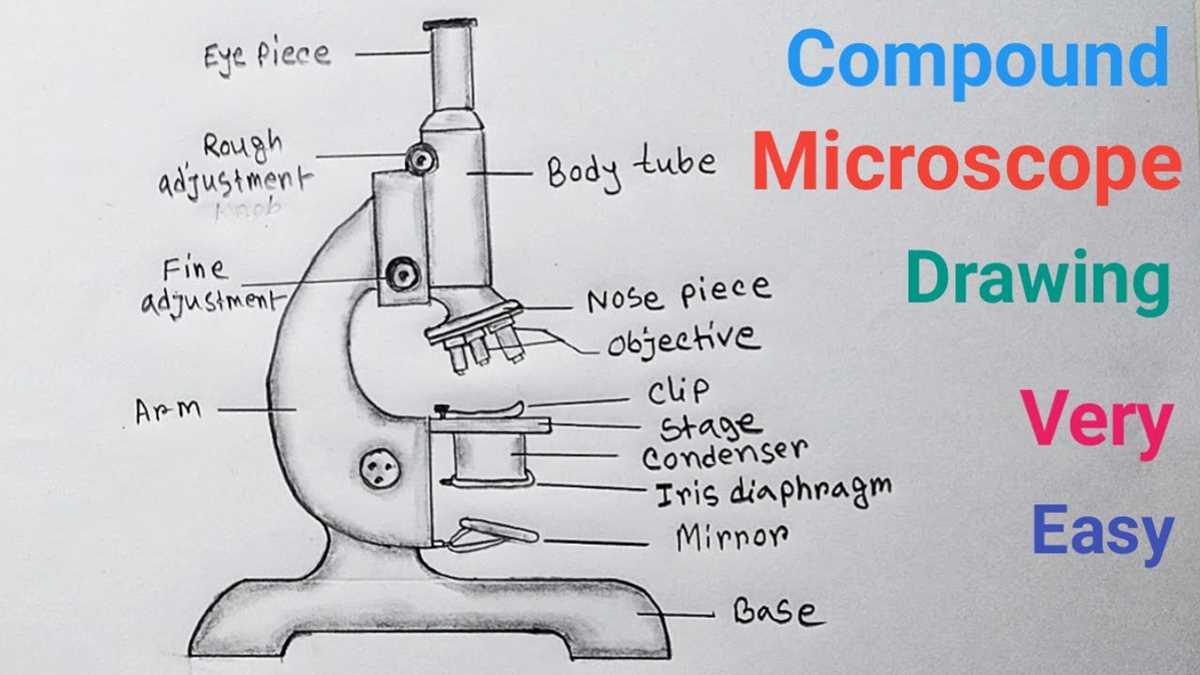
If you’re assembling or maintaining your optical instrument, recognizing the components and understanding their roles is a must. Pay attention to the focal system and eyepiece, which are critical for clarity and magnification. The stage and condenser are vital for optimal light focus and sample positioning.
Regular inspection of the base, arm, and coarse/fine adjustments can prevent misalignments that affect image quality. Cleaning and careful calibration of the lenses and objective will ensure consistent results in your observations.
Familiarize yourself with each element, including the mechanical components and optical systems, for smooth operation. This knowledge will enhance your overall experience and extend the life of the equipment.
Microscope Diagram with Parts
Begin by identifying the optical lenses at the top, as these are crucial for magnification. The eyepiece, which houses the ocular lens, provides the first step in viewing your sample, while the objective lenses underneath determine the level of zoom or magnification.
Next, observe the stage where the sample is placed. The mechanical stage helps in precise movement of the specimen, ensuring proper alignment under the lenses. The condenser, located just below the stage, focuses the light onto the sample for clear visibility.
Don’t overlook the arm and base, as these provide structural support, stabilizing the device during use. The coarse and fine adjustment knobs allow for precise focusing, while the diaphragm controls light intensity, impacting image contrast and brightness.
How to Identify and Label the Key Components of a Microscope
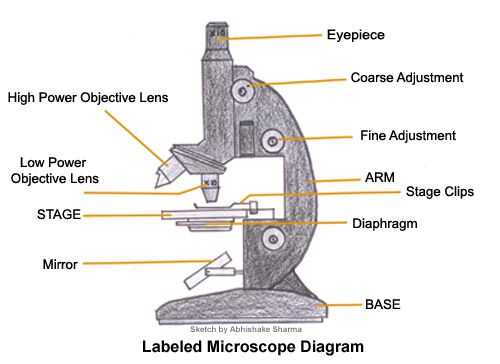
Start by labeling the eyepiece, which is the lens through which you view the sample. Directly below it is the revolving nosepiece, which holds the objective lenses and allows for easy switching between them for different magnifications.
The objective lenses, located on the rotating nosepiece, should be marked according to their magnification power. The highest-power lens typically has the smallest numerical value, while the lower-power lenses provide broader views of the specimen.
Next, locate the stage, which is where the slide with your sample is placed. Use the mechanical stage clips or stage clips to secure the slide. Label the condenser, which focuses light onto the specimen, as well as the diaphragm, which controls the intensity of that light.
Finally, mark the coarse and fine adjustment knobs. The coarse adjustment knob moves the stage quickly for rough focusing, while the fine adjustment knob allows for detailed focusing. The base and arm, which provide structural stability, are typically labeled last.
Common Issues with Microscope Components and How to Fix Them
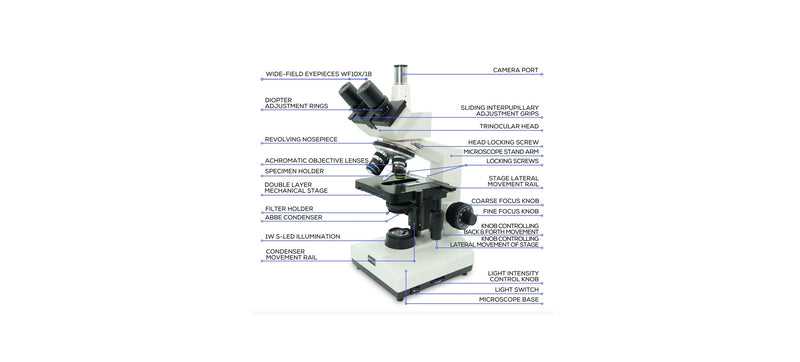
If the image appears blurry, the most common cause is improper focusing. Check both the coarse and fine adjustment knobs, and make sure the sample is positioned at the correct focal point. Clean the lenses to avoid any dirt or residue that may affect clarity.
If the light is dim or uneven, adjust the diaphragm and condenser to ensure optimal illumination. The light bulb or LED might need replacing if the brightness remains low after adjustments. Also, check for any loose electrical connections.
If the objective lenses seem stuck or difficult to rotate, apply gentle pressure to the revolving nosepiece. Over time, debris can accumulate, causing resistance. Clean the rotating mechanism and lubricate it lightly to restore smooth movement.
For poor resolution or distorted images, verify that the objective lenses are aligned properly. Ensure that the slide is securely placed on the stage, and check if the stage clips are holding it firmly in place. Misalignment can cause image distortion.
Lastly, if the arm or base feels loose, tighten any screws or bolts that may have become undone over time. A wobbly structure can interfere with the stability of the entire device, leading to inconsistent focus and images.