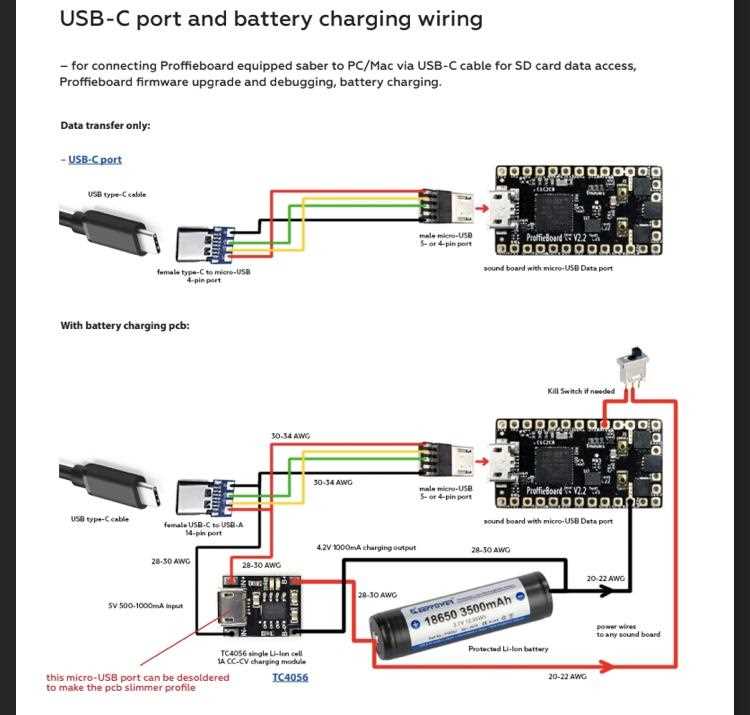
Connect matching contacts between both cable ends and verify the pin roles before joining conductors. A standard four-line data cable carries power, ground, and two data channels. These lines must remain in the same order from one connector to the other to prevent device damage or failed communication.
Most cables built for the Universal Serial Bus interface follow a consistent color layout. Red carries +5V supply, black serves as ground, white transmits the negative data signal, and green carries the positive data signal. Maintain the twisted pair arrangement of the green and white conductors; separating them increases signal noise and may interrupt file transfer between devices.
Choose conductors rated between 28 and 24 AWG depending on the current load. Thin lines around 28 AWG handle data transmission well, while the power pair often uses 24 AWG for stable voltage delivery. Keep the total cable length under 5 meters for standard high-speed communication. Longer lines may cause voltage drop and unstable device detection.
Shielding improves signal stability. Wrap the cable core with aluminum foil or braided shielding connected to ground at one side of the connector housing. This reduces electromagnetic interference from nearby electronics such as power adapters, monitors, or motors.
USB to USB Wiring Diagram with Pin Layout Cable Connections and Color Codes
Align the four conductors in both cable ends in the same sequence before joining them. The Universal Serial Bus interface uses four primary contacts arranged inside the connector shell: power supply, ground return, and a differential pair for data transfer. Maintain identical pin mapping between both sides; reversing the power pair or crossing data lines may damage connected hardware or prevent device detection.
The typical conductor layout inside a standard data cable follows a fixed color scheme used by most manufacturers. Red carries the +5 volt supply line that powers small peripherals, black connects to ground and completes the electrical circuit, while the communication pair uses white for the D− signal and green for the D+ signal. These two data conductors must remain twisted together along the entire cable length to maintain signal integrity during high-speed communication. Use 24 AWG copper conductors for the power pair if the cable supplies charging current above 1 ampere, while the signal pair commonly uses 28 AWG. Keep total length below about 5 meters for stable high-speed operation. Shielding made from braided copper or aluminum foil around the inner conductors reduces electromagnetic interference from nearby electronics and improves reliability during file transfer.
USB to USB Wiring Diagram Pinout for Power and Data Lines in Standard Cables
Match each connector contact to the correct conductor before joining cable ends. A standard four-pin layout carries one 5-volt supply line, one ground return path, and a differential pair used for digital communication between devices. Hold the connector with the metal shell facing upward and identify the pins from left to right; the first contact typically carries power, the second transmits the negative data signal, the third carries the positive data signal, and the fourth connects to ground.
Follow the widely used color layout inside most data cables. Red connects to the +5 V supply line, black links to ground, white carries the D− communication signal, and green carries the D+ signal. Keep the white and green conductors twisted together along the cable core. This pair structure preserves signal balance and reduces noise during high-speed communication between computers, storage devices, and peripherals.
Select conductor gauges based on current load and cable length. Power lines commonly use 24 AWG stranded copper for stable voltage delivery, while the communication pair often uses 28 AWG. Limit total cable length to about 5 meters for high-speed transfer. Longer runs increase signal attenuation and may cause unstable device recognition. Adding braided shielding around the inner conductors and grounding the shield to the connector shell helps block electromagnetic interference from nearby electronics.