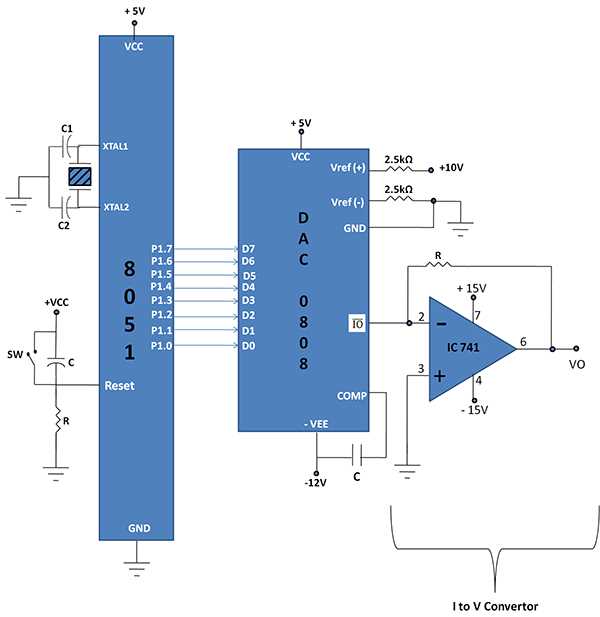
To build a functional embedded system, begin by selecting the appropriate components to support your design. A key step is setting up the processor and connecting the necessary peripherals. The configuration should prioritize reliable power distribution, correct clock timing, and efficient data transfer between components.
Start by connecting the processor’s address and data bus to external devices. This can include RAM, input/output interfaces, and sensors. Keep in mind the voltage requirements of each device and ensure proper grounding to avoid interference and instability in the circuit.
For communication between the microprocessor and other elements, use serial or parallel ports based on the application needs. A pull-up resistor for reset pins can be included to ensure proper initialization, while decoupling capacitors stabilize the power supply.
Testing your connections step by step is key. Simulate the connections to check for errors and verify voltage levels before powering up the system. Troubleshooting tools like oscilloscopes can help diagnose any issues in data transfer or signal integrity, allowing you to refine the design.
Building the Microprocessor Interface
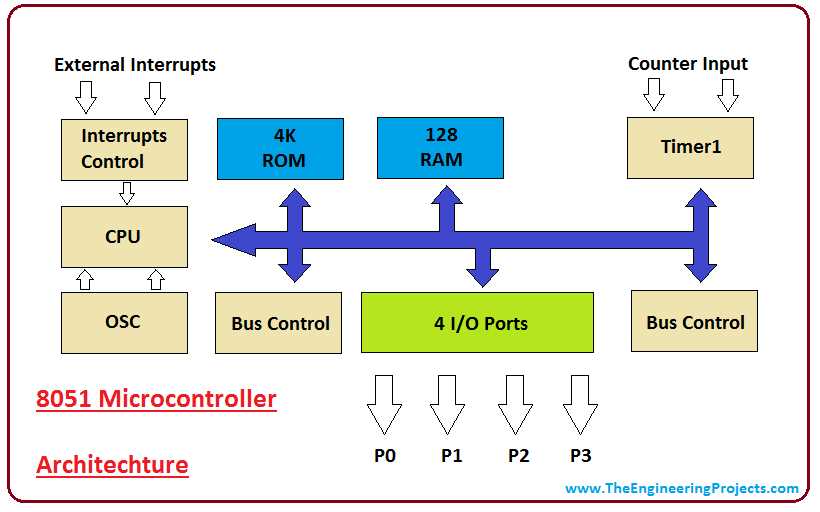
When designing the hardware, first connect the processor to memory. This includes both program storage and data memory. Typically, RAM modules are linked to the processor’s data bus, while ROM or Flash storage holds the program code. Make sure to match the voltage levels between all connected components to prevent damage and ensure stability in communication.
Another critical aspect is the clock generation. Without a stable clock, the entire system can malfunction. A crystal oscillator is commonly used for accurate timing, and should be placed as close to the processor as possible to minimize signal degradation. Be sure to include the correct capacitors to filter out noise, which could interfere with the processor’s operation.
For input and output functionality, integrate external devices such as LEDs, switches, and sensors. The I/O pins should be properly configured to handle both digital and analog signals. Adding buffers can help protect against overvoltage and prevent short-circuits. Always test the system after wiring each component to ensure smooth data transfer and reliable operation.
How to Design a Basic 8051 Microcontroller Circuit
To begin designing a basic setup, first ensure that you have the right power supply for your processor. The power input should be stable and match the processor’s requirements. Typically, a 5V DC supply is used, but make sure to check your component specifications. Adding decoupling capacitors close to the processor can filter out power fluctuations and prevent instability.
The next step is to connect the address and data bus to memory modules. The processor’s data pins should be linked to both RAM and program memory. For RAM, a 128-byte or 256-byte module is often sufficient, depending on your application. Program memory, usually ROM or flash memory, stores your code and needs to be interfaced with the processor’s address lines for proper data retrieval.
Clock Generation and Timing
A stable clock is necessary for reliable operation. Use a crystal oscillator with the proper frequency for the processor to generate the timing signals. A 12 MHz crystal is commonly used in many designs, but this can vary based on application needs. Ensure the capacitors are correctly sized to filter any unwanted frequencies or noise.
Next, connect reset and control lines. A reset pin is needed to initialize the processor at startup, ensuring it begins operation in a known state. Typically, a pull-up resistor is used to reset the processor to its default state when power is applied. Ensure that this is wired correctly to avoid any startup issues.
Interfacing I/O Devices
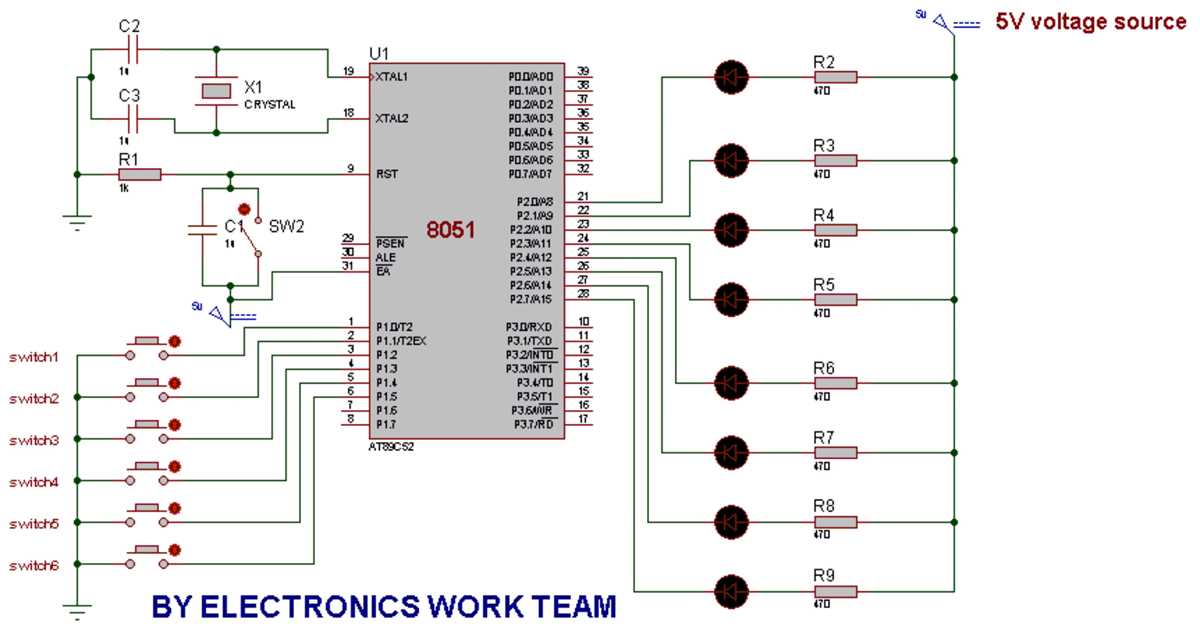
For input and output handling, external devices such as switches, LEDs, and sensors need to be properly connected. The I/O pins of the processor interface with these devices, and you’ll need to set them as input or output using the proper instructions in your code. In some cases, adding a buffer or driver circuit is necessary to protect your microprocessor from high current demands from peripherals like motors or relays.
- For switches, use pull-down resistors to ensure a known state when no input is received.
- LEDs should be connected with current-limiting resistors to prevent damage.
- For sensors, ensure proper analog-to-digital conversion if needed.
Once all components are connected, verify that the signal paths are free of any shorts or mismatched voltage levels. It’s important to carefully inspect the wiring and connections before applying power to the system. Any mistake can cause irreparable damage to the components.
Finally, test the system incrementally. Power on the setup and check for expected outputs at each stage. Use diagnostic tools like oscilloscopes to monitor the signals at key points in the design, such as the clock and data lines. Troubleshooting early in the process will help ensure a smooth final implementation.