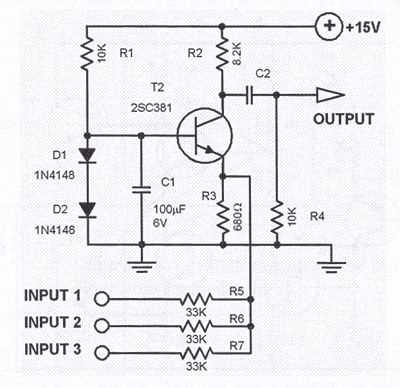
Connect each input line to its designated preamp channel and confirm polarity to avoid phase cancellation. Use shielded conductors for sensitive sources to reduce hum and interference.
Adjust gain stages carefully to maintain a clear signal without clipping. Ensure that level controls on each input are set so no channel dominates the combined output, preserving dynamic range.
Integrate equalization modules directly after preamp stages to refine tonal balance. Apply subtle frequency adjustments to enhance clarity and presence without introducing distortion or feedback.
Route all processed signals to a common summing bus and verify connections with a multimeter before applying power. Proper bus configuration prevents accidental short circuits and ensures stable operation.
Test the complete assembly with multiple sources simultaneously. Observe output meters for uniform response, and fine-tune attenuation and balance controls to achieve an even mix across all channels.
Audio Mixer Setup and Connection Guide
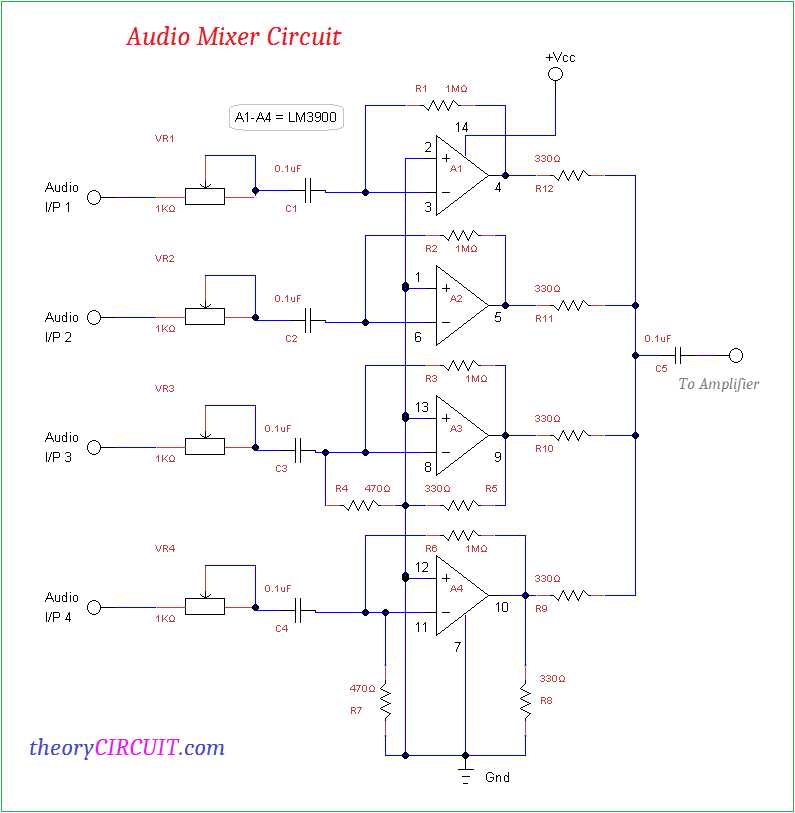
Connect each input source to its designated preamplifier terminal using shielded cables to prevent interference. Confirm that polarity is correct for all connections to maintain phase integrity.
Adjust the gain controls on each input channel to match signal levels, avoiding distortion while keeping each source audible in the overall mix. Use a reference meter for precise calibration.
Integrate tone shaping units after preamplification to refine frequency response. Apply light equalization on low, mid, and high bands to prevent muddiness and enhance clarity without overloading the system.
Route all processed signals to the central summing bus, ensuring each channel is properly assigned. Check for loose contacts or exposed conductors to prevent short circuits during operation.
Use auxiliary sends for monitoring or external effects, balancing the output to prevent signal clipping. Adjust the return path level to maintain consistent volume across all channels.
Test the assembled system with multiple inputs active, observing meter readings for peak levels. Make fine adjustments to fader positions to achieve an even and balanced output.
Finally, secure all connections and label input and output terminals clearly. Regularly inspect for signal degradation and maintain grounding paths to reduce noise and maintain high fidelity.
Identifying Input and Output Terminals for Signal Flow
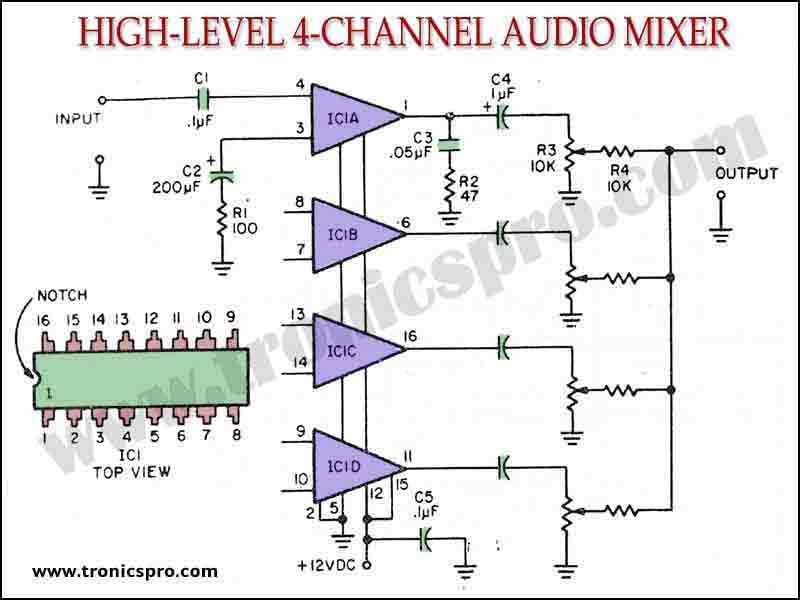
Begin by locating the main input ports on the front or rear panel. These are usually marked with clear labels indicating channel numbers or line types, and they accept standard connectors such as XLR or TRS.
Verify the polarity of each input connection to maintain correct signal orientation. Using a multimeter or continuity tester can help ensure that the positive and negative leads correspond correctly with the source device.
Check each input for sensitivity settings. Some terminals provide adjustable gain or trim controls, which allow the incoming signal to match the internal processing level and avoid distortion.
Output terminals are generally positioned opposite the input section. They can include main mix outputs, subgroup outputs, and auxiliary sends, each serving a distinct path for signal routing.
Identify balanced versus unbalanced outputs to choose the correct cable type and prevent noise issues. Balanced outputs use three-conductor connectors and reduce hum over long cable runs.
Document the signal path for each terminal. Use a numbered list or table to map which source feeds which channel and where its signal is routed to help streamline troubleshooting and future adjustments.
- Confirm output levels match downstream equipment requirements.
- Check for proper grounding to minimize interference and prevent ground loops.
- Label all connections clearly for quick identification during setup.
Finally, test the full signal chain by feeding known inputs and monitoring outputs. Observe meters or headphones to ensure each terminal carries the intended signal without unexpected attenuation or distortion.