Check all power supplies before connecting any pins to prevent damage to components. Use a regulated voltage source and verify levels with a multimeter.
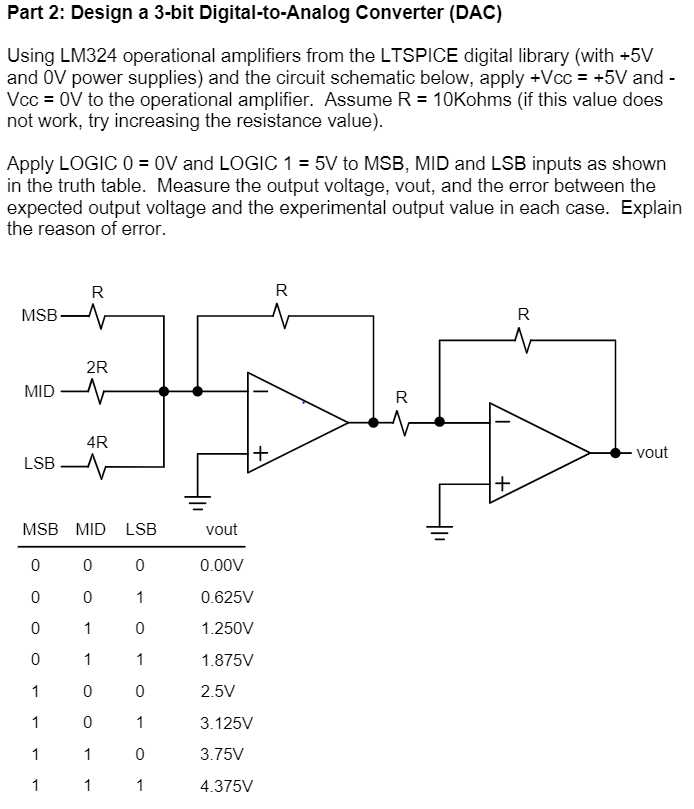
Identify input terminals clearly. Each pin corresponds to specific binary signals that will be transformed into a continuous voltage output. Misplacing connections can lead to inaccurate results or component failure.
Connect output leads to the intended load carefully. Ensure resistive or capacitive loads match module specifications to maintain stable signal levels and avoid overloading the device.
Label each connection and verify continuity. Testing with a signal generator helps confirm correct operation and allows adjustments to reference voltage or gain before full implementation.
Step by Step Guide to Signal Conversion Module Connections and Setup
Disconnect all power sources before connecting the module to prevent accidental shorts. Verify each supply voltage with a multimeter to match the component specifications.
Identify the input terminals accurately. Each pin represents a specific binary value and must be connected in the correct sequence to produce the intended continuous voltage output.
Connecting Output and Load Components
Attach output leads to the intended resistive or capacitive loads. Ensure load ratings align with the module’s maximum output current to prevent overheating or voltage drops that can distort the signal.
Testing and Verification
After completing connections, use a signal generator to apply test patterns and a voltmeter to measure output levels. Check each stage for correct voltage scaling and continuity before integrating the module into the final system.
Identifying Input Pins and Reference Voltages
Always power down the module before touching input terminals to prevent shorts or damage. Verify no residual voltage is present using a multimeter.
Locate the input pins clearly. Each pin corresponds to a binary value and determines the resulting voltage output when the module is active. Mixing pin assignments can distort the signal.
Reference voltages define the full-scale output range. Measure these values with a precise voltmeter and ensure they match the module’s specifications to maintain accurate conversion.
- Check manufacturer labels or datasheets to identify pins.
- Mark each lead according to binary significance.
- Confirm connections using a continuity tester.
- Apply reference voltage and measure stability at the input terminals.
Inspect each input for proper insulation and secure attachment. Loose or frayed connections can cause intermittent operation or inaccurate readings.
After verification, label all inputs and reference points. Clear labeling simplifies troubleshooting and prevents accidental miswiring during later adjustments or testing.