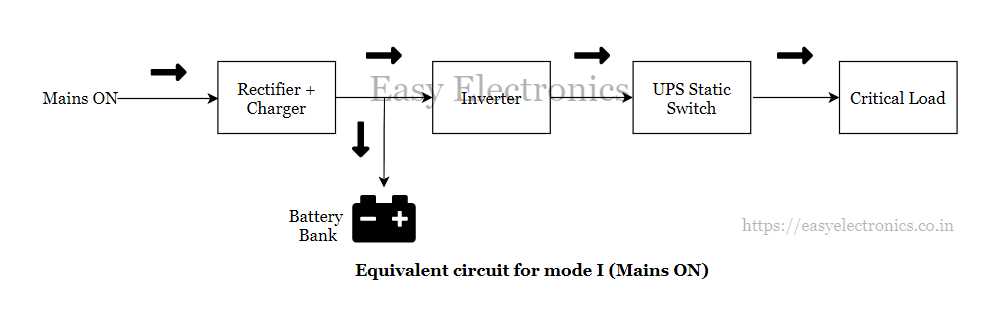
To design and maintain a reliable backup power system, understanding the internal structure of the electrical flow is critical. Start by recognizing the different components involved, such as the battery, inverter, and rectifier. Each of these parts plays a vital role in ensuring that power is continuously supplied, even during interruptions.
Check the input and output stages carefully. These should be connected properly to control the charging and discharging of the battery while providing clean power to the connected load. Misconnections can lead to overheating or poor performance, so understanding their exact placement within the structure is necessary for safe operation.
Make sure to follow the system’s schematics and verify the connections with a multimeter to ensure each component functions properly. Pay close attention to the voltage and current ratings of each part, as mismatched ratings can cause system failure or long-term damage. Before final installation, always test the system thoroughly.
Circuit of an Uninterrupted Power Supply System
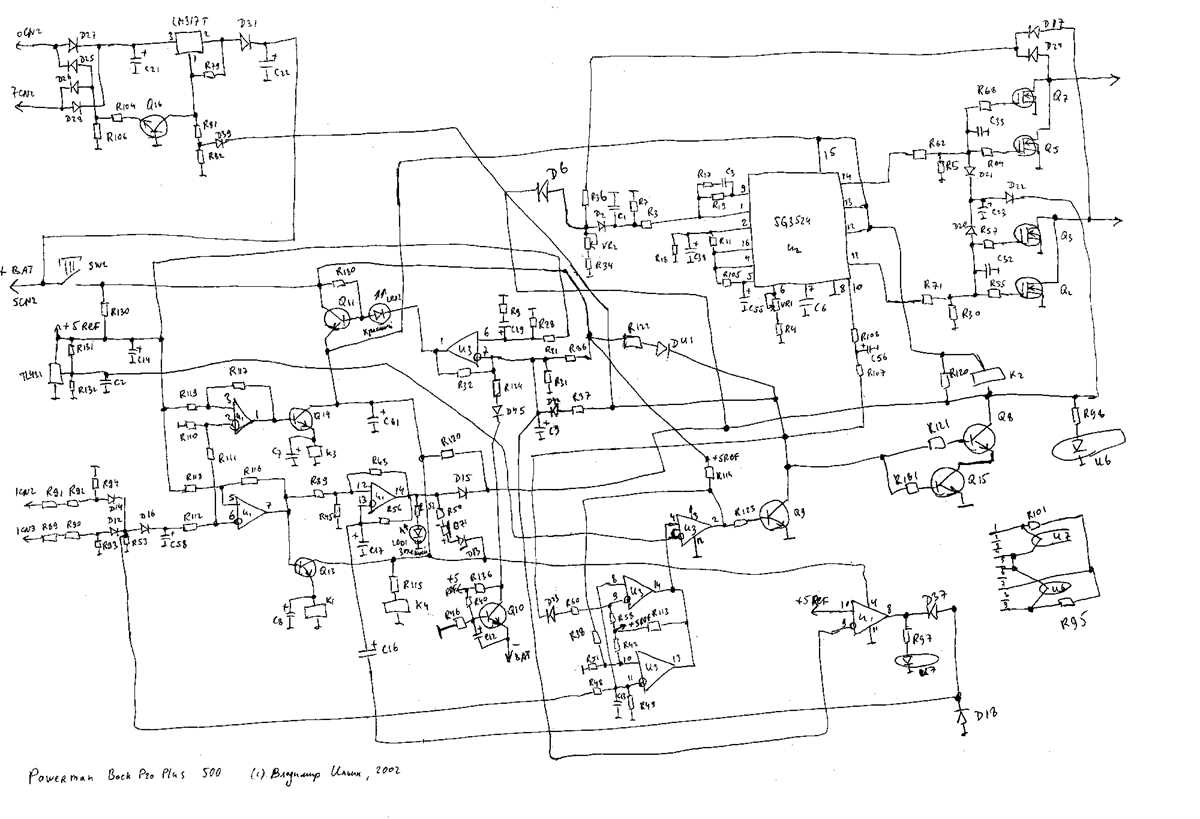
When assembling an uninterrupted power system, understanding how each component connects is critical. Start by identifying the battery, inverter, rectifier, and filter as key parts of the structure. Each plays a unique role in converting and storing energy, ensuring a seamless power flow when needed.
Begin by connecting the power input to the rectifier. This device is responsible for converting alternating current (AC) to direct current (DC), which charges the battery. Check the current rating of your rectifier to ensure it matches the system’s specifications. An improperly rated rectifier could lead to inefficient charging or overloading.
The next stage involves connecting the battery to the inverter. The inverter converts the stored DC into AC for powering your equipment. Ensure that the battery is of sufficient capacity for the expected load and is connected to the inverter using wires with the proper insulation and gauge.
The inverter is connected to the load through the AC output terminal. Make sure the load is properly rated to handle the maximum output of the inverter. Overloading the inverter can cause permanent damage and could also lead to a failure of the backup system.
- Rectifier: Converts AC to DC to charge the battery.
- Battery: Stores energy for later use.
- Inverter: Converts DC back to AC to power the load.
For stability, add a filter circuit between the inverter and the load to smooth out any fluctuations in power output. This helps prevent voltage spikes or drops from damaging sensitive equipment connected to the system.
Finally, always use a multimeter to check the voltage at each stage of the system before turning it on. Testing at each point ensures all components are working correctly and avoids costly mistakes during installation.
Key Components in an Uninterrupted Power System
The heart of any backup power system lies in its components, each playing a specific role in ensuring reliable power delivery. First, the battery is the primary source of stored energy. It must be selected based on capacity to handle the expected load for the required runtime. Choose a battery with a longer lifespan and high charge retention capabilities for maximum reliability.
The inverter is another key element. It is responsible for converting direct current (DC) stored in the battery into alternating current (AC), which is used by most devices. Make sure the inverter is rated to handle the maximum expected load without overloading or overheating. Using a high-quality inverter helps maintain power quality and ensures smooth operation of connected equipment.
The rectifier converts alternating current (AC) from the mains supply into direct current (DC) to charge the battery. It is critical to select a rectifier with the appropriate output rating, as underperformance can lead to insufficient battery charging or overloading. Pay attention to the efficiency of the rectifier to reduce energy loss during this conversion process.
Next, the battery charger controls the charging of the battery. It ensures the battery is charged properly without overcharging or discharging too much. This component typically has built-in safety features to protect the battery and extend its lifespan. Verify that the charger is compatible with the battery type and meets the system’s energy demands.
- Battery: Stores energy for later use, ensuring continuous power during interruptions.
- Inverter: Converts stored DC power into usable AC for powering connected devices.
- Rectifier: Converts incoming AC power into DC for charging the battery.
Protection circuits are also critical in any backup power system. These circuits include fuses, circuit breakers, and surge protectors, which safeguard the system from overvoltage, short circuits, and other electrical faults. Incorporating high-quality protection components reduces the risk of damage to sensitive equipment and ensures the system operates safely.
Additionally, the control panel or microprocessor acts as the brain of the system. It monitors battery status, power output, and other key parameters, ensuring everything is functioning within the desired parameters. A well-designed control panel allows for easy monitoring and troubleshooting of the system.
Lastly, the transfer switch manages the seamless transition between utility power and backup power. This component ensures there is no interruption in the power supply when switching from the mains to the battery supply. It’s crucial to ensure the transfer switch operates quickly and smoothly to prevent any dips or disruptions in power delivery to critical equipment.