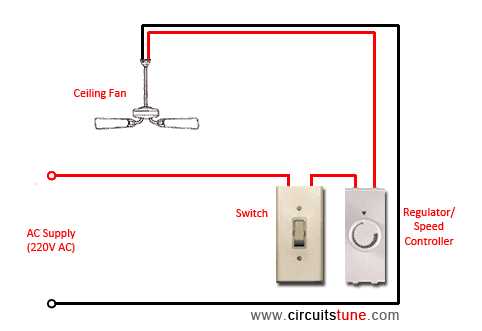
Start by identifying the power supply and the specific wires that control the light and the blades. Ensure the power is turned off at the breaker before beginning any connections. Typically, there will be a black wire for the hot connection, a white wire for the neutral, and a green or bare wire for grounding. These wires must be securely connected to their corresponding terminals in the junction box.
If your setup includes a light kit, there may be an additional blue wire dedicated to the light fixture. Make sure this wire is properly connected to the switch and the power source, ensuring that the light can be controlled independently of the main unit. Always check the manufacturer’s instructions for any specific wiring configurations unique to the model you’re working with.
Once the connections are made, double-check the integrity of each wire connection. Use wire nuts to secure the ends and ensure there is no exposed copper that could cause a short circuit. After the installation, test the system by restoring power and operating the switches to ensure everything works correctly.
Understanding the Wiring Connections for a Fan and Light System
To begin installing a unit with a light and rotating blades, you must first identify the appropriate power connections. The main power cable typically includes three wires: black for the hot connection, white for the neutral, and green or bare for grounding. Connect the black wire from the supply to the black wire of the unit. Ensure the white wire from the power source connects with the neutral terminal in the junction box.
If the unit includes a light, there may be an additional blue wire that needs to be connected separately. This wire should be linked to the light kit and the corresponding power source to allow independent operation of the light and the rotating blades. This separation helps to control the brightness of the light while maintaining the fan’s speed.
Checking for Proper Grounding
Ensure that the ground wire is securely connected to the grounding terminal in the junction box. This wire prevents electric shock hazards by safely directing any stray current to the ground. It is vital to check that this wire is properly installed to avoid potential safety risks during operation.
Before completing the installation, verify that all the wire nuts are tightly secured around the connections. Loose or exposed wiring can lead to electrical short circuits or fires. Use electrical tape to cover any exposed wire ends for additional protection. Make sure there is no copper visible once the connections are made.
Once everything is connected, turn the power back on at the breaker box and test the functionality of both the light and the rotating blades. Operate the light using the appropriate switch and ensure the blades rotate smoothly at the correct speed. If everything is working as expected, you can finish securing the unit in place.
Final Testing and Safety Checks
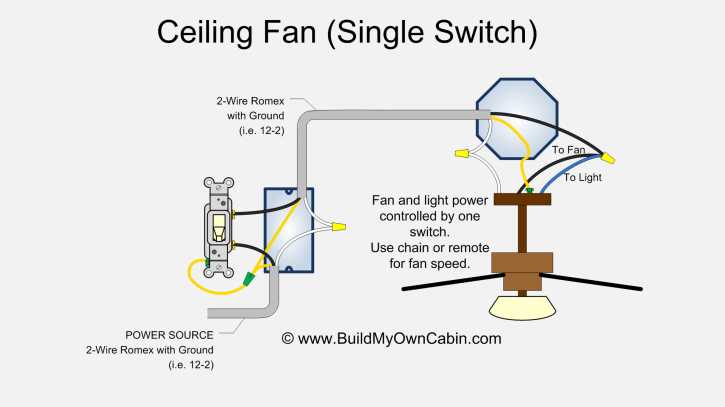
After securing the unit to the ceiling, perform a final inspection. Check for any loose connections or exposed wires. Ensure the unit is firmly in place, and double-check that the light and fan blades are properly aligned. If the system does not function properly, recheck each connection and ensure the proper wires are connected to the corresponding terminals.
Step-by-Step Guide to Wiring a Fan with a Light Kit
Start by ensuring the power is turned off at the breaker. This is crucial to avoid electric shock or damage during installation. Use a voltage tester to double-check that no power is running through the wires before proceeding with any connections.
Next, identify the wires from the power supply: typically, you’ll find a black (hot) wire, a white (neutral) wire, and a green or bare wire for grounding. The fan and light kit will also have their own corresponding wires: black for the fan motor, blue for the light, white for neutral, and ground for safety. Make sure to match the colors properly when connecting the wires.
Connecting the Power Supply Wires
Begin by connecting the black wire from the power supply to the black wire on the unit, which controls the rotation of the blades. Secure the connection using a wire nut, ensuring the connection is firm and no copper is exposed. Next, connect the white (neutral) wire from the supply to the white wire from the fan, again securing the connection with a wire nut.
For the light kit, connect the blue wire from the fan to the blue wire for the light kit, which allows independent control of the light fixture. Be sure to secure this connection as well with a wire nut to prevent any loose connections that could lead to malfunction.
Grounding the Unit
Connect the ground wire from the power supply to the fan’s ground wire. This is typically a green or bare wire and is important for safety. Make sure the connection is secure, as grounding ensures that any stray electricity is safely directed into the earth rather than through the unit or the user.
Once all wires are connected and secured, check each connection to ensure there are no exposed wires and that the wire nuts are tight. Any loose or improperly connected wires could cause electrical shorts or failure. After this, carefully tuck the wires into the junction box to avoid pinching or straining the connections.
After securing all the wires, mount the unit onto the ceiling bracket. Ensure that it is securely fastened, as a loose installation could lead to instability when the blades are spinning. Double-check the positioning of the fan to ensure it is aligned properly before tightening the screws fully.
Finally, restore the power at the breaker and test both the fan and the light. Verify that both work as expected, and check for any irregularities, such as flickering lights or inconsistent blade speed. If everything functions properly, your installation is complete and the unit is ready for use.